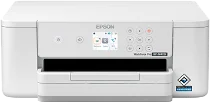
Epson WorkForce Pro WF-M4119 Drivers for Windows and macOS.
Supported Microsoft Windows Operating Systems
Windows 11
Windows 10 (32-bit and 64-bit)
Windows 8.1 (32-bit and 64-bit)
Windows 8 (32-bit and 64-bit)
Windows 7 (32-bit and 64-bit)
Windows Vista (32-bit and 64-bit)
Supported OS: Windows 11, Windows 10 32-bit and 64-bit, Windows 8.1 32-bit and 64-bit, Windows 8 32-bit and 64-bit, Windows 7 32-bit and 64-bit, Windows Vista 32-bit and 64-bit
Supported OS: Windows 10 32-bit, Windows 8.1 32-bit, Windows 8 32-bit, Windows 7 32-bit, Windows Vista 32-bit
Supported OS: Windows 11, Windows 10 64-bit, Windows 8.1 64-bit, Windows 8 64-bit, Windows 7 64-bit, Windows Vista 64-bit
Supported macOS Operating Systems
macOS Sequoia 15
macOS Sonoma 14
macOS Ventura 13
macOS Monterey 12
macOS Big Sur 11
macOS Catalina 10.15
macOS Mojave 10.14
macOS High Sierra 10.13
macOS Sierra 10.12
OS X El Capitan 10.11
OS X Yosemite 10.10
OS X Mavericks 10.9
OS X Mountain Lion 10.8
Mac OS X Lion 10.7
Mac OS X Snow Leopard 10.6
Supported OS: OS X Mavericks 10.9, OS X Yosemite 10.10, OS X El Capitan 10.11, macOS Sierra 10.12, macOS High Sierra 10.13, macOS Mojave 10.14, macOS Catalina 10.15, macOS Big Sur 11, macOS Monterey 12, macOS Ventura 13, macOS Sonoma 14, macOS Sequoia 15
Supported OS: Mac OS X Snow Leopard 10.6, Mac OS X Lion 10.7, OS X Mountain Lion 10.8, OS X Mavericks 10.9, OS X Yosemite 10.10, OS X El Capitan 10.11, macOS Sierra 10.12, macOS High Sierra 10.13, macOS Mojave 10.14, macOS Catalina 10.15, macOS Big Sur 11, macOS Monterey 12, macOS Ventura 13, macOS Sonoma 14, macOS Sequoia 15
Epson WorkForce Pro WF-M4119 Specifications
Epson WorkForce Pro WF-M4119 is an inkjet single-function mono printer that is suitable for day-to-day small workgroup document printing needs. The printer uses the PrecisionCore Heat-Free printhead technology, which ensures everyday quality print output. Only one black DURABrite Ultra pigment cartridge drives the ink system, and the goal of the system is to deliver clear text on standard office paper. Being a mono printer, the device is ideal for forms, invoices, reports, and correspondence letters. It is not suitable for any kind of graphics work. Installation of the driver will allow users to get basic print controls and setup options. However, there are no other tools like a scanner or copier.
The maximum resolution of the printer is 4800 x 2400 dpi, thus making it easy for the printer to print text and lines clearly. The default print speed of black prints at the ISO standard is up to 21 ppm for text. The printer offers a fast first-page print time of 6.3 seconds. The paper tray can accept standard office papers of letter, legal, A4, envelopes, and card sizes, as well as larger media up to a user-defined size. The automatic double-sided printing is possible at 12 ISO ppm.
The connection options include Hi-Speed USB, 10/100 Ethernet, Wi-Fi, Wi-Fi Direct, AirPrint, Mopria, and Epson mobile print solutions for phones. The printer dimensions in desktop position without output tray are about 16.7 x 14.9 x 6.5 inches, while printing depth is 19.4 inches and weight is about 12.8 lbs. The recommended printing volume of 2,000 pages per month does not push the duty cycle, which is 40,000 pages. As the printer prints only, the driver installation will not bring any scanning, copying, faxing, or ADF functions.