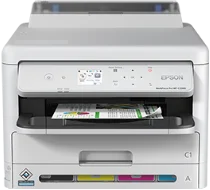
Epson WorkForce Pro WF-C5310 Drivers for Windows and macOS.
Supported Microsoft Windows Operating Systems
Windows 11
Windows 10 (32-bit and 64-bit)
Windows 8.1 (32-bit and 64-bit)
Windows 8 (32-bit and 64-bit)
Windows 7 (32-bit and 64-bit)
Windows Vista (32-bit and 64-bit)
Supported OS: Windows 11, Windows 10 32-bit and 64-bit, Windows 8.1 32-bit and 64-bit, Windows 8 32-bit and 64-bit, Windows 7 32-bit and 64-bit, Windows Vista 32-bit and 64-bit
Supported OS: Windows 10 32-bit, Windows 8.1 32-bit, Windows 8 32-bit, Windows 7 32-bit, Windows Vista 32-bit
Supported OS: Windows 11, Windows 10 64-bit, Windows 8.1 64-bit, Windows 8 64-bit, Windows 7 64-bit, Windows Vista 64-bit
Supported macOS Operating Systems
macOS Sequoia 15
macOS Sonoma 14
macOS Ventura 13
macOS Monterey 12
macOS Big Sur 11
macOS Catalina 10.15
macOS Mojave 10.14
macOS High Sierra 10.13
macOS Sierra 10.12
OS X El Capitan 10.11
OS X Yosemite 10.10
OS X Mavericks 10.9
OS X Mountain Lion 10.8
Mac OS X Lion 10.7
Mac OS X Snow Leopard 10.6
Supported OS: OS X Mavericks 10.9, OS X Yosemite 10.10, OS X El Capitan 10.11, macOS Sierra 10.12, macOS High Sierra 10.13, macOS Mojave 10.14, macOS Catalina 10.15, macOS Big Sur 11, macOS Monterey 12, macOS Ventura 13, macOS Sonoma 14, macOS Sequoia 15
Supported OS: Mac OS X Snow Leopard 10.6, Mac OS X Lion 10.7, OS X Mountain Lion 10.8, OS X Mavericks 10.9, OS X Yosemite 10.10, OS X El Capitan 10.11, macOS Sierra 10.12, macOS High Sierra 10.13, macOS Mojave 10.14, macOS Catalina 10.15, macOS Big Sur 11, macOS Monterey 12, macOS Ventura 13, macOS Sonoma 14, macOS Sequoia 15
Epson WorkForce Pro WF-C5310 Specifications
The Epson WorkForce Pro WF-C5310 is a one-task office printer. It uses PrecisionCore heat-free printhead technology for precise text printing and business graphics. Moreover, the device uses the DURABrite Ultra pigment ink that protects office documents from smudging and fading. The printer has a Replaceable Ink Pack System that guarantees high page yields and minimizes the need for changing cartridges on the busiest days. Since this model prints office documents only, users have to select other devices to make scans, copies, and faxes.
Max print resolution goes up to 4800 x 1200 optimized dpi. The speed of printing by ISO standards equals 25 ppm in black and white. The printer comes with a 250-sheet capacity in the front feeder tray and an 80-sheet capacity in the back tray. The device automatically switches to double-sided printing to save paper while preparing reports, filling out forms, and processing internal documents. In such a way, the printer suits busy office tasks with regular color printing.
Connectivity options of the Epson printer include USB, Ethernet, Wi-Fi, Wi-Fi Direct, and mobile printing features. The dimensions of this device are equal to 425 x 535 x 357 mm when it stands on the table. Such a printer will be useful for making invoices, letters, spreadsheets, labels, and other routine office documents in color. This device does not have the scan option, copier, ADF, or fax features. The printer driver helps control print settings and color output.