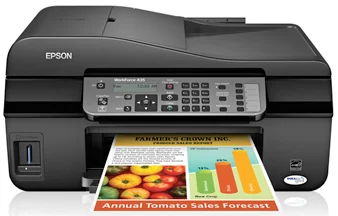
Epson WorkForce 435 Printer Software and Drivers for Windows and macOS.
Supported Microsoft Windows Operating Systems
Windows 11
Windows 10 (32-bit and 64-bit)
Windows 8.1 (32-bit and 64-bit)
Windows 8 (32-bit and 64-bit)
Windows 7 (32-bit and 64-bit)
Windows Vista (32-bit and 64-bit)
Windows XP (32-bit and 64-bit)
Supported OS: Windows 8 32-bit and 64-bit, Windows 8.1 32-bit and 64-bit, Windows 10 32-bit and 64-bit, Windows 11
This driver package installer contains the following items:
- Printer Driver
- Scanner Driver and EPSON Scan Utility
- Epson Fax Utility
- Network Installer
Supported OS: Windows 8 32-bit, Windows 8.1 32-bit, Windows 10 32-bit
Supported OS: Windows 8 64-bit, Windows 8.1 64-bit, Windows 10 64-bit
Supported OS: Windows 11, Windows 10 32-bit and 64-bit, Windows 8.1 32-bit and 64-bit, Windows 8 32-bit and 64-bit, Windows 7 32-bit and 64-bit, Windows Vista 32-bit and 64-bit, Windows XP 32-bit and 64-bit
Supported macOS Operating Systems
macOS Ventura 13
macOS Monterey 12
macOS Big Sur 11
macOS Catalina 10.15
macOS Mojave 10.14
macOS High Sierra 10.13
macOS Sierra 10.12
OS X El Capitan 10.11
OS X Yosemite 10.10
OS X Mavericks 10.9
OS X Mountain Lion 10.8
Mac OS X Lion 10.7
Mac OS X Snow Leopard 10.6
Mac OS X Leopard 10.5
Supported OS: Mac OS X Snow Leopard 10.6, Mac OS X Lion 10.7, OS X Mountain Lion 10.8, OS X Mavericks 10.9, OS X Yosemite 10.10, OS X El Capitan 10.11, macOS Sierra 10.12, macOS High Sierra 10.13, macOS Mojave 10.14, macOS Catalina 10.15, macOS Big Sur 11, macOS Monterey 12, macOS Ventura 13
Supported OS: Mac OS X Leopard 10.5, Mac OS X Snow Leopard 10.6, Mac OS X Lion 10.7, OS X Mountain Lion 10.8, OS X Mavericks 10.9, OS X Yosemite 10.10, OS X El Capitan 10.11, macOS Sierra 10.12, macOS High Sierra 10.13, macOS Mojave 10.14, macOS Catalina 10.15, macOS Big Sur 11, macOS Monterey 12, macOS Ventura 13
Supported OS: Mac OS X Leopard 10.5, Mac OS X Snow Leopard 10.6, Mac OS X Lion 10.7, OS X Mountain Lion 10.8, OS X Mavericks 10.9, OS X Yosemite 10.10, OS X El Capitan 10.11, macOS Sierra 10.12, macOS High Sierra 10.13, macOS Mojave 10.14
Epson WorkForce 435 Specifications
For small office users or home workers who do some printing, the Epson WorkForce 435 is a multifunction printer. It has a price that fits a modest budget and delivers a variety of printing outputs to those who need functionality beyond basic printing. As for setup, the WorkForce 435 is easy to complete. The interface of this printer is just as simple. Therefore, even those who are not technically minded can easily find their way around in the software.
Regarding printing capability, the WorkForce 435 merely passes muster for the color printing of text documents. It is less crisp than more expensive printers. It’s not a market leader for speed either, though in all fairness, it’s not especially slow, even on color prints or in higher quality settings. It could be a problem if you have large print jobs frequently. While ink efficiency is pretty good, frequent users may run to the office supply store to replace cartridges more often, which adds to the total cost. The printer’s ink cartridges are obtainable in both standard and high-capacity sizes. Users can choose between low initial costs or long-term use with relatively low operating outlay.
The WorkForce 435 fails to dazzle on the wireless printing front. Demand for such primary machines has been increasing; even cheaper models will now let you print out your masterpiece wirelessly from a distance of 10 meters. Unfortunately, the WorkForce 435 does not allow wired or wireless printing, something those with heavy usage needs need to stay highly productive outside the office. But other features like the ADF will eliminate the hassle of scanning and copying documents with multiple pages. Given the low price, the Epson WorkForce 435 is suitable for those with light print needs who are more relaxed about the latest networking features. If you want something basic, it’s suitable—or something which will spare you the trouble of banging on about unnecessary tricks.