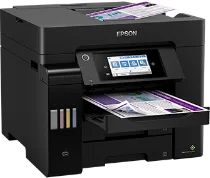
Epson ET-5850U Drivers for Windows and macOS.
Supported Microsoft Windows Operating Systems
Windows 11
Windows 10 (32-bit and 64-bit)
Windows 8.1 (32-bit and 64-bit)
Windows 8 (32-bit and 64-bit)
Windows 7 (32-bit and 64-bit)
Windows Vista (32-bit and 64-bit)
Supported OS: Windows 11, Windows 10 32-bit and 64-bit, Windows 8.1 32-bit and 64-bit, Windows 8 32-bit and 64-bit, Windows 7 32-bit and 64-bit, Windows Vista 32-bit and 64-bit
Supported OS: Windows 10 32-bit, Windows 8.1 32-bit, Windows 8 32-bit, Windows 7 32-bit
Supported OS: Windows 11, Windows 10 64-bit, Windows 8.1 64-bit, Windows 8 64-bit, Windows 7 64-bit, Windows Vista 64-bit
Supported OS: Windows 11, Windows 10 32-bit and 64-bit, Windows 8.1 32-bit and 64-bit, Windows 8 32-bit and 64-bit, Windows 7 32-bit and 64-bit
Supported macOS Operating Systems
macOS Sequoia 15
macOS Sonoma 14
macOS Ventura 13
macOS Monterey 12
macOS Big Sur 11
macOS Catalina 10.15
macOS Mojave 10.14
macOS High Sierra 10.13
macOS Sierra 10.12
OS X El Capitan 10.11
OS X Yosemite 10.10
OS X Mavericks 10.9
OS X Mountain Lion 10.8
Mac OS X Lion 10.7
Mac OS X Snow Leopard 10.6
Supported OS: macOS Catalina 10.15, macOS Big Sur 11, macOS Monterey 12, macOS Ventura 13, macOS Sonoma 14, macOS Sequoia 15
Supported OS: Mac OS X Lion 10.7, OS X Mountain Lion 10.8, OS X Mavericks 10.9, OS X Yosemite 10.10, OS X El Capitan 10.11, macOS Sierra 10.12, macOS High Sierra 10.13, macOS Mojave 10.14
Supported OS: Mac OS X Snow Leopard 10.6, Mac OS X Lion 10.7, OS X Mountain Lion 10.8, OS X Mavericks 10.9, OS X Yosemite 10.10, OS X El Capitan 10.11, macOS Sierra 10.12, macOS High Sierra 10.13, macOS Mojave 10.14, macOS Catalina 10.15, macOS Big Sur 11, macOS Monterey 12, macOS Ventura 13, macOS Sonoma 14, macOS Sequoia 15
Supported OS: Mac OS X Snow Leopard 10.6, Mac OS X Lion 10.7, OS X Mountain Lion 10.8, OS X Mavericks 10.9, OS X Yosemite 10.10, OS X El Capitan 10.11, macOS Sierra 10.12, macOS High Sierra 10.13, macOS Mojave 10.14, macOS Catalina 10.15, macOS Big Sur 11, macOS Monterey 12, macOS Ventura 13, macOS Sonoma 14, macOS Sequoia 15
Epson ET-5850U Specifications
Epson ET-5850U is an A4 colour multifunction ink tank printer that is ideal for busy and shared document printing in the office environment. The printer uses the PrecisionCore Heat-Free inkjet engine and works well in situations where there is frequently shared printing of office documents without using laser hardware. The printer comes with an EcoTank system in which it uses large refillable tanks instead of normal cartridges. Pigment inks are used in printing black text, graphs, and colour images in reports and client documents.
The resolution of the print is 4,800 x 1,200 dpi which means that the documents that can be printed will have high detail and clarity even when printing invoices and letters for record purposes. The ISO print speeds stand at 25 ppm for both monochrome and colour standard A4 printing. The plain paper output is good for printing invoices, letters, forms, spreadsheets, and report forms. There are two 250-sheet front input trays combined with a 50-sheet rear feed tray for envelopes and other specialty papers without changing the trays. There is also automatic two-sided printing and 50-sheet ADF to ease longer office printing tasks.
Connection possibilities include Wi-Fi, Wi-Fi Direct, Ethernet, and Hi-Speed USB to ensure flexibility in local and network driver installation. It is also possible to connect mobile devices to print via Epson Smart Panel. Other office network printing services are available through compatible devices. With dimensions of 425 x 500 x 350 mm, it fits well in office counters and adjacent cabinets. Weighing at around 17.8 kg, it can be used in one fixed workspace within the office environment.