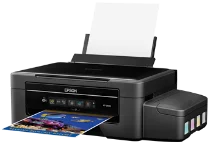
Epson ET-2500 Printer Software and Drivers for Windows and macOS.
Supported Microsoft Windows Operating Systems
Windows 11
Windows 10 (32/64-bit)
Windows 8.1 (32/64-bit)
Windows 8 (32/64-bit)
Windows 7 (32/64-bit)
Windows Vista (32/64-bit)
Windows XP (32-bit)
Supported OS: Windows 11, Windows 10 32-bit and 64-bit, Windows 8.1 32-bit and 64-bit, Windows 8 32-bit and 64-bit, Windows 7 32-bit and 64-bit, Windows Vista 32-bit and 64-bit
This driver package installer contains the following items:
- Printer Driver
- Scanner Driver and EPSON Scan Utility
- Epson Event Manager
- Epson Software Updater
Supported OS: Windows XP 32-bit
This driver package installer contains the following items:
- Printer Driver
- Scanner Driver and EPSON Scan Utility
- Epson Event Manager
- Epson Software Updater
Supported OS: Windows 10 32-bit, Windows 8.1 32-bit, Windows 8 32-bit, Windows 7 32-bit, Windows Vista 32-bit, Windows XP 32-bit
Supported OS: Windows 11, Windows 10 64-bit, Windows 8.1 64-bit, Windows 8 64-bit, Windows 7 64-bit, Windows Vista 64-bit
Supported OS: Windows 11, Windows 10 32-bit and 64-bit, Windows 8.1 32-bit and 64-bit, Windows 8 32-bit and 64-bit, Windows 7 32-bit and 64-bit, Windows Vista 32-bit and 64-bit, Windows XP 32-bit
Supported OS: Windows 10 32-bit, Windows 8.1 32-bit, Windows 8 32-bit, Windows 7 32-bit, Windows Vista 32-bit, Windows XP 32-bit
Supported OS: Windows 11, Windows 10 64-bit, Windows 8.1 64-bit, Windows 8 64-bit, Windows 7 64-bit, Windows Vista 64-bit
Supported macOS Operating Systems
macOS Ventura 13
macOS Monterey 12
macOS Big Sur 11
macOS Catalina 10.15
macOS Mojave 10.14
macOS High Sierra 10.13
macOS Sierra 10.12
OS X El Capitan 10.11
OS X Yosemite 10.10
OS X Mavericks 10.9
OS X Mountain Lion 10.8
Mac OS X Lion 10.7
Mac OS X Snow Leopard 10.6
Mac OS X Leopard 10.5
Supported OS: macOS Catalina 10.15, macOS Big Sur 11, macOS Monterey 12, macOS Ventura 13
This driver package installer contains the following items:
- Printer Driver
- Scanner Driver and Epson Scan 2 Utility
- ICA Scanner Driver v5.8.6
- Epson Event Manager
- Epson Software Updater
Supported OS: Mac OS X Lion 10.7, OS X Mountain Lion 10.8, OS X Mavericks 10.9, OS X Yosemite 10.10, OS X El Capitan 10.11, macOS Sierra 10.12, macOS High Sierra 10.13, macOS Mojave 10.14
This driver package installer contains the following items:
- Printer Driver
- Scanner Driver and Epson Scan 2 Utility
- ICA Scanner Driver v5.8.6
- Epson Event Manager
- Epson Software Updater
Supported OS: Mac OS X Snow Leopard 10.6, Mac OS X Lion 10.7, OS X Mountain Lion 10.8, OS X Mavericks 10.9, OS X Yosemite 10.10, OS X El Capitan 10.11, macOS Sierra 10.12, macOS High Sierra 10.13, macOS Mojave 10.14, macOS Catalina 10.15, macOS Big Sur 11, macOS Monterey 12, macOS Ventura 13
This driver package installer contains the following items:
- Printer Driver
- Scanner Driver and Epson Scan 2 Utility
- ICA Scanner Driver v5.8.6
- Epson Event Manager
- Epson Software Updater
Supported OS: macOS Catalina 10.15, macOS Big Sur 11, macOS Monterey 12, macOS Ventura 13
Supported OS: Mac OS X Snow Leopard 10.6, Mac OS X Lion 10.7, OS X Mountain Lion 10.8, OS X Mavericks 10.9, OS X Yosemite 10.10, OS X El Capitan 10.11, macOS Sierra 10.12, macOS High Sierra 10.13, macOS Mojave 10.14
Supported OS: Mac OS X Leopard 10.5, Mac OS X Snow Leopard 10.6, Mac OS X Lion 10.7, OS X Mountain Lion 10.8, OS X Mavericks 10.9, OS X Yosemite 10.10, OS X El Capitan 10.11, macOS Sierra 10.12, macOS High Sierra 10.13, macOS Mojave 10.14, macOS Catalina 10.15, macOS Big Sur 11, macOS Monterey 12, macOS Ventura 13
Supported OS: Mac OS X Snow Leopard 10.6, Mac OS X Lion 10.7, OS X Mountain Lion 10.8, OS X Mavericks 10.9, OS X Yosemite 10.10, OS X El Capitan 10.11, macOS Sierra 10.12, macOS High Sierra 10.13, macOS Mojave 10.14, macOS Catalina 10.15, macOS Big Sur 11, macOS Monterey 12, macOS Ventura 13
Epson ET-2500 Specifications
The Epson EcoTank ET-2500 makes a bold leap in design philosophy, addressing the ink-cost anxiety that plagues the everyday printer user. At the center of this innovation is the EcoTank system — a cartridge-free reservoir space that accommodates bottled ink. The result is a dramatic reduction in each page’s cost and a much more eco-friendly choice, as it ultimately mitigates cartridge waste. It’s true that the printer ships with a generous volume of ink (said to last about two years’ worth of typical use), and while the high up-front cost might sting, the math is straightforward. For users with substantial print volumes, the ET-2500 promises to be a much more economical device over its lifetime.
As for performance — well, it’s a mixed bag. The ET-2500’s print quality is generally solid, producing sharp text and attractive graphics that quickly suit any home or small office task. However, it’s not the speediest unit. With modest rates of 9.2 pages per minute (ppm) on black-and-white and 4.5 ppm on color, the ET-2500 isn’t going to win any sprints. Given that casual printing needs are really what this is best suited for, this slower pace might be acceptable — however, it could be a deal-breaker if you need to churn out larger, time-sensitive jobs. Wireless connectivity also makes the ET-2500 an easy-to-use device, with the built-in Epson Connect letting you print directly from any smartphone, tablet, or computer. At the same time, the native Android and iOS apps add even more printer control features. On the downside, there’s no Ethernet port to be found — so if you’re a fan of wired connections, that might be a deal-breaker.
To Pad the cost of its unique ink system, the ET-2500 makes some sacrifices on the design front. It lacks any perks of an automatic document feeder or auto-duplex printing, so users will be flipping pages for double-sided documents just like in the bad old days. However, it also skips out on a cutting-edge touch panel UI favoring primary button navigation. None of these should put off an economy-minded buyer too much, leaving the ET-2500 as a viable option for those whose printer priorities are all about long-term savings and environmental sustainability over the bells and whistles of an artificially intelligent printing experience.