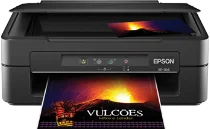
Epson XP-104 Drivers for Windows and macOS.
Supported Microsoft Windows Operating Systems
Windows 11
Windows 10 (32-bit and 64-bit)
Windows 8.1 (32-bit and 64-bit)
Windows 8 (32-bit and 64-bit)
Windows 7 (32-bit and 64-bit)
Windows Vista (32-bit and 64-bit)
Supported OS: Windows 10 32-bit, Windows 8.1 32-bit, Windows 8 32-bit, Windows 7 32-bit, Windows Vista 32-bit
Supported OS: Windows 11, Windows 10 64-bit, Windows 8.1 64-bit, Windows 8 64-bit, Windows 7 64-bit, Windows Vista 64-bit
Supported OS: Windows 11, Windows 10 32-bit and 64-bit, Windows 8.1 32-bit and 64-bit, Windows 8 32-bit and 64-bit, Windows 7 32-bit and 64-bit, Windows Vista 32-bit and 64-bit
Supported macOS Operating Systems
macOS Sequoia 15
macOS Sonoma 14
macOS Ventura 13
macOS Monterey 12
macOS Big Sur 11
macOS Catalina 10.15
macOS Mojave 10.14
macOS High Sierra 10.13
macOS Sierra 10.12
OS X El Capitan 10.11
OS X Yosemite 10.10
OS X Mavericks 10.9
OS X Mountain Lion 10.8
Mac OS X Lion 10.7
Mac OS X Snow Leopard 10.6
Mac OS X Leopard 10.5
Supported OS: Mac OS X Snow Leopard 10.6, Mac OS X Lion 10.7, OS X Mountain Lion 10.8, OS X Mavericks 10.9, OS X Yosemite 10.10, OS X El Capitan 10.11, macOS Sierra 10.12, macOS High Sierra 10.13, macOS Mojave 10.14, macOS Catalina 10.15
Supported OS: Mac OS X Leopard 10.5, Mac OS X Snow Leopard 10.6, Mac OS X Lion 10.7, OS X Mountain Lion 10.8, OS X Mavericks 10.9, OS X Yosemite 10.10, OS X El Capitan 10.11, macOS Sierra 10.12, macOS High Sierra 10.13, macOS Mojave 10.14, macOS Catalina 10.15, macOS Big Sur 11, macOS Monterey 12, macOS Ventura 13, macOS Sonoma 14, macOS Sequoia 15
Epson XP-104 Specifications
The Epson XP-104 is an all-in-one device used by homeowners for various printing, scanning, and copying needs. Micro Piezo technology of Epson is responsible for printing with four colors – CMYK (cyan, magenta, yellow, black) through individual Epson ink cartridges for every color. The user installs four types of cartridges independently of each other. It is convenient since it helps to maintain the device simply and effectively during home printing. Home A4 printing and occasional photo printing and copying are its primary tasks. Flatbed scanner and buttons make using the device comfortable for homeowners who do not need office printers.
Resolution is set at 5760 x 1440 optimized dpi; that allows creating documents and small photos with good quality at home. The maximum speed of printing is set at 26 ppm (black) and 13 ppm (color) in draft mode. ISO speed equals 6.2 black ipm and 3.1 color ipm. Rear top-entry paper tray capacity is 50 sheets of A4, Letter, Legal, and Photo formats. Since legal and custom media can be printed only one sheet at a time, it is suitable for light daily use.
For connectivity, this printer uses only a USB connection that corresponds to the specification of USB version 2.0. Body measurements are 390 x 300 x 145 mm, which makes storing the printer simple even in a little space. In printing position, the depth and height of the printer become 528 x 279 mm, respectively. About 3.9 kg in weight (without cartridges and power supply cable) makes it suitable for home and student offices. Note that the printer does not have Wi-Fi, Ethernet, ADF, fax, touch panel, or automatic duplex printing.