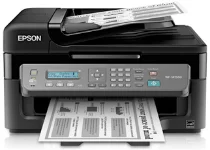
Epson WorkForce WF-M1560 Printer Software and Drivers for Windows and macOS.
Supported Microsoft Windows Operating Systems
Windows 11
Windows 10 (32/64-bit)
Windows 8.1 (32/64-bit)
Windows 8 (32/64-bit)
Windows 7 (32/64-bit)
Windows Vista (32/64-bit)
Windows XP (32/64-bit)
Supported OS: Windows 11, Windows 10 32-bit and 64-bit, Windows 8.1 32-bit and 64-bit, Windows 8 32-bit and 64-bit, Windows 7 32-bit and 64-bit, Windows Vista 32-bit and 64-bit, Windows XP 32-bit and 64-bit
This driver package installer contains the following items:
- Printer Driver
- Scanner Driver and EPSON Scan Utility
- Epson Event Manager
- Epson Software Updater
- Epson Fax Utility
- Network Installer
Supported OS: Windows 10 32-bit, Windows 8.1 32-bit, Windows 8 32-bit, Windows 7 32-bit, Windows Vista 32-bit, Windows XP 32-bit
Supported OS: Windows 10 64-bit, Windows 8.1 64-bit, Windows 8 64-bit, Windows 7 64-bit, Windows Vista 64-bit, Windows XP 64-bit
Supported OS: Windows 11, Windows 10 32-bit and 64-bit, Windows 8.1 32-bit and 64-bit, Windows 8 32-bit and 64-bit, Windows 7 32-bit and 64-bit, Windows Vista 32-bit and 64-bit, Windows XP 32-bit and 64-bit
Supported macOS Operating Systems
macOS Ventura 13
macOS Monterey 12
macOS Big Sur 11
macOS Catalina 10.15
macOS Mojave 10.14
macOS High Sierra 10.13
macOS Sierra 10.12
OS X El Capitan 10.11
OS X Yosemite 10.10
OS X Mavericks 10.9
OS X Mountain Lion 10.8
Mac OS X Lion 10.7
Mac OS X Snow Leopard 10.6
Mac OS X Leopard 10.5
Supported OS: Mac OS X Leopard 10.5, Mac OS X Snow Leopard 10.6, Mac OS X Lion 10.7, OS X Mountain Lion 10.8, OS X Mavericks 10.9, OS X Yosemite 10.10, OS X El Capitan 10.11, macOS Sierra 10.12, macOS High Sierra 10.13, macOS Mojave 10.14, macOS Catalina 10.15, macOS Big Sur 11, macOS Monterey 12, macOS Ventura 13
Supported OS: Mac OS X Snow Leopard 10.6, Mac OS X Lion 10.7, OS X Mountain Lion 10.8, OS X Mavericks 10.9, OS X Yosemite 10.10, OS X El Capitan 10.11, macOS Sierra 10.12, macOS High Sierra 10.13, macOS Mojave 10.14, macOS Catalina 10.15, macOS Big Sur 11, macOS Monterey 12, macOS Ventura 13
Supported OS: Mac OS X Leopard 10.5, Mac OS X Snow Leopard 10.6, Mac OS X Lion 10.7, OS X Mountain Lion 10.8, OS X Mavericks 10.9, OS X Yosemite 10.10, OS X El Capitan 10.11, macOS Sierra 10.12, macOS High Sierra 10.13, macOS Mojave 10.14
Epson WorkForce WF-M1560 Specifications
The Epson WorkForce WF-M1560 is a space-saving all-in-one monochrome printer that is usually good for smaller businesses and households. The WF-M1560 meets user needs by providing simple monochrome prints and the added convenience of copy and scan functions. Mainly for office colleagues and home users, it has a stylistic design and fits into tight spaces just as easily as larger all-in-one printers. In a nutshell, this system is fast enough for most text-centered paperwork like invoices or basic fliers.
Epson promotes the WF-M1560 printer for its economical choice, all the more so because its ink cartridges keep costs low to produce each printed page. Although this may be attractive, anyone considering buying it should first carefully evaluate the volume of printing they’ll do. The cartridges’ capacity may seem insufficient for high-volume users, so the already low-cost per sheet business will have to bear more frequent replacements. Another essential thing to consider is this: The cost per page might be low, but with heavy use, the total cost could increase. Compared with some of Epson’s EcoTank models for heavy-duty service with refillable ink tanks, the WF-M1560 may not be as economical.
In any case, the WF-M1560 isn’t just a budget printer; it offers convenience too: Wirelessly connected, it can print from several devices using the built-in Wi-Fi. In small offices where several users require access to the company printer with a minimum of wires, flexibility of this sort can be a godsend. The WF-M1560 could be more feature-rich, with basic functionality that doesn’t include advanced features in its more sophisticated relatives. While accommodating direct printing for its target audience without any fuss, we have here that those needing to conduct paper management in black-and-white need something simple and effective. For them, the WF-M1560 is an efficient solution.