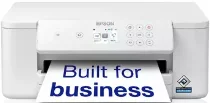
Epson WorkForce Pro WF-C4310DW Drivers for Windows and macOS.
Supported Microsoft Windows Operating Systems
Windows 11
Windows 10 (32-bit and 64-bit)
Windows 8.1 (32-bit and 64-bit)
Windows 8 (32-bit and 64-bit)
Windows 7 (32-bit and 64-bit)
Supported OS: Windows 10 32-bit, Windows 8.1 32-bit, Windows 8 32-bit, Windows 7 32-bit
Supported OS: Windows 11, Windows 10 64-bit, Windows 8.1 64-bit, Windows 8 64-bit, Windows 7 64-bit
Supported OS: Windows 11, Windows 10 32-bit and 64-bit, Windows 8.1 32-bit and 64-bit, Windows 8 32-bit and 64-bit, Windows 7 32-bit and 64-bit
Supported OS: Windows 11, Windows 10 32-bit and 64-bit, Windows 8.1 32-bit and 64-bit, Windows 8 32-bit and 64-bit, Windows 7 32-bit and 64-bit
Supported OS: Windows 11, Windows 10 32-bit and 64-bit, Windows 8.1 32-bit and 64-bit, Windows 8 32-bit and 64-bit, Windows 7 32-bit and 64-bit
Supported OS: Windows 11, Windows 10 32-bit and 64-bit, Windows 8.1 32-bit and 64-bit, Windows 8 32-bit and 64-bit, Windows 7 32-bit and 64-bit
Supported macOS Operating Systems
macOS Tahoe 26
macOS Sequoia 15
macOS Sonoma 14
macOS Ventura 13
macOS Monterey 12
macOS Big Sur 11
macOS Catalina 10.15
macOS Mojave 10.14
macOS High Sierra 10.13
macOS Sierra 10.12
OS X El Capitan 10.11
OS X Yosemite 10.10
OS X Mavericks 10.9
OS X Mountain Lion 10.8
Mac OS X Lion 10.7
Mac OS X Snow Leopard 10.6
Mac OS X Leopard 10.5
Supported OS: macOS Tahoe 26, macOS Sequoia 15, macOS Sonoma 14, macOS Ventura 13, macOS Monterey 12, macOS Big Sur 11, macOS Catalina 10.15, macOS Mojave 10.14, macOS High Sierra 10.13, macOS Sierra 10.12, OS X El Capitan 10.11, OS X Yosemite 10.10, OS X Mavericks 10.9, OS X Mountain Lion 10.8, Mac OS X Lion 10.7, Mac OS X Snow Leopard 10.6, Mac OS X Leopard 10.5
Supported OS: macOS Tahoe 26, macOS Sequoia 15, macOS Sonoma 14, macOS Ventura 13, macOS Monterey 12, macOS Big Sur 11, macOS Catalina 10.15, macOS Mojave 10.14, macOS High Sierra 10.13, macOS Sierra 10.12, OS X El Capitan 10.11, OS X Yosemite 10.10, OS X Mavericks 10.9, OS X Mountain Lion 10.8, Mac OS X Lion 10.7, Mac OS X Snow Leopard 10.6, Mac OS X Leopard 10.5
Epson WorkForce Pro WF-C4310DW Specifications
The Epson WorkForce Pro WF-C4310DW is an A4 colour office inkjet printer with print-only hardware. There is no scanner, copier, fax section, or automatic document feeder. Printing comes from a PrecisionCore head with 800 black nozzles and 256 nozzles for each colour. DURABrite Ultra pigment ink runs through black, cyan, yellow, and magenta cartridges. The front panel carries a 6.1 cm colour screen for local settings.
Maximum print resolution reaches 4,800 x 2,400 dpi. Variable-sized droplet technology can place 3.8 pl droplets for finer ink control. ISO speed is 21 pages per minute in monochrome and 11 pages per minute in colour. First-page output takes about 6.3 seconds in mono and 9.3 seconds in colour. Automatic duplex printing works on A4 plain paper. Duplex ISO speed runs at 12 mono images per minute and 7 colour images per minute.
Paper input starts with a 250-sheet front cassette and an 80-sheet rear feed. Together, they give 330 sheets of total input capacity. Printed pages collect in a 250-sheet output tray, so the output side can hold most ordinary loaded jobs. Paper weights run from 64 to 255 g/m². A4, Letter, user-defined sheets, and envelopes use the correct feed path for the job. The single-function layout keeps paper movement focused on printing, with no document-scanning path inside the unit.
A direct computer connection can use Hi-Speed USB. Network printing can run through Ethernet or Wi-Fi. Wi-Fi Direct helps when no router connection is available. Phone and tablet jobs can go through Epson Connect, Epson iPrint, Apple AirPrint, or Mopria Print Service. Network protocol support includes IPv4, IPv6, HTTP, HTTPS, and SMB 2.0. Printer language support is ESC/P-R emulation. With the body closed, the unit measures 425 x 378 x 164 mm and weighs 5.8 kg. Printing power use is around 23 watts during operation.