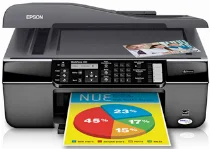
Epson WorkForce 310 Printer Software and Drivers for Windows and macOS.
Supported Microsoft Windows Operating Systems
Windows 11
Windows 10 (32-bit and 64-bit)
Windows 8.1 (32-bit and 64-bit)
Windows 8 (32-bit and 64-bit)
Windows 7 (32-bit and 64-bit)
Windows Vista (32-bit and 64-bit)
Windows XP (32-bit and 64-bit)
Supported OS: Windows 10 32-bit, Windows 8.1 32-bit, Windows 8 32-bit
This driver package installer contains the following items:
- Printer Driver
- Scanner Driver
- Epson Status Monitor
- Epson EasyPrint
- Epson Event Manager
Supported OS: Windows 11, Windows 10 64-bit, Windows 8.1 64-bit, Windows 8 64-bit
This driver package installer contains the following items:
- Printer Driver
- Scanner Driver
- Epson Status Monitor
- Epson EasyPrint
- Epson Event Manager
Supported OS: Windows 7 32-bit, Windows XP 32-bit, Windows Vista 32-bit
This driver package installer contains the following items:
- Printer Driver
- Scanner Driver
- Epson Status Monitor
- Epson EasyPrint
- Epson Event Manager
Supported OS: Windows 7 64-bit, Windows XP 64-bit, Windows Vista 64-bit
This driver package installer contains the following items:
- Printer Driver
- Scanner Driver
- Epson Status Monitor
- Epson EasyPrint
- Epson Event Manager
Supported OS: Windows 10 32-bit, Windows 8.1 32-bit, Windows 8 32-bit
Supported OS: Windows 11, Windows 10 64-bit, Windows 8.1 64-bit, Windows 8 64-bit
Supported OS: Windows 7 32-bit, Windows XP 32-bit, Windows Vista 32-bit
Supported OS: Windows 7 64-bit, Windows XP 64-bit, Windows Vista 64-bit
Supported OS: Windows 10 32-bit, Windows 8.1 32-bit, Windows 8 32-bit
Supported OS: Windows 10 64-bit, Windows 8.1 64-bit, Windows 8 64-bit
Supported OS: Windows 7 32-bit, Windows XP 32-bit, Windows Vista 32-bit
Supported OS: Windows 7 64-bit, Windows XP 64-bit, Windows Vista 64-bit
Supported OS: Windows 11, Windows 10 32-bit and 64-bit, Windows 8.1 32-bit and 64-bit, Windows 8 32-bit and 64-bit, Windows 7 32-bit and 64-bit, Windows Vista 32-bit and 64-bit, Windows XP 32-bit and 64-bit
Supported macOS Operating Systems
macOS Ventura 13
macOS Monterey 12
macOS Big Sur 11
macOS Catalina 10.15
macOS Mojave 10.14
macOS High Sierra 10.13
macOS Sierra 10.12
OS X El Capitan 10.11
OS X Yosemite 10.10
OS X Mavericks 10.9
OS X Mountain Lion 10.8
Mac OS X Lion 10.7
Mac OS X Snow Leopard 10.6
Mac OS X Leopard 10.5
Supported OS: macOS Mojave 10.14, macOS Catalina 10.15, macOS Big Sur 11, macOS Monterey 12
Supported OS: Mac OS X Leopard 10.5, Mac OS X Snow Leopard 10.6, Mac OS X Lion 10.7, OS X Mountain Lion 10.8, OS X Mavericks 10.9, OS X Yosemite 10.10, OS X El Capitan 10.11, macOS Sierra 10.12, macOS High Sierra 10.13, macOS Mojave 10.14, macOS Catalina 10.15, macOS Big Sur 11, macOS Monterey 12, macOS Ventura 13
Supported OS: Mac OS X Leopard 10.5, Mac OS X Snow Leopard 10.6, Mac OS X Lion 10.7, OS X Mountain Lion 10.8, OS X Mavericks 10.9, OS X Yosemite 10.10, OS X El Capitan 10.11, macOS Sierra 10.12, macOS High Sierra 10.13, macOS Mojave 10.14
Epson WorkForce 310 Specifications
The Epson WorkForce 310 is reliable enough for small offices and home offices. This all-in-one printer stands out when it comes to speed, as it churns out black-and-white documents as fast as you want on demand; in fact, it’s surprising for its class. Color printing is slow, though still acceptable. For text documents, the print quality is sharp enough; it is an excellent tool for firms that send lots of letters or produce reports. Its strong point is that life is durable. It is an attractive choice for any busy office, engineered to handle a heavy workload.
Work efficiency is an outstanding advantage. The individual ink cartridges employed by the WorkForce 310 mean that you only have to replace the color running out, resulting in less waste and more money saved. The printer is also loaded with energy-saving features and is ENERGY STAR compliant, which attracts environmentally concerned customers. Thus, although expensive to buy at the outset, this ink and energy are no drain on the wallet. Especially if you do not have high-volume needs, the purchase price of this printer can be prohibitive to some.
The Epson WorkForce 310 offers a competitive choice for small businesses and home offices that want a dependable tool. Fast, with muscular capacity, it’s the No. 1 option for large printing tasks. Running costs, too, are reasonable as the machine uses individual ink cartridges. Better-suited options may be available if you want something cheaper first and foremost and which will only sometimes be used. But the WorkForce 310 is one sturdy fellow in the printing field.