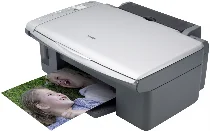
Epson Stylus DX4850 Printer Software and Drivers for Windows and macOS.
Supported Microsoft Windows Operating Systems
Windows 11
Windows 10 (32/64-bit)
Windows 8.1 (32/64-bit)
Windows 8 (32/64-bit)
Windows 7 (32/64-bit)
Windows Vista (32/64-bit)
Windows XP (32/64-bit)
Supported OS: Windows 10 32-bit, Windows 8.1 32-bit, Windows 8 32-bit, Windows 7 32-bit, Windows Vista 32-bit, Windows XP 32-bit
Supported OS: Windows 11, Windows 10 64-bit, Windows 8.1 64-bit, Windows 8 64-bit, Windows 7 64-bit, Windows Vista 64-bit, Windows XP 64-bit
Supported OS: Windows 11, Windows 10 32-bit and 64-bit, Windows 8.1 32-bit and 64-bit, Windows 8 32-bit and 64-bit, Windows 7 32-bit and 64-bit, Windows Vista 32-bit and 64-bit, Windows XP 32-bit and 64-bit
Supported OS: Windows 11
Supported macOS Operating Systems
macOS Ventura 13
macOS Monterey 12
macOS Big Sur 11
macOS Catalina 10.15
macOS Mojave 10.14
macOS High Sierra 10.13
macOS Sierra 10.12
OS X El Capitan 10.11
OS X Yosemite 10.10
OS X Mavericks 10.9
OS X Mountain Lion 10.8
Mac OS X Lion 10.7
Mac OS X Snow Leopard 10.6
Mac OS X Leopard 10.5
Supported OS: Mac OS X Leopard 10.5, Mac OS X Snow Leopard 10.6, Mac OS X Lion 10.7, OS X Mountain Lion 10.8, OS X Mavericks 10.9, OS X Yosemite 10.10, OS X El Capitan 10.11, macOS Sierra 10.12, macOS High Sierra 10.13, macOS Mojave 10.14, macOS Catalina 10.15, macOS Big Sur 11, macOS Monterey 12, macOS Ventura 13
Supported OS: Mac OS X Leopard 10.5, Mac OS X Snow Leopard 10.6, Mac OS X Lion 10.7, OS X Mountain Lion 10.8, OS X Mavericks 10.9, OS X Yosemite 10.10, OS X El Capitan 10.11
Supported OS: Mac OS X Leopard 10.5, Mac OS X Snow Leopard 10.6, Mac OS X Lion 10.7, OS X Mountain Lion 10.8, OS X Mavericks 10.9, OS X Yosemite 10.10, OS X El Capitan 10.11
Supported OS: Mac OS X Leopard 10.5, Mac OS X Snow Leopard 10.6, Mac OS X Lion 10.7, OS X Mountain Lion 10.8, OS X Mavericks 10.9, OS X Yosemite 10.10, OS X El Capitan 10.11, macOS Sierra 10.12, macOS High Sierra 10.13, macOS Mojave 10.14, macOS Catalina 10.15, macOS Big Sur 11
Supported OS: Mac OS X Leopard 10.5, Mac OS X Snow Leopard 10.6, Mac OS X Lion 10.7, OS X Mountain Lion 10.8, OS X Mavericks 10.9, OS X Yosemite 10.10, OS X El Capitan 10.11, macOS Sierra 10.12, macOS High Sierra 10.13, macOS Mojave 10.14, macOS Catalina 10.15, macOS Big Sur 11
Epson Stylus DX4850 Specifications
The Epson Stylus DX4850 is a multifunction printer notable for its versatility. In addition to the standard functions of a printer, it can also serve as a scanner and a copier. Intended for those seeking a single solution to multiple tasks, it performs well in speed and quality. As for the latter, this printer stands out due to its color accuracy and detailed printing of photos and other colored materials. Thus, this appliance delivers what it promises and is, without a doubt, a proper tool for those who need high-quality colored printing. As for the speed, it is in a perfect balance with the quality of the printouts, meaning that the time of accomplishing any task is reasonable while the result is impressive.
Despite the advantages in terms of functionality and transportation, the Epson Stylus DX4850 cannot be considered a perfect device due to some drawbacks. Expressly, it can be noted that this printer’s ink consumption belongs to the higher side, being closer to the worst-case scenario compared to similar models. Thus, regarding the costs of operation spending on ink, the DX4850 cannot be recommended for those who plan on printing regularly and abundantly. Nevertheless, its simplicity of setup operation and quality of operation predetermines that this printer will be considered an adequate tool by those who do not mind these expenses for a good customer experience. As a result, the Epson Stylus DX4850 printer is a worthy candidate in the multifunction printer market since it serves a user in multiple ways and does that well. Still, the cost and hawk consumption of ink negatively affects their appeal.