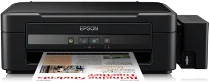
Epson L210 Printer Software and Drivers for Windows and macOS.
Supported Microsoft Windows Operating Systems
Windows 11
Windows 10 (32-bit and 64-bit)
Windows 8.1 (32-bit and 64-bit)
Windows 8 (32-bit and 64-bit)
Windows 7 (32-bit and 64-bit)
Windows Vista (32-bit and 64-bit)
Windows XP (32-bit and 64-bit)
Supported OS: Windows 10 32-bit, Windows 8.1 32-bit, Windows 8 32-bit, Windows 7 32-bit, Windows Vista 32-bit, Windows XP 32-bit
Supported OS: Windows 11, Windows 10 64-bit, Windows 8.1 64-bit, Windows 8 64-bit, Windows 7 64-bit, Windows Vista 64-bit, Windows XP 64-bit
Supported OS: Windows 11, Windows 10 32-bit and 64-bit, Windows 8.1 32-bit and 64-bit, Windows 8 32-bit and 64-bit, Windows 7 32-bit and 64-bit, Windows Vista 32-bit and 64-bit, Windows XP 32-bit and 64-bit
Supported macOS Operating Systems
macOS Big Sur 11
macOS Catalina 10.15
macOS Mojave 10.14
macOS High Sierra 10.13
macOS Sierra 10.12
OS X El Capitan 10.11
OS X Yosemite 10.10
OS X Mavericks 10.9
OS X Mountain Lion 10.8
Mac OS X Lion 10.7
Mac OS X Snow Leopard 10.6
Mac OS X Leopard 10.5
Supported OS: Mac OS X Leopard 10.5, Mac OS X Snow Leopard 10.6, Mac OS X Lion 10.7, OS X Mountain Lion 10.8, OS X Mavericks 10.9, OS X Yosemite 10.10, OS X El Capitan 10.11, macOS Sierra 10.12, macOS High Sierra 10.13, macOS Mojave 10.14, macOS Catalina 10.15, macOS Big Sur 11
Supported OS: Mac OS X Snow Leopard 10.6, Mac OS X Lion 10.7, OS X Mountain Lion 10.8, OS X Mavericks 10.9, OS X Yosemite 10.10, OS X El Capitan 10.11, macOS Sierra 10.12, macOS High Sierra 10.13, macOS Mojave 10.14, macOS Catalina 10.15, macOS Big Sur 11
Supported OS: OS X El Capitan 10.11
Supported OS: Mac OS X Leopard 10.5, Mac OS X Snow Leopard 10.6, Mac OS X Lion 10.7, OS X Mountain Lion 10.8, OS X Mavericks 10.9, OS X Yosemite 10.10, OS X El Capitan 10.11, macOS Sierra 10.12, macOS High Sierra 10.13, macOS Mojave 10.14, macOS Catalina 10.15, macOS Big Sur 11
Epson L210 Specifications
The Epson L210 is a full-package printer with additional features added on, stepping up from its predecessor. It is especially suited to heavy-duty users because it has an integrated ink tank system. It makes it both budget-friendly and convenient since people can print more pages of superior quality at lower costs and with less hassle when changing the ink. Furthermore, keeping track of the ink is easy with tank-mounted ones you can see from across the room. It is easier and cleaner than filling traditional cartridges. That is a nice change for users watching their pocketbooks because of a tight budget or thinking about ecology.
In terms of printing quality, the L210 is all right. Although it doesn’t quite measure up to the premium models, it serves the purposes those basic ones offer. The printer is good at text output and suitable for daily document printing needs. Without the vibrancy found in photo printers, there is not much to like about the color output images. It is noted that the Epson L210, versatile as it is, will not be suited to professionals needing superior-quality pictures. The L210 also does well in speed, moving along regularly. For text documents, the printer is best kept busy.
As far as design goes, the printer is simple to use. It doesn’t offer any advanced connectivity options—like wireless printing—but it has the basics, such as USB connectivity. With a slender design, it would fit well in tighter quarters. In short, the L210 should be your first choice if you want a trouble-free printer for large, high-resolution print jobs. Its low cost of operation and human-centric design make it a good choice for homes and small businesses that still require print quality for text—although not for expensive visuals.