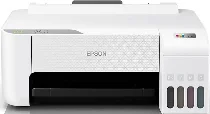
Epson L1256 Drivers for Windows and macOS.
Supported Microsoft Windows Operating Systems
Windows 11
Windows 10 (32-bit and 64-bit)
Windows 8.1 (32-bit and 64-bit)
Windows 8 (32-bit and 64-bit)
Windows 7 (32-bit and 64-bit)
Windows Vista (32-bit and 64-bit)
Supported OS: Windows 11, Windows 10 32-bit and 64-bit, Windows 8.1 32-bit and 64-bit, Windows 8 32-bit and 64-bit, Windows 7 32-bit and 64-bit, Windows Vista 32-bit and 64-bit
This combo package installer obtains and installs the following items:
- Printer Driver
- Epson Software Updater
- Additional Software
Supported OS: Windows 10 32-bit, Windows 8.1 32-bit, Windows 8 32-bit, Windows 7 32-bit, Windows Vista 32-bit
Supported OS: Windows 11, Windows 10 64-bit, Windows 8.1 64-bit, Windows 8 64-bit, Windows 7 64-bit, Windows Vista 64-bit
Supported macOS Operating Systems
macOS Tahoe 26
macOS Sequoia 15
macOS Sonoma 14
macOS Ventura 13
macOS Monterey 12
macOS Big Sur 11
macOS Catalina 10.15
macOS Mojave 10.14
macOS High Sierra 10.13
macOS Sierra 10.12
OS X El Capitan 10.11
OS X Yosemite 10.10
OS X Mavericks 10.9
OS X Mountain Lion 10.8
Mac OS X Lion 10.7
Mac OS X Snow Leopard 10.6
Supported OS: macOS Tahoe 26, macOS Sequoia 15, macOS Sonoma 14, macOS Ventura 13, macOS Monterey 12, macOS Big Sur 11, macOS Catalina 10.15, macOS Mojave 10.14, macOS High Sierra 10.13, macOS Sierra 10.12, OS X El Capitan 10.11, OS X Yosemite 10.10, OS X Mavericks 10.9, OS X Mountain Lion 10.8, Mac OS X Lion 10.7, Mac OS X Snow Leopard 10.6
This combo package installer obtains and installs the following items:
- Printer Driver
- Epson Software Updater
- Additional Software
Epson L1256 Specifications
The Epson L1256 is an A4 EcoTank ink-tank printer for printing only; scanner, copier, fax, and automatic document feeder hardware are not fitted. Printing relies on a piezoelectric printhead with 180 black nozzles and 59 nozzles for each colour. The refillable ink tanks use 003 black, cyan, magenta, and yellow bottles. As this model has no built-in screen, setup and status control depend on software or mobile tools.
Maximum print resolution reaches 5,760 x 1,440 dpi. On A4 plain paper, draft speed runs up to 33 ppm in black and 15 ppm in colour. Under ISO 24734, simplex speed is 10 ipm for black and 5 ipm for colour. The first page takes about 10 seconds in black or 16 seconds in colour. A 10 x 15 cm photo takes about 69 seconds with borders or 90 seconds borderless.
Paper input comes through one rear feed tray with capacity for 100 sheets of 80 g/m² plain paper. When Epson Premium Glossy Photo Paper is loaded, the same feed takes 20 sheets. Printed output collects in a tray rated for 30 plain sheets or 20 glossy photo sheets. Standard sizes include Legal, Indian-Legal, Letter, A4, A5, A6, B5, B6, 16K, Hagaki, and 4 x 6 inches. Envelope handling is limited to Number 10, DL, and C6.
Automatic two-sided printing is not listed, so duplex jobs require manual page turning. A computer can connect through USB 2.0. Wireless printing runs through Wi-Fi or Wi-Fi Direct, with TCP/IPv4 and TCP/IPv6 listed for network operation. Epson Connect covers Epson iPrint, Epson Email Print, and Remote Print Driver; Epson Smart Panel is also listed as a mobile option. With the body closed, the printer measures 375 x 347 x 169 mm and weighs 2.9 kg.