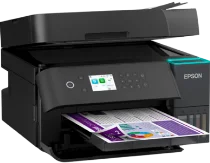
Epson ET-3950U Drivers for Windows and macOS.
Supported Microsoft Windows Operating Systems
Windows 11
Windows 10 (32-bit and 64-bit)
Windows 8.1 (32-bit and 64-bit)
Windows 8 (32-bit and 64-bit)
Windows 7 (32-bit and 64-bit)
Windows Vista (32-bit and 64-bit)
Supported OS: Windows 11, Windows 10 32-bit and 64-bit, Windows 8.1 32-bit and 64-bit, Windows 8 32-bit and 64-bit, Windows 7 32-bit and 64-bit
Supported OS: Windows 10 32-bit, Windows 8.1 32-bit, Windows 8 32-bit, Windows 7 32-bit
Supported OS: Windows 11, Windows 10 64-bit, Windows 8.1 64-bit, Windows 8 64-bit, Windows 7 64-bit
Supported OS: Windows 11, Windows 10 32-bit and 64-bit, Windows 8.1 32-bit and 64-bit, Windows 8 32-bit and 64-bit, Windows 7 32-bit and 64-bit
Supported OS: Windows 10 32-bit, Windows 8.1 32-bit, Windows 8 32-bit, Windows 7 32-bit, Windows Vista 32-bit
Supported OS: Windows 11, Windows 10 64-bit, Windows 8.1 64-bit, Windows 8 64-bit, Windows 7 64-bit, Windows Vista 64-bit
Supported macOS Operating Systems
macOS Tahoe 26
macOS Sequoia 15
macOS Sonoma 14
macOS Ventura 13
macOS Monterey 12
macOS Big Sur 11
macOS Catalina 10.15
macOS Mojave 10.14
macOS High Sierra 10.13
macOS Sierra 10.12
OS X El Capitan 10.11
OS X Yosemite 10.10
OS X Mavericks 10.9
OS X Mountain Lion 10.8
Mac OS X Lion 10.7
Mac OS X Snow Leopard 10.6
Supported OS: macOS Tahoe 26, macOS Sequoia 15, macOS Sonoma 14, macOS Ventura 13, macOS Monterey 12, macOS Big Sur 11, macOS Catalina 10.15, macOS Mojave 10.14, macOS High Sierra 10.13, macOS Sierra 10.12, OS X El Capitan 10.11, OS X Yosemite 10.10, OS X Mavericks 10.9
Supported OS: macOS Tahoe 26, macOS Sequoia 15, macOS Sonoma 14, macOS Ventura 13, macOS Monterey 12, macOS Big Sur 11, macOS Catalina 10.15, macOS Mojave 10.14, macOS High Sierra 10.13, macOS Sierra 10.12, OS X El Capitan 10.11, OS X Yosemite 10.10, OS X Mavericks 10.9
Supported OS: macOS Tahoe 26, macOS Sequoia 15, macOS Sonoma 14, macOS Ventura 13, macOS Monterey 12, macOS Big Sur 11, macOS Catalina 10.15, macOS Mojave 10.14, macOS High Sierra 10.13, macOS Sierra 10.12, OS X El Capitan 10.11, OS X Yosemite 10.10, OS X Mavericks 10.9
Supported OS: macOS Tahoe 26, macOS Sequoia 15, macOS Sonoma 14, macOS Ventura 13, macOS Monterey 12, macOS Big Sur 11, macOS Catalina 10.15, macOS Mojave 10.14, macOS High Sierra 10.13, macOS Sierra 10.12, OS X El Capitan 10.11, OS X Yosemite 10.10, OS X Mavericks 10.9, OS X Mountain Lion 10.8, Mac OS X Lion 10.7, Mac OS X Snow Leopard 10.6
Epson ET-3950U Specifications
The Epson ET-3950U is a non-cartridge all-in-one solution suitable for home and small office document production. This inkjet printer relies on the heat-free technology and precision core printhead to provide quality text and graphics output. It comes with refillable black, cyan, magenta, and yellow tanks to avoid frequent ink shortages. Printing, scanning, and copying are possible with the printer; hence, there will be one download package of the drivers required. As the printer is part of the ReadyPrint scheme, people should download software for the Epson ET-3950U.
The maximum print resolution goes up to 4800 x 1200 dpi for crisp output of text, graphics, photos, and images. The estimated print speed, according to Epson, is 18 pages of black text and 9 pages of color text per minute. With a front 250-sheet paper tray, the printer can print large reports and school papers. The two-sided printing function is beneficial when people want to print longer manual documents for their record-keeping or editing. Standard drivers support plain paper, envelopes, and photo media.
Wi-Fi, Wi-Fi Direct, and USB connections offer flexible setup of the printer for any computer or mobile device on several desks. Thanks to Epson Smart Panel compatibility, people can use mobile devices with the printer for scanning and printing operations. Desktop size makes the machine appropriate for home offices, study rooms, or family workspaces without occupying much space. There is also a 30-page automatic document feeder to scan, copy, and sometimes handle paperwork in batches using the scanner. The ET-3950U does not have a fax function.