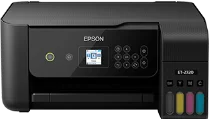
Epson ET-2720 Drivers for Windows and macOS.
Supported Microsoft Windows Operating Systems
Windows 11
Windows 10 (32-bit and 64-bit)
Windows 8.1 (32-bit and 64-bit)
Windows 8 (32-bit and 64-bit)
Windows 7 (32-bit and 64-bit)
Windows Vista (32-bit and 64-bit)
Supported OS: Windows 11, Windows 10 32-bit and 64-bit, Windows 8.1 32-bit and 64-bit, Windows 8 32-bit and 64-bit, Windows 7 32-bit and 64-bit, Windows Vista 32-bit and 64-bit
This combo package installer obtains and installs the following items:
- Printer Driver
- Scanner Driver and Epson Scan 2 Utility
- Easy Photo Scan
- Epson Event Manager
- Epson Scan OCR Component
- Epson Software Updater
Supported OS: Windows 10 32-bit, Windows 8.1 32-bit, Windows 8 32-bit, Windows 7 32-bit, Windows Vista 32-bit
Supported OS: Windows 10 64-bit, Windows 8.1 64-bit, Windows 8 64-bit, Windows 7 64-bit, Windows Vista 64-bit
Supported OS: Windows 11, Windows 10 32-bit and 64-bit, Windows 8.1 32-bit and 64-bit, Windows 8 32-bit and 64-bit, Windows 7 32-bit and 64-bit, Windows Vista 32-bit and 64-bit
Supported OS: Windows 10 32-bit, Windows 8.1 32-bit, Windows 8 32-bit, Windows 7 32-bit, Windows Vista 32-bit
Supported OS: Windows 11, Windows 10 64-bit, Windows 8.1 64-bit, Windows 8 64-bit, Windows 7 64-bit, Windows Vista 64-bit
Supported macOS Operating Systems
macOS Tahoe 26
macOS Sequoia 15
macOS Sonoma 14
macOS Ventura 13
macOS Monterey 12
macOS Big Sur 11
macOS Catalina 10.15
macOS Mojave 10.14
macOS High Sierra 10.13
macOS Sierra 10.12
OS X El Capitan 10.11
OS X Yosemite 10.10
OS X Mavericks 10.9
OS X Mountain Lion 10.8
Mac OS X Lion 10.7
Mac OS X Snow Leopard 10.6
Supported OS: macOS Tahoe 26, macOS Sequoia 15, macOS Sonoma 14, macOS Ventura 13, macOS Monterey 12, macOS Big Sur 11, macOS Catalina 10.15
This combo package installer obtains and installs the following items:
- Printer Driver
- Scanner Driver and Epson Scan 2 Utility
- Epson Event Manager
- Epson Scan 2 OCR Component
- Epson Software Updater
Supported OS: macOS Mojave 10.14, macOS High Sierra 10.13, macOS Sierra 10.12, OS X El Capitan 10.11, OS X Yosemite 10.10, OS X Mavericks 10.9, OS X Mountain Lion 10.8, Mac OS X Lion 10.7
This combo package installer obtains and installs the following items:
- Printer Driver
- Scanner Driver and Epson Scan 2 Utility
- Epson Easy Photo Scan
- Epson Event Manager
- EPSON Scan 2 OCR Component
- Epson Software Updater
Supported OS: macOS Tahoe 26, macOS Sequoia 15, macOS Sonoma 14, macOS Ventura 13, macOS Monterey 12, macOS Big Sur 11, macOS Catalina 10.15, macOS Mojave 10.14, macOS High Sierra 10.13, macOS Sierra 10.12, OS X El Capitan 10.11, OS X Yosemite 10.10, OS X Mavericks 10.9, OS X Mountain Lion 10.8, Mac OS X Lion 10.7, Mac OS X Snow Leopard 10.6
Supported OS: macOS Tahoe 26, macOS Sequoia 15, macOS Sonoma 14, macOS Ventura 13, macOS Monterey 12, macOS Big Sur 11, macOS Catalina 10.15, macOS Mojave 10.14, macOS High Sierra 10.13, macOS Sierra 10.12, OS X El Capitan 10.11, OS X Yosemite 10.10, OS X Mavericks 10.9, OS X Mountain Lion 10.8, Mac OS X Lion 10.7, Mac OS X Snow Leopard 10.6
Supported OS: macOS Tahoe 26, macOS Sequoia 15, macOS Sonoma 14, macOS Ventura 13, macOS Monterey 12, macOS Big Sur 11, macOS Catalina 10.15, macOS Mojave 10.14, macOS High Sierra 10.13, macOS Sierra 10.12, OS X El Capitan 10.11, OS X Yosemite 10.10, OS X Mavericks 10.9, OS X Mountain Lion 10.8, Mac OS X Lion 10.7, Mac OS X Snow Leopard 10.6
Epson ET-2720 Specifications
The Epson ET-2720 printer serves as a cartridge-free all-in-one inkjet for family use. It comes with Micro Piezo printhead that is combined with four ink tanks, which serve black, cyan, magenta, and yellow. Rather than using small ink cartridges, the device accepts EcoTank bottles with ink from tank openings placed on its front part. As for performance, it provides for printing, scanning, and copying all within one single unit. Hence, the driver package controls basic features of the device for use in forms, receipts, and simple photos.
For printing, the ET-2720 offers resolution of up to 5760 x 1440 optimized dpi for colored documents and photos. Epson states that documents are printed at speeds of up to 10.5 ISO ppm (black) and 5 ISO ppm (colored). The rear feed feeds up to 100 plain or photo papers. However, double-sided printing needs to be done manually since the printer lacks automatic duplex capabilities.
Options for connecting with the computer involve USB, Wi-Fi, and Wi-Fi Direct that allow to set it up either locally or wirelessly. The printer is compatible with the mobile Epson iPrint application as well. This printer has dimensions of 14.8 x 13.7 x 7.0 inches and weight of 8.8 pounds. Besides, it lacks Ethernet, fax capabilities, and automatic document feeder.