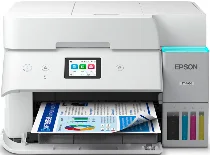
Epson EcoTank ET-4950 Drivers for Windows and macOS.
Supported Microsoft Windows Operating Systems
Windows 11
Windows 10 (32-bit and 64-bit)
Windows 8.1 (32-bit and 64-bit)
Windows 8 (32-bit and 64-bit)
Windows 7 (32-bit and 64-bit)
Windows Vista (32-bit and 64-bit)
Supported OS: Windows 11, Windows 10 32-bit and 64-bit, Windows 8.1 32-bit and 64-bit, Windows 8 32-bit and 64-bit, Windows 7 32-bit and 64-bit
Supported OS: Windows 10 32-bit, Windows 8.1 32-bit, Windows 8 32-bit, Windows 7 32-bit
Supported OS: Windows 11, Windows 10 64-bit, Windows 8.1 64-bit, Windows 8 64-bit, Windows 7 64-bit
Supported OS: Windows 11, Windows 10 32-bit and 64-bit, Windows 8.1 32-bit and 64-bit, Windows 8 32-bit and 64-bit, Windows 7 32-bit and 64-bit
Supported OS: Windows 10 32-bit, Windows 8.1 32-bit, Windows 8 32-bit, Windows 7 32-bit, Windows Vista 32-bit
Supported OS: Windows 11, Windows 10 64-bit, Windows 8.1 64-bit, Windows 8 64-bit, Windows 7 64-bit, Windows Vista 64-bit
Supported macOS Operating Systems
macOS Sequoia 15
macOS Sonoma 14
macOS Ventura 13
macOS Monterey 12
macOS Big Sur 11
macOS Catalina 10.15
macOS Mojave 10.14
macOS High Sierra 10.13
macOS Sierra 10.12
OS X El Capitan 10.11
OS X Yosemite 10.10
OS X Mavericks 10.9
OS X Mountain Lion 10.8
Mac OS X Lion 10.7
Mac OS X Snow Leopard 10.6
Supported OS: OS X Mavericks 10.9, OS X Yosemite 10.10, OS X El Capitan 10.11, macOS Sierra 10.12, macOS High Sierra 10.13, macOS Mojave 10.14, macOS Catalina 10.15, macOS Big Sur 11, macOS Monterey 12, macOS Ventura 13, macOS Sonoma 14, macOS Sequoia 15
Supported OS: OS X Mavericks 10.9, OS X Yosemite 10.10, OS X El Capitan 10.11, macOS Sierra 10.12, macOS High Sierra 10.13, macOS Mojave 10.14, macOS Catalina 10.15, macOS Big Sur 11, macOS Monterey 12, macOS Ventura 13, macOS Sonoma 14, macOS Sequoia 15
Supported OS: OS X Mavericks 10.9, OS X Yosemite 10.10, OS X El Capitan 10.11, macOS Sierra 10.12, macOS High Sierra 10.13, macOS Mojave 10.14, macOS Catalina 10.15, macOS Big Sur 11, macOS Monterey 12, macOS Ventura 13, macOS Sonoma 14, macOS Sequoia 15
Supported OS: Mac OS X Snow Leopard 10.6, Mac OS X Lion 10.7, OS X Mountain Lion 10.8, OS X Mavericks 10.9, OS X Yosemite 10.10, OS X El Capitan 10.11, macOS Sierra 10.12, macOS High Sierra 10.13, macOS Mojave 10.14, macOS Catalina 10.15, macOS Big Sur 11, macOS Monterey 12, macOS Ventura 13, macOS Sonoma 14, macOS Sequoia 15
Epson EcoTank ET-4950 Specifications
The Epson EcoTank ET-4950 uses a PrecisionCore 1S printhead and MicroPiezo inkjet technology to provide high-quality printing with an impressive speed of up to 18 ISO ppm for black and 9 ISO ppm for color documents. Automatic two-sided printing allows printing documents at a speed of 7 ISO ppm for black and 5 ISO ppm for color. The printer provides borderless printing up to the size of a letter and uses 4800 × 1200 dpi to create sharp images and high-quality text printing. Available mobile printing capabilities include Epson Smart Panel, Epson Connect, Apple AirPrint, Mopria Print Service, Android printing, and Amazon Alexa voice control.
The multifunction copier provides fast copying with speeds up to 11.5 ISO cpm for black and 5.7 ISO cpm for color. It is possible to make up to 99 PC-free copies using this device with the help of legal-sized documents. In-built features include automatic two-sided copying, ID copy, shadow removal, punch-hole removal, and borderless copying. The reduction/enlargement rate can reach up to 25% to 400%. It is possible to collate copy jobs up to 60 pages.
In terms of scanning, there is a CIS flatbed scanner with 30-sheet automatic document feeder for two-sided originals. This scanner has hardware resolutions of 1200 × 2400 dpi and 9600 dpi interpolated and provides scanning of vibrant 48-bit color and accurate 24-bit color. Destinations of scan can be computers, cloud services, and Chromebooks. Auto two-sided scanning and Mopria Scan allow increasing the efficiency when dealing with large documents. Legal-size originals, borderless scanning, and high-quality scanned images make this multifunction scanner really useful.
As to connectivity, this model has features such as Hi-Speed USB, Ethernet, dual-band Wi-Fi 5, Wi-Fi Direct, and mesh networking. The printer is suitable for Windows, macOS, ChromeOS, and Windows Server systems. 250-sheet paper tray, 20-sheet photo capacity, and automatic faxing help to increase efficiency on a daily basis. There is a 2.4-inch color touchscreen to simplify the operation of the device and an EcoTank ink system with yields up to 8,500 black and 6,500 color pages. Energy STAR certification, low power usage, and recommended monthly volume of 1,600 pages are additional useful features.