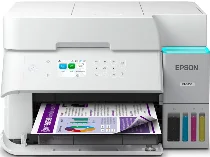
Epson EcoTank ET-3958 Drivers for Windows and macOS.
Supported Microsoft Windows Operating Systems
Windows 11
Windows 10 (32-bit and 64-bit)
Windows 8.1 (32-bit and 64-bit)
Windows 8 (32-bit and 64-bit)
Windows 7 (32-bit and 64-bit)
Windows Vista (32-bit and 64-bit)
Supported OS: Windows 11, Windows 10 32-bit and 64-bit, Windows 8.1 32-bit and 64-bit, Windows 8 32-bit and 64-bit, Windows 7 32-bit and 64-bit
Supported OS: Windows 10 32-bit, Windows 8.1 32-bit, Windows 8 32-bit, Windows 7 32-bit
Supported OS: Windows 11, Windows 10 64-bit, Windows 8.1 64-bit, Windows 8 64-bit, Windows 7 64-bit
Supported OS: Windows 11, Windows 10 32-bit and 64-bit, Windows 8.1 32-bit and 64-bit, Windows 8 32-bit and 64-bit, Windows 7 32-bit and 64-bit
Supported OS: Windows 10 32-bit, Windows 8.1 32-bit, Windows 8 32-bit, Windows 7 32-bit, Windows Vista 32-bit
Supported OS: Windows 11, Windows 10 64-bit, Windows 8.1 64-bit, Windows 8 64-bit, Windows 7 64-bit, Windows Vista 64-bit
Supported macOS Operating Systems
macOS Sequoia 15
macOS Sonoma 14
macOS Ventura 13
macOS Monterey 12
macOS Big Sur 11
macOS Catalina 10.15
macOS Mojave 10.14
macOS High Sierra 10.13
macOS Sierra 10.12
OS X El Capitan 10.11
OS X Yosemite 10.10
OS X Mavericks 10.9
OS X Mountain Lion 10.8
Mac OS X Lion 10.7
Mac OS X Snow Leopard 10.6
Supported OS: OS X Mavericks 10.9, OS X Yosemite 10.10, OS X El Capitan 10.11, macOS Sierra 10.12, macOS High Sierra 10.13, macOS Mojave 10.14, macOS Catalina 10.15, macOS Big Sur 11, macOS Monterey 12, macOS Ventura 13, macOS Sonoma 14, macOS Sequoia 15
Supported OS: OS X Mavericks 10.9, OS X Yosemite 10.10, OS X El Capitan 10.11, macOS Sierra 10.12, macOS High Sierra 10.13, macOS Mojave 10.14, macOS Catalina 10.15, macOS Big Sur 11, macOS Monterey 12, macOS Ventura 13, macOS Sonoma 14, macOS Sequoia 15
Supported OS: OS X Mavericks 10.9, OS X Yosemite 10.10, OS X El Capitan 10.11, macOS Sierra 10.12, macOS High Sierra 10.13, macOS Mojave 10.14, macOS Catalina 10.15, macOS Big Sur 11, macOS Monterey 12, macOS Ventura 13, macOS Sonoma 14, macOS Sequoia 15
Supported OS: Mac OS X Snow Leopard 10.6, Mac OS X Lion 10.7, OS X Mountain Lion 10.8, OS X Mavericks 10.9, OS X Yosemite 10.10, OS X El Capitan 10.11, macOS Sierra 10.12, macOS High Sierra 10.13, macOS Mojave 10.14, macOS Catalina 10.15, macOS Big Sur 11, macOS Monterey 12, macOS Ventura 13, macOS Sonoma 14, macOS Sequoia 15
Epson EcoTank ET-3958 Specifications
This printer creates high-quality color printing thanks to the MicroPiezo inkjet printing technology with the help of the PrecisionCore 1S printhead. The print speed is about 18 ISO ppm in black and 9 ISO ppm in color. Two-sided automatic printing helps save on paper and still maintains the speed of 7 ISO ppm in black and 5 ISO ppm in color. Borderless printing allows printing pictures and other materials up to 8.5 x 11 inches. It can be used via mobile printing through Epson Smart Panel, Apple AirPrint, Mopria, Android Printing, and Amazon Alexa.
The Epson EcoTank ET-3958 is an efficient printer that unites such functionalities as printing, copying, and scanning in one device. It allows printing 99 pages per minute without the computer’s use, automatic duplex printing, and even copying of legal-sized materials. With its flatbed scanner and 30-sheet automatic document feeder, it creates a picture of up to 1200 x 2400 dpi resolution. The advanced scanning functionality includes cloud scanning, Chromebook compatibility, automatic two-sided scanning, and direct computer scanning. A 2.4-inch color LCD panel makes working with a printer easier.
It is equipped with such connectivity options as Hi-Speed USB, Ethernet, dual-band Wi-Fi 5, Wi-Fi Direct, and mesh networking. It contains a paper tray of 250 sheets that can accommodate plain paper, photo paper, envelopes, and other media sizes up to legal format. The printer can handle a workload up to 10,000 pages a month, but the recommended monthly usage is 1,600 pages. The included 502 ink bottles are good for 8,500 black pages and 6,500 color pages.