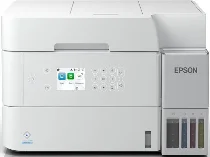
Epson EcoTank ET-3956 Drivers for Windows and macOS.
Supported Microsoft Windows Operating Systems
Windows 11
Windows 10 (32-bit and 64-bit)
Windows 8.1 (32-bit and 64-bit)
Windows 8 (32-bit and 64-bit)
Windows 7 (32-bit and 64-bit)
Supported OS: Windows 10 32-bit, Windows 8.1 32-bit, Windows 8 32-bit, Windows 7 32-bit
Supported OS: Windows 11, Windows 10 64-bit, Windows 8.1 64-bit, Windows 8 64-bit, Windows 7 64-bit
Supported OS: Windows 11, Windows 10 32-bit and 64-bit, Windows 8.1 32-bit and 64-bit, Windows 8 32-bit and 64-bit, Windows 7 32-bit and 64-bit
Supported OS: Windows 11, Windows 10 32-bit and 64-bit, Windows 8.1 32-bit and 64-bit, Windows 8 32-bit and 64-bit, Windows 7 32-bit and 64-bit
Supported OS: Windows 11, Windows 10 32-bit and 64-bit, Windows 8.1 32-bit and 64-bit, Windows 8 32-bit and 64-bit, Windows 7 32-bit and 64-bit
Supported OS: Windows 11, Windows 10 32-bit and 64-bit, Windows 8.1 32-bit and 64-bit, Windows 8 32-bit and 64-bit, Windows 7 32-bit and 64-bit
Supported macOS Operating Systems
macOS Tahoe 26
macOS Sequoia 15
macOS Sonoma 14
macOS Ventura 13
macOS Monterey 12
macOS Big Sur 11
macOS Catalina 10.15
macOS Mojave 10.14
macOS High Sierra 10.13
macOS Sierra 10.12
OS X El Capitan 10.11
OS X Yosemite 10.10
OS X Mavericks 10.9
OS X Mountain Lion 10.8
Mac OS X Lion 10.7
Mac OS X Snow Leopard 10.6
Mac OS X Leopard 10.5
Supported OS: macOS Tahoe 26, macOS Sequoia 15, macOS Sonoma 14, macOS Ventura 13, macOS Monterey 12, macOS Big Sur 11, macOS Catalina 10.15, macOS Mojave 10.14, macOS High Sierra 10.13, macOS Sierra 10.12, OS X El Capitan 10.11, OS X Yosemite 10.10, OS X Mavericks 10.9, OS X Mountain Lion 10.8, Mac OS X Lion 10.7, Mac OS X Snow Leopard 10.6, Mac OS X Leopard 10.5
Supported OS: macOS Tahoe 26, macOS Sequoia 15, macOS Sonoma 14, macOS Ventura 13, macOS Monterey 12, macOS Big Sur 11, macOS Catalina 10.15, macOS Mojave 10.14, macOS High Sierra 10.13, macOS Sierra 10.12, OS X El Capitan 10.11, OS X Yosemite 10.10, OS X Mavericks 10.9, OS X Mountain Lion 10.8, Mac OS X Lion 10.7, Mac OS X Snow Leopard 10.6, Mac OS X Leopard 10.5
Supported OS: macOS Tahoe 26, macOS Sequoia 15, macOS Sonoma 14, macOS Ventura 13, macOS Monterey 12, macOS Big Sur 11, macOS Catalina 10.15, macOS Mojave 10.14, macOS High Sierra 10.13, macOS Sierra 10.12, OS X El Capitan 10.11, OS X Yosemite 10.10, OS X Mavericks 10.9, OS X Mountain Lion 10.8, Mac OS X Lion 10.7, Mac OS X Snow Leopard 10.6, Mac OS X Leopard 10.5
Epson EcoTank ET-3956 Specifications
Epson EcoTank ET-3956 is a white A4 EcoTank multifunction inkjet for printing, scanning, and copying. Printing comes from a PrecisionCore printhead with 400 black nozzles and 128 nozzles for each colour. The refillable tanks use pigment black ink and dye cyan, magenta, and yellow ink. Bottle capacity is 127 ml for black and 70 ml for each colour. A 6.1 cm colour LCD sits on the control panel for direct settings.
Maximum print resolution reaches 4,800 x 1,200 dpi. The smallest droplet is 3.3 picolitres. ISO print speed runs at 18 pages per minute in monochrome and 9 pages per minute in colour. Draft output rises to 35 pages per minute in black and 23 pages per minute in colour. For automatic duplex printing, speed reaches 7 pages per minute in black and 5 pages per minute in colour.
Scanning relies on a CIS unit with 1,200 x 2,400 dpi optical resolution. From the flatbed, one A4 black page scans in about 9 seconds. The automatic document feeder scans black or colour originals at 5 images per minute. Two-sided ADF scanning runs at 3½ images per minute. The 30-page feeder also handles two-sided A4 plain-paper originals for copying or scanning.
Paper feeds from a 250-sheet cassette, and printed pages collect in a 30-sheet output tray. The cassette takes A4, A5, A6, Letter, B5, and B6 sheets. Envelopes use the same cassette path in Number 10, DL, or C6 size. Photo paper is accepted at 10 x 15 cm and 13 x 18 cm. A wired setup can use USB or Ethernet, while wireless printing runs through Wi-Fi 5 or Wi-Fi Direct. Mobile printing and scanning work through AirPrint, Mopria Print Service, Mopria Scan, Epson Smart Panel, and Epson Connect.