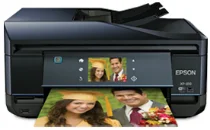
Epson XP-810 Printer Software and Drivers for Windows and macOS.
Supported Microsoft Windows Operating Systems
Windows 11
Windows 10 (32-bit and 64-bit)
Windows 8.1 (32-bit and 64-bit)
Windows 8 (32-bit and 64-bit)
Windows 7 (32-bit and 64-bit)
Windows Vista (32-bit and 64-bit)
Windows XP (32-bit and 64-bit)
Supported OS: Windows 11, Windows 10 32-bit and 64-bit, Windows 8.1 32-bit and 64-bit, Windows 8 32-bit and 64-bit, Windows 7 32-bit and 64-bit, Windows Vista 32-bit and 64-bit, Windows XP 32-bit and 64-bit
This driver package installer contains the following items:
- Printer Driver
- Scanner Driver and EPSON Scan Utility
- Epson Easy Photo Scan
- Epson Event Manager
- Epson Software Updater
- Network Installer
Supported OS: Windows 10 32-bit, Windows 8.1 32-bit, Windows 8 32-bit, Windows 7 32-bit, Windows Vista 32-bit, Windows XP 32-bit
Supported OS: Windows 11, Windows 10 64-bit, Windows 8.1 64-bit, Windows 8 64-bit, Windows 7 64-bit, Windows Vista 64-bit, Windows XP 64-bit
Supported OS: Windows 11, Windows 10 32-bit and 64-bit, Windows 8.1 32-bit and 64-bit, Windows 8 32-bit and 64-bit, Windows 7 32-bit and 64-bit, Windows Vista 32-bit and 64-bit, Windows XP 32-bit and 64-bit
Supported OS: Windows 10 32-bit, Windows 8.1 32-bit, Windows 8 32-bit, Windows 7 32-bit, Windows Vista 32-bit, Windows XP 32-bit
Supported OS: Windows 11, Windows 10 64-bit, Windows 8.1 64-bit, Windows 8 64-bit, Windows 7 64-bit, Windows Vista 64-bit, Windows XP 64-bit
Supported macOS Operating Systems
macOS Ventura 13
macOS Monterey 12
macOS Big Sur 11
macOS Catalina 10.15
macOS Mojave 10.14
macOS High Sierra 10.13
macOS Sierra 10.12
OS X El Capitan 10.11
OS X Yosemite 10.10
OS X Mavericks 10.9
OS X Mountain Lion 10.8
Mac OS X Lion 10.7
Mac OS X Snow Leopard 10.6
Mac OS X Leopard 10.5
Supported OS: macOS Catalina 10.15, macOS Big Sur 11, macOS Monterey 12, macOS Ventura 13
This driver package installer contains the following items:
- Printer Driver
- Scanner Driver and Epson Scan 2 Utility
- ICA Scanner Driver
- Epson Event Manager
- Epson FAX Utility
- Epson Print CD
- Epson Software Updater
Supported OS: Mac OS X Lion 10.7, OS X Mountain Lion 10.8, OS X Mavericks 10.9, OS X Yosemite 10.10, OS X El Capitan 10.11, macOS Sierra 10.12, macOS High Sierra 10.13, macOS Mojave 10.14
This driver package installer contains the following items:
- Printer Driver
- Scanner Driver and Epson Scan 2 Utility
- ICA Scanner Driver
- Epson Event Manager
- Epson FAX Utility
- Epson Print CD
- Epson Software Updater
Supported OS: Mac OS X Leopard 10.5, Mac OS X Snow Leopard 10.6, Mac OS X Lion 10.7, OS X Mountain Lion 10.8, OS X Mavericks 10.9, OS X Yosemite 10.10, OS X El Capitan 10.11, macOS Sierra 10.12, macOS High Sierra 10.13
Supported OS: macOS Catalina 10.15, macOS Big Sur 11, macOS Monterey 12, macOS Ventura 13
Supported OS: Mac OS X Leopard 10.5, Mac OS X Snow Leopard 10.6, Mac OS X Lion 10.7, OS X Mountain Lion 10.8, OS X Mavericks 10.9, OS X Yosemite 10.10, OS X El Capitan 10.11, macOS Sierra 10.12, macOS High Sierra 10.13, macOS Mojave 10.14
Supported OS: Mac OS X Leopard 10.5, Mac OS X Snow Leopard 10.6, Mac OS X Lion 10.7, OS X Mountain Lion 10.8, OS X Mavericks 10.9, OS X Yosemite 10.10, OS X El Capitan 10.11, macOS Sierra 10.12, macOS High Sierra 10.13, macOS Mojave 10.14, macOS Catalina 10.15, macOS Big Sur 11, macOS Monterey 12, macOS Ventura 13
Supported OS: Mac OS X Snow Leopard 10.6, Mac OS X Lion 10.7, OS X Mountain Lion 10.8, OS X Mavericks 10.9, OS X Yosemite 10.10, OS X El Capitan 10.11, macOS Sierra 10.12, macOS High Sierra 10.13, macOS Mojave 10.14, macOS Catalina 10.15, macOS Big Sur 11, macOS Monterey 12, macOS Ventura 13
Epson XP-810 Specifications
The Epson Expression Premium XP-810 Small-in-One Printer displays an impressive synthesis of form and function. This multifunction device outperforms its humble billing, providing the same feature set on many larger desktop models. With control panels that fold and trays that retract, the printer folds up slimly when not in use. This 3.5-inch touchscreen display presents an intuitive, multifunctional way to operate it. It has many features, including duplex printing and scanning for monochrome copying, along with the fax option. Whether or not you use these functions, they will still increase your productivity at work.
When it comes to printing performance, the XP-810 does an admirable job. The top-notch Epson Claria Premium ink system includes five cartridges supporting vivid colors and sharp text. The printer produces photos of professional quality on specialty media, adding photo black ink that adds depth to the contrast. It highlights the product as an excellent choice for people who enjoy photography yet want high-quality photographs from home printing. Print speeds, too, are speedy, with rates higher than average in both black-and-white and color. But speed does not come at the expense of output quality, which remains consistently high across various media types. The automatic duplex printing mechanism means it does work efficiently. However, users who print large numbers of jobs will feel restricted by the paper tray since it can hold only a certain number of sheets.
Regarding connectivity, you can’t beat the Expression Premium XP-810. This no-holds-barred machine isn’t shy about getting wired with Ethernet, Wi-Fi, and (Wi-Fi Direct) – plus printing directly from your mobile. This broad connectivity makes clear that the printer is adjustable for multiple user environments and workflow. But also think about how high ongoing ink expenses would be because even though it’s a small machine at first glance, those replacements could add up quickly if you print regularly. In short, the Epson XP-810 is a remarkably compact but still powerful all-in-one printer that impresses with its print quality and speed, intelligent design, and multiple-connection options. Those who look for high-quality prints rich in features will appreciate it. They also know that the capability makes for costly operations.