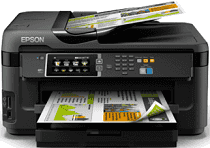
Epson WorkForce WF-7611 Drivers for Windows and macOS.
Supported Microsoft Windows Operating Systems
Windows 11
Windows 10 (32-bit and 64-bit)
Windows 8.1 (32-bit and 64-bit)
Windows 8 (32-bit and 64-bit)
Windows 7 (32-bit and 64-bit)
Windows Vista (32-bit and 64-bit)
Windows XP (32-bit and 64-bit)
Supported OS: Windows 10 32-bit, Windows 8.1 32-bit, Windows 8 32-bit, Windows 7 32-bit, Windows Vista 32-bit, Windows XP 32-bit
Supported OS: Windows 11, Windows 10 64-bit, Windows 8.1 64-bit, Windows 8 64-bit, Windows 7 64-bit, Windows Vista 64-bit, Windows XP 64-bit
Supported OS: Windows 11, Windows 10 32-bit and 64-bit, Windows 8.1 32-bit and 64-bit, Windows 8 32-bit and 64-bit, Windows 7 32-bit and 64-bit, Windows Vista 32-bit and 64-bit, Windows XP 32-bit and 64-bit
Supported OS: Windows 11, Windows 10 32-bit and 64-bit, Windows 8.1 32-bit and 64-bit, Windows 8 32-bit and 64-bit, Windows 7 32-bit and 64-bit, Windows Vista 32-bit and 64-bit, Windows XP 32-bit and 64-bit
Supported macOS Operating Systems
macOS Sonoma 14
macOS Ventura 13
macOS Monterey 12
macOS Big Sur 11
macOS Catalina 10.15
macOS Mojave 10.14
macOS High Sierra 10.13
macOS Sierra 10.12
OS X El Capitan 10.11
OS X Yosemite 10.10
OS X Mavericks 10.9
OS X Mountain Lion 10.8
Mac OS X Lion 10.7
Mac OS X Snow Leopard 10.6
Mac OS X Leopard 10.5
Supported OS: Mac OS X Leopard 10.5, Mac OS X Snow Leopard 10.6, Mac OS X Lion 10.7, OS X Mountain Lion 10.8, OS X Mavericks 10.9, OS X Yosemite 10.10, OS X El Capitan 10.11, macOS Sierra 10.12, macOS High Sierra 10.13, macOS Mojave 10.14, macOS Catalina 10.15, macOS Big Sur 11, macOS Monterey 12, macOS Ventura 13, macOS Sonoma 14
Epson WorkForce WF-7611 Specifications
Epson WorkForce WF-7611 is an all-in-one printer designed for small offices and home businesses. The appliance can print, scan, copy, and fax, which is convenient because no one has to purchase four different devices. The design is relatively compact, but the printer still supports wide-format printing – up to 13 x 19 inches- suitable for clients who often prepare lengthy documents or various advertising materials. In addition, the touchscreen is quite large and occupies 4.3 inches to provide an intuitive interface, which can be easily used by people who are not very experienced with modern technology.
One of the most prominent features of the Epson WorkForce WF-7611 is PrecisionCore technology. The appliance can produce high-definition prints with extremely sharp text and vivid colors, suitable for any type of graphic image and document. The printer has a regular tray and a rear feed for special media, such as envelopes or cardstock. In addition, the appliance is suitable for wireless printing from different devices because many people decide to print something from their smartphone or tablet on the go.
However, there are some drawbacks as well. The first one is that even though the print quality is fine, it may not be suitable for clients who need photos of the best quality. In addition, the printer is relatively large, which is a disadvantage because people in tiny offices may feel uncomfortable. Finally, some users report that the initial setup could be more accessible overall. However, the Epson WorkForce WF-7611 is one of the best all-in-one printers that people may choose because it is fast and high-quality and allows customers to save money on not buying separate print devices.