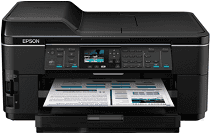
Epson WorkForce WF-7511 Drivers for Windows and macOS.
Supported Microsoft Windows Operating Systems
Windows 11
Windows 10 (32-bit and 64-bit)
Windows 8.1 (32-bit and 64-bit)
Windows 8 (32-bit and 64-bit)
Windows 7 (32-bit and 64-bit)
Windows Vista (32-bit and 64-bit)
Windows XP (32-bit and 64-bit)
Supported OS: Windows 10 32-bit, Windows 8.1 32-bit, Windows 8 32-bit, Windows 7 32-bit, Windows Vista 32-bit, Windows XP 32-bit
Supported OS: Windows 11, Windows 10 64-bit, Windows 8.1 64-bit, Windows 8 64-bit, Windows 7 64-bit, Windows Vista 64-bit, Windows XP 64-bit
Supported OS: Windows 11, Windows 10 32-bit and 64-bit, Windows 8.1 32-bit and 64-bit, Windows 8 32-bit and 64-bit, Windows 7 32-bit and 64-bit, Windows Vista 32-bit and 64-bit, Windows XP 32-bit and 64-bit
Supported OS: Windows 11, Windows 10 32-bit and 64-bit, Windows 8.1 32-bit and 64-bit, Windows 8 32-bit and 64-bit, Windows 7 32-bit and 64-bit, Windows Vista 32-bit and 64-bit, Windows XP 32-bit and 64-bit
Supported OS: Windows 11, Windows 10 32-bit and 64-bit, Windows 8.1 32-bit and 64-bit, Windows 8 32-bit and 64-bit, Windows 7 32-bit and 64-bit, Windows Vista 32-bit and 64-bit, Windows XP 32-bit and 64-bit
Supported macOS Operating Systems
macOS Sonoma 14
macOS Ventura 13
macOS Monterey 12
macOS Big Sur 11
macOS Catalina 10.15
macOS Mojave 10.14
macOS High Sierra 10.13
macOS Sierra 10.12
OS X El Capitan 10.11
OS X Yosemite 10.10
OS X Mavericks 10.9
OS X Mountain Lion 10.8
Mac OS X Lion 10.7
Mac OS X Snow Leopard 10.6
Mac OS X Leopard 10.5
Supported OS: Mac OS X Leopard 10.5, Mac OS X Snow Leopard 10.6, Mac OS X Lion 10.7, OS X Mountain Lion 10.8, OS X Mavericks 10.9, OS X Yosemite 10.10, OS X El Capitan 10.11, macOS Sierra 10.12, macOS High Sierra 10.13, macOS Mojave 10.14, macOS Catalina 10.15, macOS Big Sur 11, macOS Monterey 12, macOS Ventura 13, macOS Sonoma 14
Epson WorkForce WF-7511 Specifications
The Epson WorkForce WF-7511 is a multifunctional office printer that can be altered to take large paper up to A3+. The printer produces high-quality, reliable output, but at medium speed: it can print 15 pages per minute in black and white and 8.4 pages per minute in color. For office use, the printer is ideal, though relatively slow. What is more, WorkForce WF-7511 is distinguished by a wide array of connectivity options, as it can be connected to a wireless network, Ethernet, and be put into direct action through a USB. Furthermore, this printer can also print from mobile phones using Apple AirPrint, Google Cloud Print, and Epson Connect.
As for the control of this device, it is relatively simple, as there is not much to do with the printer at an office, and, thus, many options are maximally simple. It involves a 2.5-inch color control display, where everything can be read and analyzed and, more importantly, regulated. The control of WorkForce WF-7511 is supposed to be convenient and straightforward. Thus, every option should be easy to perform; the printer efficiently handles the largest and smallest print jobs. Nevertheless, it has managed to balance facilitating work and operation well. The volume and quality of printing are pretty good, as for an office printer, but it processes several pieces of paper, which is not particularly impressive – 250 standard paper sheets. Thus, the Epson WorkForce WF-7511 is the best choice for a small or medium office.