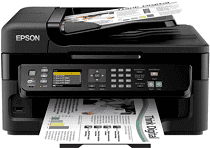
Epson WorkForce WF-2661 Drivers for Windows and macOS.
Supported Microsoft Windows Operating Systems
Windows 11
Windows 10 (32/64-bit)
Windows 8.1 (32/64-bit)
Windows 8 (32/64-bit)
Windows 7 SP1 (32/64-bit)
Windows Vista SP2 (32/64-bit)
Windows XP SP3 (32/64-bit)
Supported OS: Windows 10 32-bit, Windows 8.1 32-bit, Windows 8 32-bit, Windows 7 32-bit, Windows Vista 32-bit, Windows XP 32-bit
Supported OS: Windows 11, Windows 10 64-bit, Windows 8.1 64-bit, Windows 8 64-bit, Windows 7 64-bit, Windows Vista 64-bit, Windows XP 64-bit
Supported OS: Windows 11, Windows 10 32-bit and 64-bit, Windows 8.1 32-bit and 64-bit, Windows 8 32-bit and 64-bit, Windows 7 32-bit and 64-bit, Windows Vista 32-bit and 64-bit, Windows XP 32-bit and 64-bit
Supported OS: Windows 11, Windows 10 32-bit and 64-bit, Windows 8.1 32-bit and 64-bit, Windows 8 32-bit and 64-bit, Windows 7 32-bit and 64-bit, Windows Vista 32-bit and 64-bit, Windows XP 32-bit and 64-bit
Supported macOS Operating Systems
macOS Sonoma 14
macOS Ventura 13
macOS Monterey 12
macOS Big Sur 11
macOS Catalina 10.15
macOS Mojave 10.14
macOS High Sierra 10.13
macOS Sierra 10.12
OS X El Capitan 10.11
OS X Yosemite 10.10
OS X Mavericks 10.9
OS X Mountain Lion 10.8
Mac OS X Lion 10.7
Mac OS X Snow Leopard 10.6
Mac OS X Leopard 10.5
Supported OS: Mac OS X Leopard 10.5, Mac OS X Snow Leopard 10.6, Mac OS X Lion 10.7, OS X Mountain Lion 10.8, OS X Mavericks 10.9, OS X Yosemite 10.10, OS X El Capitan 10.11, macOS Sierra 10.12, macOS High Sierra 10.13, macOS Mojave 10.14, macOS Catalina 10.15, macOS Big Sur 11, macOS Monterey 12, macOS Ventura 13, macOS Sonoma 14
Supported OS: Mac OS X Leopard 10.5, Mac OS X Snow Leopard 10.6, Mac OS X Lion 10.7, OS X Mountain Lion 10.8, OS X Mavericks 10.9, OS X Yosemite 10.10, OS X El Capitan 10.11, macOS Sierra 10.12, macOS High Sierra 10.13, macOS Mojave 10.14, macOS Catalina 10.15, macOS Big Sur 11, macOS Monterey 12, macOS Ventura 13, macOS Sonoma 14
Epson WorkForce WF-2661 Specifications
The Epson WorkForce WF-2661 is a fairly standard printer designed primarily for use in small offices and home businesses. The device is a multifunctional device and thus combines functions of a printer, scanner, copier, and fax. Wireless printing supporting Wi-Fi, Apple AirPrint, and Google Cloud Print technologies makes the printer quite convenient for use with a variety of devices, including tablets and smartphones. The WF-2661 is not groundbreaking but combines good printing quality and relatively high speed, considering its low price.
On the one hand, the device’s technical characteristics are partly lacking for cost-efficient production. Its maximum printing speed is 9.5 pages per minute for black ink and 4.5 pages for colored. The 4800 x 1200 dpi printing resolution ensures the average quality of printed materials with clear text and pictures. The scanner’s resolution is up to 2400 dpi, which is acceptable for daily tasks. The device is well-suited for printing documents and scanning forms, filling them in, or making quick photocopies of documents. At the same time, the printer is not likely suitable for high-volume printing or use by professional photographers due to some limitations on the quality of printed photos.
The Epson WF-2661 offers a relatively solid set of features for its price. Some of its competitors need to provide ADF, a reasonably valuable feature for copying and scanning several pages, or even have it available only in more expensive models. The device is quite economical for home business in terms of ink usage and combines a solid set of features at a relatively low price. However, as is often the case with relatively large printing devices, the initial setup can be tricky. Thankfully, Epson offers fairly good instructions with the printer and has a sound customer service system. Ultimately, the WF-2661 is not the best printer on the market, but it is a solid device with relatively good performance at a reasonable price.