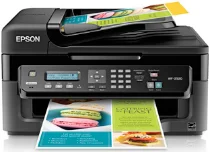
Epson WorkForce WF-2520 printer Software and Drivers for Windows and macOS.
Supported Microsoft Windows Operating Systems
Windows 11
Windows 10 (32/64-bit)
Windows 8.1 (32/64-bit)
Windows 8 (32/64-bit)
Windows 7 (32/64-bit)
Windows Vista (32/64-bit)
Windows XP (32/64-bit)
Supported OS: Windows 11, Windows 10 32-bit and 64-bit, Windows 8.1 32-bit and 64-bit, Windows 8 32-bit and 64-bit, Windows 7 32-bit and 64-bit, Windows Vista 32-bit and 64-bit, Windows XP 32-bit and 64-bit
This driver package installer contains the following items:
- Printer Driver
- Scanner Driver and EPSON Scan Utility
- Epson Fax Utility
- Epson Event Manager
- Epson Software Updater
- Network Installer
Supported OS: Windows 10 32-bit, Windows 8.1 32-bit, Windows 8 32-bit, Windows 7 32-bit, Windows Vista 32-bit, Windows XP 32-bit
Supported OS: Windows 11, Windows 10 64-bit, Windows 8.1 64-bit, Windows 8 64-bit, Windows 7 64-bit, Windows Vista 64-bit, Windows XP 64-bit
Supported OS: Windows 11, Windows 10 32-bit and 64-bit, Windows 8.1 32-bit and 64-bit, Windows 8 32-bit and 64-bit, Windows 7 32-bit and 64-bit, Windows Vista 32-bit and 64-bit, Windows XP 32-bit and 64-bit
Supported macOS Operating Systems
macOS Ventura 13
macOS Monterey 12
macOS Big Sur 11
macOS Catalina 10.15
macOS Mojave 10.14
macOS High Sierra 10.13
macOS Sierra 10.12
OS X El Capitan 10.11
OS X Yosemite 10.10
OS X Mavericks 10.9
OS X Mountain Lion 10.8
Mac OS X Lion 10.7
Mac OS X Snow Leopard 10.6
Mac OS X Leopard 10.5
Supported OS: Mac OS X Snow Leopard 10.6, Mac OS X Lion 10.7, OS X Mountain Lion 10.8, OS X Mavericks 10.9, OS X Yosemite 10.10, OS X El Capitan 10.11, macOS Sierra 10.12, macOS High Sierra 10.13, macOS Mojave 10.14, macOS Catalina 10.15, macOS Big Sur 11, macOS Monterey 12, macOS Ventura 13
Supported OS: Mac OS X Leopard 10.5, Mac OS X Snow Leopard 10.6, Mac OS X Lion 10.7, OS X Mountain Lion 10.8, OS X Mavericks 10.9, OS X Yosemite 10.10, OS X El Capitan 10.11, macOS Sierra 10.12, macOS High Sierra 10.13, macOS Mojave 10.14, macOS Catalina 10.15, macOS Big Sur 11, macOS Monterey 12, macOS Ventura 13
Supported OS: Mac OS X Leopard 10.5, Mac OS X Snow Leopard 10.6, Mac OS X Lion 10.7, OS X Mountain Lion 10.8, OS X Mavericks 10.9, OS X Yosemite 10.10, OS X El Capitan 10.11, macOS Sierra 10.12, macOS High Sierra 10.13, macOS Mojave 10.14
Epson WorkForce WF-2520 Specifications
Epson WorkForce WF-2520 is an inkjet printer for home office and small business use. It does well in all the fundamentals, containing print, scan, copy, and fax functions on a small machine. With a simple shape, it easily slips into a tight spot and has a small footprint. You would expect this type of printer to fit into primarily domestic circumstances. But its outstanding feature is the integrated Ethernet interface, which makes it convenient for many people to use locally on a network (like the office). It also has counterbalanced print output quality for both text and graphics. If you need the font to be bold black, everything comes out clear enough. However, it is not the fastest printer; it printed at nine pages per minute for black and white documents and 4.7 pages a bit slow for color printing, actually, which wonʻt do very well for more demanding print jobs.
Economical running costs are where the WF-2520 earns its laurels. Since it uses individual ink cartridges, it is only necessary to replace the color that is out. It could save you a considerable amount in the long run. This EcoPrinter generates very little heat and uses only the power it needs to do its work, particularly in the case of rising costs. However, if one has more color printing to do, the ink cost could eventually equal or surpass–or more than wipe clean your savings from getting such a ‘bargain-priced’ printer in the first place”. On the other hand, for busier offices, 100-sheet paper is nothing; you must reload every other minute.
In its class, the Epson WorkForce WF-2520 is about on par with network capabilities. Compared with others in the same price range, the WF-2520 does well. However, its competitors might offer faster print speeds or more substantial paper handling crucial factors for print users. Overall, the WF-2520 is an intelligent choice for users who want a simple, no-nonsense printer. While there are downsides, such as modest speed and low paper capacity, it functions well for its intended small office audience, mainly when space and cost are concerns.