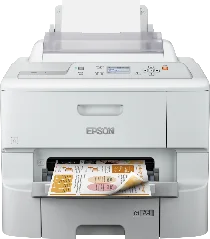
Epson WorkForce Pro WF-6090DW printer Software and Drivers for Windows and macOS.
Supported Microsoft Windows Operating Systems
Windows 11
Windows 10 (32/64-bit)
Windows 8.1 (32/64-bit)
Windows 8 (32/64-bit)
Windows 7 (32/64-bit)
Windows Vista (32/64-bit)
Windows XP (32/64-bit)
Supported OS: Windows 10 32-bit, Windows 8.1 32-bit, Windows 8 32-bit, Windows 7 32-bit
Supported OS: Windows 11, Windows 10 64-bit, Windows 8.1 64-bit, Windows 8 64-bit, Windows 7 64-bit
Supported OS: Windows 10 32-bit, Windows 8.1 32-bit, Windows 8 32-bit, Windows 7 32-bit
Supported OS: Windows 11, Windows 10 64-bit, Windows 8.1 64-bit, Windows 8 64-bit, Windows 7 64-bit
Supported OS: Windows 10 32-bit and 64-bit, Windows 8.1 32-bit and 64-bit, Windows 8 32-bit and 64-bit, Windows 7 32-bit and 64-bit, Windows Vista 32-bit and 64-bit, Windows XP 32-bit and 64-bit
Supported macOS Operating Systems
macOS Big Sur 11
macOS Catalina 10.15
macOS Mojave 10.14
macOS High Sierra 10.13
macOS Sierra 10.12
OS X El Capitan 10.11
OS X Yosemite 10.10
OS X Mavericks 10.9
OS X Mountain Lion 10.8
Mac OS X Lion 10.7
Mac OS X Snow Leopard 10.6
Mac OS X Leopard 10.5
Supported OS: Mac OS X Leopard 10.5, Mac OS X Snow Leopard 10.6, Mac OS X Lion 10.7, OS X Mountain Lion 10.8, OS X Mavericks 10.9, OS X Yosemite 10.10, OS X El Capitan 10.11, macOS Sierra 10.12, macOS High Sierra 10.13, macOS Mojave 10.14, macOS Catalina 10.15, macOS Big Sur 11
Supported OS: Mac OS X Leopard 10.5, Mac OS X Snow Leopard 10.6, Mac OS X Lion 10.7, OS X Mountain Lion 10.8, OS X Mavericks 10.9, OS X Yosemite 10.10, OS X El Capitan 10.11, macOS Sierra 10.12, macOS High Sierra 10.13, macOS Mojave 10.14, macOS Catalina 10.15, macOS Big Sur 11
Supported OS: macOS Catalina 10.15, macOS Big Sur 11
Epson WorkForce Pro WF-6090DW Specifications
The Epson WorkForce Pro WF-6090DW printer stands out primarily in the commercial office printer market for its exceptional speed and efficiency. It is designed to serve the needs of medium to large businesses, where a quick turnaround of documents is the norm. This device can produce prints embarrassingly quickly, one of the fastest in its class, yet it still yields professional printing quality. Many businesses require crisp, clear documents to be presented in meetings, and the fact that they can be produced alongside the writing of the minutes makes this far more convenient. Running a fleet of these printers is also economical based on ink use. The WF-6090DW uses high-yield ink cartridges, increasing the savings by reducing the cost per page. It is vital for running a large business that prints bulk daily.
Additionally, this printer can make the most of the paper, using both sides for printing courtesy of the automatic duplex print feature. The only downside is that the printer cost is proportionate to its high quality, which might be too high for smaller businesses—still, the running costs are more than the makeup for the initial setback. Compatibility with Mac and Windows systems makes no reason not to purchase this unit for the office. While some other printer models have one or two features that might be slightly better, none can measure up in every aspect. In short, the printer can call the fastest, using high-quality ink with reasonable refill intervals and paper-saving technologies.