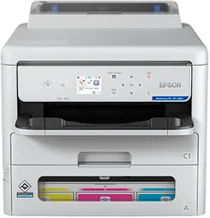
Epson WorkForce Pro EP-C800 Drivers for Windows and macOS.
Supported Microsoft Windows Operating Systems
Windows 11
Windows 10 (32/64-bit)
Windows 8.1 (32/64-bit)
Windows 8 (32/64-bit)
Windows 7 (32/64-bit)
Windows Vista (32/64-bit)
Supported OS: Windows 11, Windows 10 32-bit and 64-bit, Windows 8.1 32-bit and 64-bit, Windows 8 32-bit and 64-bit, Windows 7 32-bit and 64-bit
This combo package installer obtains and installs the following items:
- Printer Driver
- Network Installer
Supported OS: Windows 10 32-bit, Windows 8.1 32-bit, Windows 8 32-bit, Windows 7 32-bit
Supported OS: Windows 11, Windows 10 64-bit, Windows 8.1 64-bit, Windows 8 64-bit, Windows 7 64-bit
Supported OS: Windows 10 32-bit, Windows 8.1 32-bit, Windows 8 32-bit, Windows 7 32-bit, Windows Vista 32-bit
Supported OS: Windows 11, Windows 10 64-bit, Windows 8.1 64-bit, Windows 8 64-bit, Windows 7 64-bit, Windows Vista 64-bit
Supported OS: Windows 10 32-bit, Windows 8.1 32-bit, Windows 8 32-bit, Windows 7 32-bit
Supported OS: Windows 11, Windows 10 64-bit, Windows 8.1 64-bit, Windows 8 64-bit, Windows 7 64-bit
Supported OS: Windows 10 32-bit, Windows 8.1 32-bit, Windows 8 32-bit, Windows 7 32-bit
Supported OS: Windows 11, Windows 10 64-bit, Windows 8.1 64-bit, Windows 8 64-bit, Windows 7 64-bit
Supported OS: Windows 11, Windows 10 32-bit and 64-bit, Windows 8.1 32-bit and 64-bit, Windows 8 32-bit and 64-bit, Windows 7 32-bit and 64-bit
Supported OS: Windows 10 32-bit, Windows 8.1 32-bit, Windows 8 32-bit, Windows 7 32-bit, Windows Vista 32-bit
Supported OS: Windows 11, Windows 10 64-bit, Windows 8.1 64-bit, Windows 8 64-bit, Windows 7 64-bit, Windows Vista 64-bit
Supported macOS Operating Systems
macOS Tahoe 26
macOS Sequoia 15
macOS Sonoma 14
macOS Ventura 13
macOS Monterey 12
macOS Big Sur 11
macOS Catalina 10.15
macOS Mojave 10.14
macOS High Sierra 10.13
macOS Sierra 10.12
OS X El Capitan 10.11
OS X Yosemite 10.10
OS X Mavericks 10.9
OS X Mountain Lion 10.8
Mac OS X Lion 10.7
Mac OS X Snow Leopard 10.6
Supported OS: macOS Sequoia 15, macOS Sonoma 14, macOS Ventura 13, macOS Monterey 12, macOS Big Sur 11, macOS Catalina 10.15, macOS Mojave 10.14, macOS High Sierra 10.13, macOS Sierra 10.12, OS X El Capitan 10.11, OS X Yosemite 10.10, OS X Mavericks 10.9
This combo package installer obtains and installs the following items:
- Printer Driver
- Epson Software Updater
Supported OS: macOS Tahoe 26, macOS Sequoia 15, macOS Sonoma 14, macOS Ventura 13, macOS Monterey 12, macOS Big Sur 11, macOS Catalina 10.15, macOS Mojave 10.14, macOS High Sierra 10.13, macOS Sierra 10.12, OS X El Capitan 10.11, OS X Yosemite 10.10, OS X Mavericks 10.9
Supported OS: macOS Tahoe 26, macOS Sequoia 15, macOS Sonoma 14, macOS Ventura 13, macOS Monterey 12, macOS Big Sur 11, macOS Catalina 10.15, macOS Mojave 10.14, macOS High Sierra 10.13, macOS Sierra 10.12, OS X El Capitan 10.11, OS X Yosemite 10.10, OS X Mavericks 10.9, OS X Mountain Lion 10.8, Mac OS X Lion 10.7, Mac OS X Snow Leopard 10.6
Supported OS: macOS Tahoe 26, macOS Sequoia 15, macOS Sonoma 14, macOS Ventura 13, macOS Monterey 12, macOS Big Sur 11, macOS Catalina 10.15, macOS Mojave 10.14, macOS High Sierra 10.13, macOS Sierra 10.12, OS X El Capitan 10.11, OS X Yosemite 10.10, OS X Mavericks 10.9
Epson WorkForce Pro EP-C800 Specifications
Epson WorkForce Pro EP-C800 is a print-only color inkjet workgroup printer, meaning that there is no equipment for scanning, copying, or sending faxes. PrecisionCore 4S printhead manages printing by using four-color DURABrite Ultra pigment ink. There are separate cyan, magenta, yellow, and black packs for feeding the replaceable ink pack system. The control panel has a 2.4-inch color display. In terms of printing languages, the following are supported: Epson ESC/P-R, PCL 5, PCL 6, and PostScript 3 emulation.
Print resolution is 4800 x 1200 optimized dpi, with 3.8 picoliter droplets. ISO printing speed equals 25 pages per minute, both in black and color. Duplex printing has a speed of 14 ISO pages per minute. ISO draft plain-text printing has a speed of 34 pages per minute. Epson recommends using the printer for printing 2,500 to 10,000 pages per month.
In terms of paper loading, there is a 250-sheet cassette and an 80-sheet rear feed. There are three optional 500-sheet trays that may increase total capacity to 1,830 sheets. The rear feed also supports up to 10 No. 10 envelopes. It is possible to use paper sizes of 3.5 x 5 inches, 4 x 6 inches, Letter, Legal, A4, A6, half letter, and Executive. User-defined media sizes include 8.5 x 47 inches.
Nearby computers connect through Hi-Speed USB, while wired networking is based on Gigabit Ethernet. Wireless printing is possible through Wi-Fi or Wi-Fi Direct. Wireless networking technologies include 802.11 b/g/n/a/ac/k/v/r. Network printing is performed via IPP, LDP, Port 9100, and WSD. There are such mobile output solutions as Epson Email Print, Epson Smart Panel, Epson Remote Print, Apple AirPrint, Mopria, Microsoft Universal Print, and Fire OS. With the printer stored, its dimensions are 16.7 x 21.1 x 20.2 inches. The weight is 48.7 lb.