Epson SureColor SC-F1000 Drivers for Windows and macOS.
Supported Microsoft Windows Operating Systems
Windows 11
Windows 10 (32-bit and 64-bit)
Windows 8.1 (32-bit and 64-bit)
Windows 8 (32-bit and 64-bit)
Windows 7 (32-bit and 64-bit)
Supported OS: Windows 10 32-bit, Windows 8.1 32-bit, Windows 8 32-bit, Windows 7 32-bit
Supported OS: Windows 11, Windows 10 64-bit, Windows 8.1 64-bit, Windows 8 64-bit, Windows 7 64-bit
Supported OS: Windows 11, Windows 10 32-bit and 64-bit, Windows 8.1 32-bit and 64-bit, Windows 8 32-bit and 64-bit, Windows 7 32-bit and 64-bit
Supported OS: Windows 11, Windows 10 32-bit and 64-bit, Windows 8.1 32-bit and 64-bit, Windows 8 32-bit and 64-bit, Windows 7 32-bit and 64-bit
Supported macOS Operating Systems
macOS Tahoe 26
macOS Sequoia 15
macOS Sonoma 14
macOS Ventura 13
macOS Monterey 12
macOS Big Sur 11
macOS Catalina 10.15
macOS Mojave 10.14
macOS High Sierra 10.13
macOS Sierra 10.12
OS X El Capitan 10.11
OS X Yosemite 10.10
OS X Mavericks 10.9
OS X Mountain Lion 10.8
Mac OS X Lion 10.7
Mac OS X Snow Leopard 10.6
Mac OS X Leopard 10.5
Supported OS: macOS Tahoe 26, macOS Sequoia 15, macOS Sonoma 14, macOS Ventura 13, macOS Monterey 12, macOS Big Sur 11, macOS Catalina 10.15, macOS Mojave 10.14, macOS High Sierra 10.13, macOS Sierra 10.12, OS X El Capitan 10.11, OS X Yosemite 10.10, OS X Mavericks 10.9, OS X Mountain Lion 10.8, Mac OS X Lion 10.7, Mac OS X Snow Leopard 10.6, Mac OS X Leopard 10.5
Epson SureColor SC-F1000 Specifications
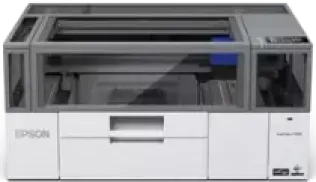
The Epson SureColor SC-F1000 is a compact direct-to-garment and direct-to-film printer. Its hardware is built for printing, not for scanning, copying, or faxing. Printing comes from a PrecisionCore Micro TFP printhead using Epson UltraChrome DG pigment ink. The cartridge set uses black, cyan, magenta, yellow, and white ink, with 250 ml in each cartridge. Epson also lists separate 250 ml cleaning and maintenance liquids for ink-system upkeep.
Maximum print resolution is 2,400 x 1,200 dpi. The smallest droplet size is 12.8 pl. The printhead has 400 nozzles for black and 400 nozzles for each colour. White ink runs through two additional 400-nozzle channels. With white ink installed, the printer can work on dark garments and film as well as lighter fabric. Nozzle Verification Technology checks the printhead during operation.
Media handling is based on platens, not office paper trays. The small platen gives a 10 x 12 inch print area, equal to 254 x 305 mm. A sleeve platen is listed at 4 x 4 inches, or 101 x 101 mm. Direct print from USB is part of the feature set. Without a flatbed scanner, automatic document feeder, duplex path, or paper cassette, handling remains centred on garment and film placement.
Wired and wireless networking are both listed for connection. Local control runs through a colour touchscreen panel. With the body closed, the printer measures 899 x 699 x 426 mm across width, depth, and height. Physical weight is about 72 kg before media or liquids. Power use is about 40 watts during operation and 20 watts in economy mode. Standby use is about 6 watts, while power-off consumption drops to 0.2 watts.