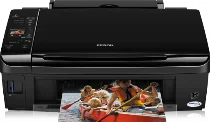
Epson Stylus SX215 Printer Software and Drivers for Windows and macOS.
Supported Microsoft Windows Operating Systems
Windows 11
Windows 10 (32-bit and 64-bit)
Windows 8.1 (32-bit and 64-bit)
Windows 8 (32-bit and 64-bit)
Windows 7 (32-bit and 64-bit)
Windows Vista (32-bit and 64-bit)
Windows XP (32-bit and 64-bit)
Supported OS: Windows 10 32-bit, Windows 8.1 32-bit, Windows 8 32-bit, Windows 7 32-bit, Windows Vista 32-bit, Windows XP 32-bit
Supported OS: Windows 11, Windows 10 64-bit, Windows 8.1 64-bit, Windows 8 64-bit, Windows 7 64-bit, Windows Vista 64-bit, Windows XP 64-bit
Supported OS: Windows 11, Windows 10 32-bit and 64-bit, Windows 8.1 32-bit and 64-bit, Windows 8 32-bit and 64-bit, Windows 7 32-bit and 64-bit, Windows Vista 32-bit and 64-bit, Windows XP 32-bit and 64-bit
Supported OS: Windows 11
Supported macOS Operating Systems
macOS Ventura 13
macOS Monterey 12
macOS Big Sur 11
macOS Catalina 10.15
macOS Mojave 10.14
macOS High Sierra 10.13
macOS Sierra 10.12
OS X El Capitan 10.11
OS X Yosemite 10.10
OS X Mavericks 10.9
OS X Mountain Lion 10.8
Mac OS X Lion 10.7
Mac OS X Snow Leopard 10.6
Mac OS X Leopard 10.5
Supported OS: Mac OS X Leopard 10.5, Mac OS X Snow Leopard 10.6, Mac OS X Lion 10.7, OS X Mountain Lion 10.8, OS X Mavericks 10.9, OS X Yosemite 10.10, OS X El Capitan 10.11, macOS Sierra 10.12, macOS High Sierra 10.13, macOS Mojave 10.14, macOS Catalina 10.15, macOS Big Sur 11, macOS Monterey 12, macOS Ventura 13
Supported OS: Mac OS X Leopard 10.5, Mac OS X Snow Leopard 10.6, Mac OS X Lion 10.7, OS X Mountain Lion 10.8, OS X Mavericks 10.9, OS X Yosemite 10.10, OS X El Capitan 10.11
Supported OS: Mac OS X Leopard 10.5, Mac OS X Snow Leopard 10.6, Mac OS X Lion 10.7, OS X Mountain Lion 10.8, OS X Mavericks 10.9, OS X Yosemite 10.10, OS X El Capitan 10.11
Supported OS: Mac OS X Leopard 10.5, Mac OS X Snow Leopard 10.6, Mac OS X Lion 10.7, OS X Mountain Lion 10.8, OS X Mavericks 10.9, OS X Yosemite 10.10, OS X El Capitan 10.11, macOS Sierra 10.12, macOS High Sierra 10.13, macOS Mojave 10.14, macOS Catalina 10.15, macOS Big Sur 11
Epson Stylus SX215 Specifications
The Epson Stylus SX215 is a user friendly multifunctional inkjet printer, it is directed entirely at the home consumer. Its simple interface and colorful, graphic style LCD achieve relaxed control and quick adjustment to various functions. The setup process is a cinch, something else you don’t have to worry about if you are going to start printing right out of the box. One convenient feature is the printer’s ability to read memory cards directly, it may print photos without input from your PC.
As for print quality, the SX215 performs more or less adequately within its price range, with clear, crisp text output suitable for everyday printing tasks such as reports, letters, and homework assignments. The SX215’s photo printing, if not exceptional compared to truly high price end models, still produces pretty good images; these pictures could keep casual users happy. Yet consider this, if you’re picky about your photographs and are focused mainly on getting top quality photo prints, think about other types of printers made especially for photos, too, or going up a tier in the model.
Economical or not, one of the typical concerns about inkjet printers such as the Epson Stylus SX215 is the cost of replacing ink cartridges. Printing infrequently, the Epson can be pretty cheap to maintain. Yet the price will only hurt if you use it frequently. Bear in mind that the cost of ink and replacing it are also part of the overall outlay on this machine. It’s essential to weigh initial savings against ongoing expenses before deciding if the SX215 suits you. It provides a trade off between affordability and performance; it’s not a wrong choice for people who print only occasionally and have modest requirements.