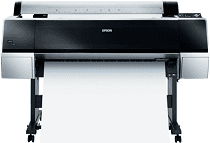
Epson Stylus Pro 9900 Drivers for Windows and macOS.
Supported Microsoft Windows Operating Systems
Windows 11
Windows 10 (32-bit and 64-bit)
Windows 8.1 (32-bit and 64-bit)
Windows 8 (32-bit and 64-bit)
Windows 7 (32-bit and 64-bit)
Windows Vista (32-bit and 64-bit)
Windows XP (32-bit and 64-bit)
Supported OS: Windows 10 32-bit, Windows 8.1 32-bit, Windows 8 32-bit, Windows 7 32-bit, Windows Vista 32-bit, Windows XP 32-bit
Supported OS: Windows 11, Windows 10 64-bit, Windows 8.1 64-bit, Windows 8 64-bit, Windows 7 64-bit, Windows Vista 64-bit, Windows XP 64-bit
Supported macOS Operating Systems
macOS Sonoma 14
macOS Ventura 13
macOS Monterey 12
macOS Big Sur 11
macOS Catalina 10.15
macOS Mojave 10.14
macOS High Sierra 10.13
macOS Sierra 10.12
OS X El Capitan 10.11
OS X Yosemite 10.10
OS X Mavericks 10.9
Supported OS: OS X Mavericks 10.9, OS X Yosemite 10.10, OS X El Capitan 10.11, macOS Sierra 10.12, macOS High Sierra 10.13, macOS Mojave 10.14, macOS Catalina 10.15, macOS Big Sur 11, macOS Monterey 12, macOS Ventura 13, macOS Sonoma 14
Epson Stylus Pro 9900 Specifications
The Epson Stylus Pro 9900 is a professional large-format printer with exceptional print quality. The high quality of printing results is achieved due to the use of Epson’s UltraChrome HDR ink, which consists of ten different color inks. A wide range of colors ensures precise and intense printing. The printer is well-suited for printing with outstanding subtlety in shades and tints, essential for photographers and graphic designers working on color-sensitive projects. The highest print resolution is 2880 x 1440 dpi. The printer is also high-speed, suitable for coping with large print jobs. Advanced print head technology prevents the most frequent problem with this type of printer, i.e., clogging. The roll paper feed function is also handy and time-saving. The initial setup, however, could cause some problems, as it is somewhat complex. Yet it works great once it is done.
The only negative factor to mention is cost. Indeed, this printer is costly, as are the replacement ink cartridges. However, it will justify its price for semiprofessional and professional purposes, as the print results are of the highest quality. Regarding the more affordable part, some other large format printers by different manufacturers cost less. However, if we consider its highest quality and reliability factors, there are not that many competitors this printer could have. Thus, I recommend this printer for printing business or individual work of the highest quality.