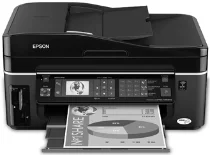
Epson Stylus Office TX600FW Printer Software and Drivers for Windows and macOS.
Supported Microsoft Windows Operating Systems
Windows 11
Windows 10 (32-bit and 64-bit)
Windows 8.1 (32-bit and 64-bit)
Windows 8 (32-bit and 64-bit)
Windows 7 (32-bit and 64-bit)
Windows Vista (32-bit and 64-bit)
Windows XP (32-bit and 64-bit)
Windows 2000 SP4
Windows Server 2016
Windows Server 2012 R2
Windows Server 2012
Windows Server 2008 R2 SP1
Windows Server 2008 SP2 (32-bit and 64-bit)
Supported OS: Windows 10 32-bit, Windows 8.1 32-bit, Windows 8 32-bit, Windows 7 32-bit, Windows Vista 32-bit, Windows XP 32-bit
Supported OS: Windows 11, Windows 10 64-bit, Windows 8.1 64-bit, Windows 8 64-bit, Windows 7 64-bit, Windows Vista 64-bit, Windows XP 64-bit
Supported OS: Windows 10 32-bit, Windows 8.1 32-bit, Windows 8 32-bit
Supported OS: Windows 10 64-bit, Windows 8.1 64-bit, Windows 8 64-bit
Supported OS: Windows 7 32-bit, Windows Vista 32-bit, Windows XP 32-bit
Supported OS: Windows 7 64-bit, Windows Vista 64-bit, Windows XP 64-bit
Supported OS: Windows 11, Windows 10 32-bit and 64-bit, Windows 8.1 32-bit and 64-bit, Windows 8 32-bit and 64-bit, Windows 7 32-bit and 64-bit, Windows Vista 32-bit and 64-bit, Windows XP 32-bit and 64-bit
Supported macOS Operating Systems
macOS Ventura 13
macOS Monterey 12
macOS Big Sur 11
macOS Catalina 10.15
macOS Mojave 10.14
macOS High Sierra 10.13
macOS Sierra 10.12
OS X El Capitan 10.11
OS X Yosemite 10.10
OS X Mavericks 10.9
OS X Mountain Lion 10.8
Mac OS X Lion 10.7
Mac OS X Snow Leopard 10.6
Mac OS X Leopard 10.5
Supported OS: macOS Mojave 10.14, macOS Catalina 10.15, macOS Big Sur 11, macOS Monterey 12, macOS Ventura 13
Supported OS: Mac OS X Leopard 10.5, Mac OS X Snow Leopard 10.6, Mac OS X Lion 10.7, OS X Mountain Lion 10.8, OS X Mavericks 10.9
Supported OS: OS X El Capitan 10.11
Supported OS: Mac OS X Leopard 10.5, Mac OS X Snow Leopard 10.6, Mac OS X Lion 10.7, OS X Mountain Lion 10.8, OS X Mavericks 10.9, OS X Yosemite 10.10, OS X El Capitan 10.11, macOS Sierra 10.12, macOS High Sierra 10.13, macOS Mojave 10.14, macOS Catalina 10.15, macOS Big Sur 11, macOS Monterey 12, macOS Ventura 13
Epson Stylus Office TX600FW Specifications
The Epson Stylus Office TX600FW features excellent all in one capabilities just right for small offices not to mention a printer’s high quality. You can do more than print with it; this machine can scan, copy, and send faxes. Thus, it can take care of most office tasks involving documents in considerably less space. It is easy to use, which is very convenient. You don’t have to struggle with the simple installation and straightforward touch panel controls. With its functionality housed in the smallest space possible, the TX600FW still suits the office where space and ease are essential.
So, regarding printing results, the TX600FW gets it right. Writing must be clear, especially in a business environment. But while not the fastest on record, the print rate is passable. Suitable for daily business, it could leave a bit to be desired if you have high volume printing needs. Though not the best as far as color printing is concerned, the printer processes color just fine. What’s most impressive is its reasonable ink use. Every color has its tank, so you only replace the one getting low. This clever design can limit costs as time goes on.
When you look at how the TX600FW fares compared to other office printers, what is most impressive about it is an all around package tied into one machine. It’s mainly for those businesses who need an all rounder machine. Yet, while it may not excel in any area, the Epson Stylus Office TX600FW serves reliably and economically for everyday office printing. As for businesses with a vital printing requirement such as large volume and high speed, it might only cover some things, but the Epson Stylus Office TX600FW is a convenient, straightforward, three in one solution for small to medium sized offices.