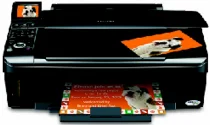
Epson Stylus NX400 All-In-Ones Printer Software and Drivers for Windows and macOS.
Supported Microsoft Windows Operating Systems
Windows 11
Windows 10 (32/64-bit)
Windows 8.1 (32/64-bit)
Windows 8 (32/64-bit)
Windows 7 (32/64-bit)
Windows Vista (32/64-bit)
Windows XP (32/64-bit)
Supported OS: Windows 10 32-bit, Windows 8.1 32-bit, Windows 8 32-bit
This driver package installer contains the following items:
- Printer Driver
- Scanner Driver
- Epson Status Monitor
- Epson EasyPrint
Supported OS: Windows 11, Windows 10 64-bit, Windows 8.1 64-bit, Windows 8 64-bit
This driver package installer contains the following items:
- Printer Driver
- Scanner Driver
- Epson Status Monitor
- Epson EasyPrint
Supported OS: Windows 7 32-bit
This driver package installer contains the following items:
- Printer Driver
- Scanner Driver
- Epson Status Monitor
- Epson EasyPrint
Supported OS: Windows 7 64-bit
This driver package installer contains the following items:
- Printer Driver
- Scanner Driver
- Epson Status Monitor
- Epson EasyPrint
Supported OS: Windows Vista 32-bit, Windows XP 32-bit
This driver package installer contains the following items:
- Printer Driver
- Scanner Driver
- Epson Status Monitor
- Epson EasyPrint
Supported OS: Windows Vista 64-bit, Windows XP 64-bit
This driver package installer contains the following items:
- Printer Driver
- Scanner Driver
- Epson Status Monitor
- Epson EasyPrint
Supported OS: Windows 10 32-bit, Windows 8.1 32-bit, Windows 8 32-bit
Supported OS: Windows 10 64-bit, Windows 8.1 64-bit, Windows 8 64-bit
Supported OS: Windows 7 32-bit
Supported OS: Windows 7 64-bit
Supported OS: Windows Vista 32-bit, Windows XP 32-bit
Supported OS: Windows Vista 64-bit, Windows XP 64-bit
Supported OS: Windows 11, Windows 10 32-bit and 64-bit, Windows 8.1 32-bit and 64-bit, Windows 8 32-bit and 64-bit, Windows 7 32-bit and 64-bit
Supported OS: Windows Vista 32-bit and 64-bit, Windows XP 32-bit and 64-bit
Supported macOS Operating Systems
macOS Ventura 13
macOS Monterey 12
macOS Big Sur 11
macOS Catalina 10.15
macOS Mojave 10.14
macOS High Sierra 10.13
macOS Sierra 10.12
OS X El Capitan 10.11
OS X Yosemite 10.10
OS X Mavericks 10.9
OS X Mountain Lion 10.8
Mac OS X Lion 10.7
Mac OS X Snow Leopard 10.6
Mac OS X Leopard 10.5
Supported OS: Mac OS X Leopard 10.5, Mac OS X Snow Leopard 10.6
This driver package installer contains the following items:
- Printer Driver
- Scanner Driver
- Epson EasyPrint
Supported OS: macOS Mojave 10.14, macOS Catalina 10.15, macOS Big Sur 11, macOS Monterey 12, macOS Ventura 13
Supported OS: Mac OS X Leopard 10.5, Mac OS X Snow Leopard 10.6
Supported OS: Mac OS X Leopard 10.5, Mac OS X Snow Leopard 10.6, Mac OS X Lion 10.7, OS X Mountain Lion 10.8
Supported OS: Mac OS X Leopard 10.5, Mac OS X Snow Leopard 10.6, Mac OS X Lion 10.7, OS X Mountain Lion 10.8, OS X Mavericks 10.9, OS X Yosemite 10.10, OS X El Capitan 10.11, macOS Sierra 10.12, macOS High Sierra 10.13, macOS Mojave 10.14, macOS Catalina 10.15, macOS Big Sur 11, macOS Monterey 12, macOS Ventura 13
Epson Stylus NX400 Specifications
Epson Stylus NX400 is a multifunction printer established to meet one’s home and small office requirements. At its building, this device combines the function of a printer, scanner, and copier, making it an all-around solution for those who do not want to purchase multiple devices. Epson’s NX400 is known in the IT world for its ease of use. Regarding the equipment installation, this does not require any additional attention – the installation guide is printed on the device itself. The printer model also has an automatic installation program, which facilitates installing the drivers on one’s computer. Even though this model’s ‘menu’ and the scope of features it provides are pretty extensive, they are also pretty easy to navigate.
The Epson Stylus NX400 printer’s printing quality can be considered one of its best features. This equipment prints in transparent, vibrant colors and delivers sharp text. It makes this multifunction solution one of the most versatile tools for printing needs. In particular, one can use it to print leaflets, pages, documents, and pictures. The other great advantage of the NX400 is its printing speed, which never gets too slow. The printing quality is high for both text and photo printing. Individual ink cartridges used for different colors produce prints that stand out in quality when measured against other equipment in this price range.
In conclusion, the Epson Stylus NX400 all-in-one printer falls within the range of excellent printing equipment. It is most competitive with other counterparts because of its print quality and ease of use. Initially, the costs of using this model were low as far as its operational characteristics were concerned. However, going through cartridges of a required color can add up to considerable money. Therefore, potential buyers should pay high attention to the printer’s operation costs – or the types of multifunction printers that provide solutions to even lower ink expenses.