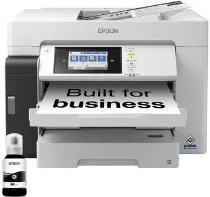
Epson M15180 Drivers for Windows and macOS.
Supported Microsoft Windows Operating Systems
Windows 11
Windows 10 (32-bit and 64-bit)
Windows 8.1 (32-bit and 64-bit)
Windows 8 (32-bit and 64-bit)
Windows 7 (32-bit and 64-bit)
Supported OS: Windows 10 32-bit, Windows 8.1 32-bit, Windows 8 32-bit, Windows 7 32-bit
Supported OS: Windows 11, Windows 10 64-bit, Windows 8.1 64-bit, Windows 8 64-bit, Windows 7 64-bit
Supported OS: Windows 11, Windows 10 32-bit and 64-bit, Windows 8.1 32-bit and 64-bit, Windows 8 32-bit and 64-bit, Windows 7 32-bit and 64-bit
Supported OS: Windows 11, Windows 10 32-bit and 64-bit, Windows 8.1 32-bit and 64-bit, Windows 8 32-bit and 64-bit, Windows 7 32-bit and 64-bit
Supported OS: Windows 11, Windows 10 32-bit and 64-bit, Windows 8.1 32-bit and 64-bit, Windows 8 32-bit and 64-bit, Windows 7 32-bit and 64-bit
Supported OS: Windows 11, Windows 10 32-bit and 64-bit, Windows 8.1 32-bit and 64-bit, Windows 8 32-bit and 64-bit, Windows 7 32-bit and 64-bit
Supported OS: Windows 11, Windows 10 32-bit and 64-bit, Windows 8.1 32-bit and 64-bit, Windows 8 32-bit and 64-bit, Windows 7 32-bit and 64-bit
Supported OS: Windows 11, Windows 10 32-bit and 64-bit, Windows 8.1 32-bit and 64-bit, Windows 8 32-bit and 64-bit, Windows 7 32-bit and 64-bit
Supported OS: Windows 11, Windows 10 32-bit and 64-bit, Windows 8.1 32-bit and 64-bit, Windows 8 32-bit and 64-bit, Windows 7 32-bit and 64-bit
Supported macOS Operating Systems
macOS Tahoe 26
macOS Sequoia 15
macOS Sonoma 14
macOS Ventura 13
macOS Monterey 12
macOS Big Sur 11
macOS Catalina 10.15
macOS Mojave 10.14
macOS High Sierra 10.13
macOS Sierra 10.12
OS X El Capitan 10.11
OS X Yosemite 10.10
OS X Mavericks 10.9
OS X Mountain Lion 10.8
Mac OS X Lion 10.7
Mac OS X Snow Leopard 10.6
Mac OS X Leopard 10.5
Supported OS: macOS Tahoe 26, macOS Sequoia 15, macOS Sonoma 14, macOS Ventura 13, macOS Monterey 12, macOS Big Sur 11, macOS Catalina 10.15, macOS Mojave 10.14, macOS High Sierra 10.13, macOS Sierra 10.12, OS X El Capitan 10.11, OS X Yosemite 10.10, OS X Mavericks 10.9, OS X Mountain Lion 10.8, Mac OS X Lion 10.7, Mac OS X Snow Leopard 10.6, Mac OS X Leopard 10.5
Supported OS: macOS Tahoe 26, macOS Sequoia 15, macOS Sonoma 14, macOS Ventura 13, macOS Monterey 12, macOS Big Sur 11, macOS Catalina 10.15, macOS Mojave 10.14, macOS High Sierra 10.13, macOS Sierra 10.12, OS X El Capitan 10.11, OS X Yosemite 10.10, OS X Mavericks 10.9, OS X Mountain Lion 10.8, Mac OS X Lion 10.7, Mac OS X Snow Leopard 10.6, Mac OS X Leopard 10.5
Epson M15180 Specifications
The Epson M15180 is an EcoTank monochrome A3 multifunction ink tank printer for printing, scanning, and copying. Its black-only print system uses PrecisionCore Heat-Free technology and DURABrite ET pigment ink. The refill tank takes the T06G black bottle, listed under part number C13T06G198. Originals can be placed on the colour flatbed CIS scanner or loaded into the 50-sheet automatic document feeder. The control panel supports direct scan and copy operation.
Print resolution reaches 4,800 x 1,200 dpi. The first monochrome page appears in about 5.5 seconds. ISO simplex speed runs up to 25 ipm, and automatic duplex output reaches up to 21 ipm. Simplex printing reaches A3+ size. Two-sided printing is limited to A3. Scanning records 1,200 x 2,400 dpi optical detail across a maximum area of 297 x 431.8 mm.
Paper enters through front cassettes and a rear feed. The automatic document feeder takes 50 pages when 80 g/m² paper is used. The feed path accepts A3+, A3, A4, A5, A6, B5, B6, Letter, Legal, Indian-Legal, and 16K. Common photo sizes are listed separately. Envelopes use number 10, DL, C6, or C4 formats. The hardware remains monochrome, so colour ink tanks and colour document printing are not part of this unit.
A direct computer connection uses Hi-Speed USB, and wired networking runs through Ethernet. Wireless printing works through Wi-Fi or Wi-Fi Direct. Mobile and cloud functions are listed through Epson Smart Panel, Epson iPrint, Epson Email Print, Remote Print Driver, Scan to Cloud, Apple AirPrint, and Mopria Print Service. The body measures 515 x 500 x 350 mm and weighs 20.2 kg. Standalone copying draws about 19 W during operation.