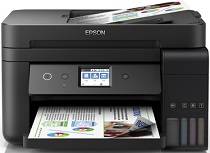
Epson L6191 Drivers for Windows and macOS.
Supported Microsoft Windows Operating Systems
Windows 11
Windows 10 (32-bit and 64-bit)
Windows 8.1 (32-bit and 64-bit)
Windows 8 (32-bit and 64-bit)
Windows 7 (32-bit and 64-bit)
Windows Vista (32-bit and 64-bit)
Supported OS: Windows 11, Windows 10 32-bit and 64-bit, Windows 8.1 32-bit and 64-bit, Windows 8 32-bit and 64-bit, Windows 7 32-bit and 64-bit, Windows Vista 32-bit and 64-bit
Supported OS: Windows 10 32-bit, Windows 8.1 32-bit, Windows 8 32-bit, Windows 7 32-bit, Windows Vista 32-bit
Supported OS: Windows 11, Windows 10 64-bit, Windows 8.1 64-bit, Windows 8 64-bit, Windows 7 64-bit, Windows Vista 64-bit
Supported OS: Windows 11, Windows 10 32-bit and 64-bit, Windows 8.1 32-bit and 64-bit, Windows 8 32-bit and 64-bit, Windows 7 32-bit and 64-bit, Windows Vista 32-bit and 64-bit
Supported macOS Operating Systems
macOS Sonoma 14
macOS Ventura 13
macOS Monterey 12
macOS Big Sur 11
macOS Catalina 10.15
macOS Mojave 10.14
macOS High Sierra 10.13
macOS Sierra 10.12
OS X El Capitan 10.11
OS X Yosemite 10.10
OS X Mavericks 10.9
OS X Mountain Lion 10.8
Mac OS X Lion 10.7
Mac OS X Snow Leopard 10.6
Supported OS: macOS Catalina 10.15, macOS Big Sur 11, macOS Monterey 12, macOS Ventura 13, macOS Sonoma 14
Supported OS: Mac OS X Lion 10.7, OS X Mountain Lion 10.8, OS X Mavericks 10.9, OS X Yosemite 10.10, OS X El Capitan 10.11, macOS Sierra 10.12, macOS High Sierra 10.13, macOS Mojave 10.14
Supported OS: Mac OS X Snow Leopard 10.6, Mac OS X Lion 10.7, OS X Mountain Lion 10.8, OS X Mavericks 10.9, OS X Yosemite 10.10, OS X El Capitan 10.11, macOS Sierra 10.12, macOS High Sierra 10.13, macOS Mojave 10.14, macOS Catalina 10.15, macOS Big Sur 11, macOS Monterey 12, macOS Ventura 13, macOS Sonoma 14
Supported OS: Mac OS X Snow Leopard 10.6, Mac OS X Lion 10.7, OS X Mountain Lion 10.8, OS X Mavericks 10.9, OS X Yosemite 10.10, OS X El Capitan 10.11, macOS Sierra 10.12, macOS High Sierra 10.13, macOS Mojave 10.14, macOS Catalina 10.15, macOS Big Sur 11, macOS Monterey 12, macOS Ventura 13, macOS Sonoma 14
Epson L6191 Specifications
Multifunctional Epson L6191 offers printer, scanner, copier, and fax. Notably, the quality of the device in question is explained by its unique ink tank system. Unlike cartridges traditionally used in such devices, the L6191 model has refillable tanks. As a result, running costs are reduced radically. Indeed, a user can print up to 7,500 black-and-white pages or 6,000 color pages with just one set of ink bottles, so this device ‘is very cost-effective for high-volume printing.’ Plus, a user can save paper using automatic duplex printing supported by the printer. In other words, this device can print on both sides of a paper sheet.
Regarding functionality, Epson L6191 is remarkable for its performance. As for the printing speed, the examined printer is able to print black drafts 33 pages per minute, while the number of color drafts does not exceed 15 pages. True, the standard quality prints are made at a slower pace, yet the overall quality of image, and sharpness in particular, is by far higher than in modern Dell laptops. The integrated scanner and copier support various tasks, which is also very convenient. Notably, the Automatic Document Feeder can handle 30-page documents, and it is another way of improving productivity, as multi-page documents do not need to be dealt with one page at a time. In addition, the device is highly user-friendly, which is ensured by its 2.4-inch color display and easy-to-navigate controls. Finally, as never before, it is highly connected: the user can print with it directly from a device due to various connectivity options, such as USB, Ethernet, Wi-Fi, or Wi-Fi Direct. The Epson L6191 seems like it could be better, though. For example, it has no touchscreen, which is not surprising since it is an old model and, thus, has a smaller display. However, with lower costs and far higher ink capacity, this printer is one of the best multipurpose devices one can buy.