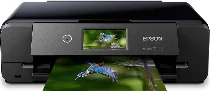
Epson Expression Photo XP-980 Drivers for Windows and macOS.
Supported Microsoft Windows Operating Systems
Windows 11
Windows 10 (32-bit and 64-bit)
Windows 8.1 (32-bit and 64-bit)
Windows 8 (32-bit and 64-bit)
Windows 7 (32-bit and 64-bit)
Windows Vista (32-bit and 64-bit)
Supported OS: Windows 11, Windows 10 32-bit and 64-bit, Windows 8.1 32-bit and 64-bit, Windows 8 32-bit and 64-bit, Windows 7 32-bit and 64-bit, Windows Vista 32-bit and 64-bit
Supported OS: Windows 10 32-bit, Windows 8.1 32-bit, Windows 8 32-bit, Windows 7 32-bit
Supported OS: Windows 11, Windows 10 64-bit, Windows 8.1 64-bit, Windows 8 64-bit, Windows 7 64-bit
Supported OS: Windows 11, Windows 10 32-bit and 64-bit, Windows 8.1 32-bit and 64-bit, Windows 8 32-bit and 64-bit, Windows 7 32-bit and 64-bit
Supported OS: Windows 10 32-bit, Windows 8.1 32-bit, Windows 8 32-bit, Windows 7 32-bit, Windows Vista 32-bit
Supported OS: Windows 11, Windows 10 64-bit, Windows 8.1 64-bit, Windows 8 64-bit, Windows 7 64-bit, Windows Vista 64-bit
Supported macOS Operating Systems
macOS Sequoia 15
macOS Sonoma 14
macOS Ventura 13
macOS Monterey 12
macOS Big Sur 11
macOS Catalina 10.15
macOS Mojave 10.14
macOS High Sierra 10.13
macOS Sierra 10.12
OS X El Capitan 10.11
OS X Yosemite 10.10
OS X Mavericks 10.9
OS X Mountain Lion 10.8
Mac OS X Lion 10.7
Mac OS X Snow Leopard 10.6
Supported OS: OS X Mavericks 10.9, OS X Yosemite 10.10, OS X El Capitan 10.11, macOS Sierra 10.12, macOS High Sierra 10.13, macOS Mojave 10.14, macOS Catalina 10.15, macOS Big Sur 11, macOS Monterey 12, macOS Ventura 13, macOS Sonoma 14, macOS Sequoia 15
Supported OS: OS X Mavericks 10.9, OS X Yosemite 10.10, OS X El Capitan 10.11, macOS Sierra 10.12, macOS High Sierra 10.13, macOS Mojave 10.14, macOS Catalina 10.15, macOS Big Sur 11, macOS Monterey 12, macOS Ventura 13, macOS Sonoma 14, macOS Sequoia 15
Supported OS: OS X Mavericks 10.9, OS X Yosemite 10.10, OS X El Capitan 10.11, macOS Sierra 10.12, macOS High Sierra 10.13, macOS Mojave 10.14, macOS Catalina 10.15, macOS Big Sur 11, macOS Monterey 12, macOS Ventura 13, macOS Sonoma 14, macOS Sequoia 15
Supported OS: Mac OS X Snow Leopard 10.6, Mac OS X Lion 10.7, OS X Mountain Lion 10.8, OS X Mavericks 10.9, OS X Yosemite 10.10, OS X El Capitan 10.11, macOS Sierra 10.12, macOS High Sierra 10.13, macOS Mojave 10.14, macOS Catalina 10.15, macOS Big Sur 11, macOS Monterey 12, macOS Ventura 13, macOS Sonoma 14, macOS Sequoia 15
Epson Expression Photo XP-980 Specifications
Epson Expression Photo XP-980 is capable of using high-quality MicroPiezo inkjet technology with six colors to provide professional photo printing with vivid colors. Moreover, this model has an excellent maximum print resolution of 5760 x 1440 optimized dpi. Its ISO speed in black is 8.5 ppm and in color, 8.0 ppm. This model has automatic duplex printing, which works with 4.8 ppm in black and 4.5 ppm in color. Printing of borderless 4 x 6 inch photos takes only eleven seconds and guarantees an incredible color precision.
The mentioned device provides Epson Connect services, which allow using it for mobile printing and scanning. It allows printing using such applications as Epson Smart Panel, AirPrint, Mopria Print Service, Android printing, and Creative Print. This scanner works with 4800 dpi optical resolution and 9600 x 9600 dpi interpolated resolution. It is able to scan to cloud services, memory cards, USB drives, computers, and email using Epson Connect. Such copy features as duplex copying, color restoration, photo enlargements, and resizing from 25 to 400 percent are available.
This model allows working with various kinds of paper. They are wide-format sheets (up to 11 x 17 inches), plain paper, premium glossy photo media, presentation paper, envelopes, and inkjet-printable CDs or DVDs. This model offers a 100-sheet input tray, a dedicated 20-sheet photo tray, and direct CD/DVD printing. Versatile connection options include built-in Wi-Fi 5, Ethernet, Wi-Fi Direct, USB Host, and memory card slots. It is compatible with such operating systems as Windows, macOS, ChromeOS, and digital cameras supporting Exif Print.
The printer is provided with a user-friendly 4.3-inch touchscreen with gesture navigation, which allows easy use of the device. There are some automatic options that improve each photo: Auto Photo Correction, advanced face detection, red-eye removal, and photo restoration. Moreover, there are six Claria Photo HD individual ink cartridges in the printer. This printer is energy-efficient since it has certifications such as ENERGY STAR, RoHS, and SmartWay Transport Partnership. In addition, the device comes with such useful items as software, a maintenance box, a power cord, and a one-year limited warranty.