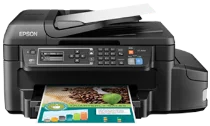
Epson ET-4550 Printer Software and Drivers for Windows and macOS.
Supported Microsoft Windows Operating Systems
Windows 11
Windows 10 (32/64-bit)
Windows 8.1 (32/64-bit)
Windows 8 (32/64-bit)
Windows 7 (32/64-bit)
Windows Vista (32/64-bit)
Windows XP (32/64-bit)
Supported OS: Windows 11, Windows 10 32-bit and 64-bit, Windows 8.1 32-bit and 64-bit, Windows 8 32-bit and 64-bit, Windows 7 32-bit and 64-bit, Windows Vista 32-bit and 64-bit
This driver package installer contains the following items:
- Printer Driver
- Scanner Driver and EPSON Scan Utility
- Epson Fax Utility
- Epson Event Manager
- Epson Software Updater
Supported OS: Windows 11, Windows 10 32-bit and 64-bit, Windows 8.1 32-bit and 64-bit, Windows 8 32-bit and 64-bit, Windows 7 32-bit and 64-bit, Windows Vista 32-bit and 64-bit, Windows XP 32-bit and 64-bit
Supported OS: Windows 10 32-bit, Windows 8.1 32-bit, Windows 8 32-bit, Windows 7 32-bit, Windows Vista 32-bit, Windows XP 32-bit
Supported OS: Windows 10 64-bit, Windows 8.1 64-bit, Windows 8 64-bit, Windows 7 64-bit, Windows Vista 64-bit, Windows XP 64-bit
Supported OS: Windows 10 32-bit, Windows 8.1 32-bit, Windows 8 32-bit, Windows 7 32-bit, Windows Vista 32-bit, Windows XP 32-bit
Supported OS: Windows 11, Windows 10 64-bit, Windows 8.1 64-bit, Windows 8 64-bit, Windows 7 64-bit, Windows Vista 64-bit, Windows XP 64-bit
Supported macOS Operating Systems
macOS Ventura 13
macOS Monterey 12
macOS Big Sur 11
macOS Catalina 10.15
macOS Mojave 10.14
macOS High Sierra 10.13
macOS Sierra 10.12
OS X El Capitan 10.11
OS X Yosemite 10.10
OS X Mavericks 10.9
OS X Mountain Lion 10.8
Mac OS X Lion 10.7
Mac OS X Snow Leopard 10.6
Mac OS X Leopard 10.5
Supported OS: macOS Catalina 10.15, macOS Big Sur 11, macOS Monterey 12, macOS Ventura 13
This driver package installer contains the following items:
- Printer Driver
- ICA Scanner Driver
- Epson Event Manager
- Epson FAX Utility
- Epson Software Updater
Supported OS: Mac OS X Lion 10.7, OS X Mountain Lion 10.8, OS X Mavericks 10.9, OS X Yosemite 10.10, OS X El Capitan 10.11, macOS Sierra 10.12, macOS High Sierra 10.13, macOS Mojave 10.14
This driver package installer contains the following items:
- Printer Driver
- ICA Scanner Driver
- Epson Event Manager
- Epson FAX Utility
- Epson Software Updater
Supported OS: Mac OS X Snow Leopard 10.6, Mac OS X Lion 10.7, OS X Mountain Lion 10.8, OS X Mavericks 10.9, OS X Yosemite 10.10, OS X El Capitan 10.11, macOS Sierra 10.12, macOS High Sierra 10.13, macOS Mojave 10.14, macOS Catalina 10.15, macOS Big Sur 11, macOS Monterey 12, macOS Ventura 13
Supported OS: macOS Catalina 10.15, macOS Big Sur 11, macOS Monterey 12, macOS Ventura 13
Supported OS: Mac OS X Snow Leopard 10.6, Mac OS X Lion 10.7, OS X Mountain Lion 10.8, OS X Mavericks 10.9, OS X Yosemite 10.10, OS X El Capitan 10.11, macOS Sierra 10.12, macOS High Sierra 10.13, macOS Mojave 10.14
Supported OS: Mac OS X Leopard 10.5, Mac OS X Snow Leopard 10.6, Mac OS X Lion 10.7, OS X Mountain Lion 10.8, OS X Mavericks 10.9, OS X Yosemite 10.10, OS X El Capitan 10.11, macOS Sierra 10.12, macOS High Sierra 10.13, macOS Mojave 10.14, macOS Catalina 10.15, macOS Big Sur 11, macOS Monterey 12, macOS Ventura 13
Supported OS: Mac OS X Snow Leopard 10.6, Mac OS X Lion 10.7, OS X Mountain Lion 10.8, OS X Mavericks 10.9, OS X Yosemite 10.10, OS X El Capitan 10.11, macOS Sierra 10.12, macOS High Sierra 10.13, macOS Mojave 10.14, macOS Catalina 10.15, macOS Big Sur 11, macOS Monterey 12, macOS Ventura 13
Epson ET-4550 Specifications
The Epson ET-4550 EcoTank multifunction printer may look like a regular printer. Still, as Kevin explains in his review, one feature distinguishes it from most: its refillable ink wells. In contrast to conventional cartridge-filled printers, the ET-4550 takes a unique approach. You fill its tanks, the user, using inexpensive ink bottles, rather than frequently hauling home whenever you deplete one cartridge. With its promise of up to two years of ink included, you’re looking at thousands of pages and, finally, the start of freedom from that irritating low-ink warning. Yes, the upfront price is higher, but for anyone who prints more than a dozen pages a day (or without virgin regularity), the long-term savings make the ET-4550 very appealing.
But the ET-4550 offers more than modestly priced performance. Its print quality for text documents is impressively sharp; even in draft mode, there’s no mistaking it for inkjet output. Color documents and graphics display rich, vibrant hues with only some modest banding in darker, solid areas. The printer is no speed demon and won’t challenge laser-based units in this fashion. However, it remains quick enough for most home and small office needs—Ditto on the all-in-one capabilities; scanning, copying, and faxing all function nicely. It is good to see that the integrated PrecisionCore print head technology contributes enormously to the quality. Clarify details — everything is adorable. The auto document feeder is a nice perk, especially if you have a lot of multipage documents to copy and scan.
It is not without its challenges. However, the ET-4550’s interface seems quite dated. In a world of sleek design and touch screens, it feels like the last page of a book. That said, it works perfectly fine. I wouldn’t call the unit intuitive, but it’s easy enough to get used to once you’ve had a play around with it. The printer still has no USB port for printing from external devices. Surprising. The ET-4550 supports all the connectivity an EPSON printer/replacing workhorse could ever need, with Ethernet, Wi-Fi, and remote printing via Epson’s suite of mobile applications. To summarize, the ET-4550 is a smart choice for anyone looking at the total cost of ownership, with some calling it the “low TCO king.” What it lacks in sex appeal more than makes up for with print quality and low operating costs.