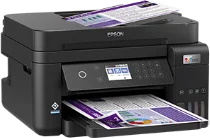
Epson ET-3850U Drivers for Windows and macOS.
Supported Microsoft Windows Operating Systems
Windows 11
Windows 10 (32-bit and 64-bit)
Windows 8.1 (32-bit and 64-bit)
Windows 8 (32-bit and 64-bit)
Windows 7 (32-bit and 64-bit)
Windows Vista (32-bit and 64-bit)
Supported OS: Windows 11, Windows 10 32-bit and 64-bit, Windows 8.1 32-bit and 64-bit, Windows 8 32-bit and 64-bit, Windows 7 32-bit and 64-bit, Windows Vista 32-bit and 64-bit
Supported OS: Windows 10 32-bit, Windows 8.1 32-bit, Windows 8 32-bit, Windows 7 32-bit, Windows Vista 32-bit
Supported OS: Windows 11, Windows 10 64-bit, Windows 8.1 64-bit, Windows 8 64-bit, Windows 7 64-bit, Windows Vista 64-bit
Supported macOS Operating Systems
macOS Tahoe 26
macOS Sequoia 15
macOS Sonoma 14
macOS Ventura 13
macOS Monterey 12
macOS Big Sur 11
macOS Catalina 10.15
macOS Mojave 10.14
macOS High Sierra 10.13
macOS Sierra 10.12
OS X El Capitan 10.11
OS X Yosemite 10.10
OS X Mavericks 10.9
OS X Mountain Lion 10.8
Mac OS X Lion 10.7
Mac OS X Snow Leopard 10.6
Supported OS: macOS Tahoe 26, macOS Sequoia 15, macOS Sonoma 14, macOS Ventura 13, macOS Monterey 12, macOS Big Sur 11, macOS Catalina 10.15, macOS Mojave 10.14, macOS High Sierra 10.13, macOS Sierra 10.12, OS X El Capitan 10.11, OS X Yosemite 10.10, OS X Mavericks 10.9, OS X Mountain Lion 10.8, Mac OS X Lion 10.7
Supported OS: macOS Tahoe 26, macOS Sequoia 15, macOS Sonoma 14, macOS Ventura 13, macOS Monterey 12, macOS Big Sur 11, macOS Catalina 10.15, macOS Mojave 10.14, macOS High Sierra 10.13, macOS Sierra 10.12, OS X El Capitan 10.11, OS X Yosemite 10.10, OS X Mavericks 10.9, OS X Mountain Lion 10.8, Mac OS X Lion 10.7, Mac OS X Snow Leopard 10.6
Supported OS: macOS Tahoe 26, macOS Sequoia 15, macOS Sonoma 14, macOS Ventura 13, macOS Monterey 12, macOS Big Sur 11, macOS Catalina 10.15, macOS Mojave 10.14, macOS High Sierra 10.13, macOS Sierra 10.12, OS X El Capitan 10.11, OS X Yosemite 10.10, OS X Mavericks 10.9, OS X Mountain Lion 10.8, Mac OS X Lion 10.7
Supported OS: macOS Tahoe 26, macOS Sequoia 15, macOS Sonoma 14, macOS Ventura 13, macOS Monterey 12, macOS Big Sur 11, macOS Catalina 10.15, macOS Mojave 10.14, macOS High Sierra 10.13, macOS Sierra 10.12, OS X El Capitan 10.11, OS X Yosemite 10.10, OS X Mavericks 10.9, OS X Mountain Lion 10.8, Mac OS X Lion 10.7, Mac OS X Snow Leopard 10.6
Epson ET-3850U Specifications
Epson ET-3850U is an inkjet printer that is used for everyday home document printing, scanning, and copying purposes. It is equipped with PrecisionCore Heat-Free technology and provides sharp printing of text, forms, and color graphics on plain paper. Its refillable ink tanks do not require using disposable ink cartridges since it uses black, cyan, magenta, and yellow Epson ink bottles as refill solutions. Front tank windows are convenient for checking ink levels both before lengthy printings and software setup. Thanks to high-capacity ink tanks, users will not have any trouble with printing in routine office conditions.
This printer prints in up to 4800 by 1200 optimized dpi, which ensures small text legibility and labels. Black ISO speed is 15.5 pages per minute, and the color ISO speed does not exceed 8.5 pages per minute. There is a 250-sheet front paper tray that contains letter and legal papers. Thanks to the two-sided automatic printing feature, it is possible to reduce paper consumption when printing drafts, forms, manuals, or homework. Everyday paper handling is good for invoices, forms, school papers, and home office documents.
This model is able to connect via Hi-Speed USB, Ethernet, Wi-Fi, and Wi-Fi Direct. Driver setup is available for Windows and macOS systems. Mobile printing can be done using Epson Smart Panel, Epson Email Print, Apple AirPrint, and Mopria Print Service. Its body measures about 14.8 by 13.7 by 9.1 inches when the device is stored on a desk without tray extension. Compact body is suitable for small office spaces, and its 30-page ADF facilitates fast scanning and copying of multi-page documents. Faxing ability is missing; thus, it is necessary to get another EcoTank.