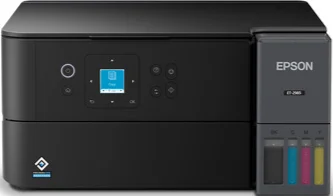
Epson ET-2985 Drivers for Windows and macOS.
Supported Microsoft Windows Operating Systems
Windows 11
Windows 10 (32-bit and 64-bit)
Windows 8.1 (32-bit and 64-bit)
Windows 8 (32-bit and 64-bit)
Windows 7 (32-bit and 64-bit)
Windows Vista (32-bit and 64-bit)
Supported OS: Windows 11, Windows 10 32-bit and 64-bit, Windows 8.1 32-bit and 64-bit, Windows 8 32-bit and 64-bit, Windows 7 32-bit and 64-bit
Supported OS: Windows 10 32-bit, Windows 8.1 32-bit, Windows 8 32-bit, Windows 7 32-bit
Supported OS: Windows 10 64-bit, Windows 8.1 64-bit, Windows 8 64-bit, Windows 7 64-bit
Supported OS: Windows 11, Windows 10 32-bit and 64-bit, Windows 8.1 32-bit and 64-bit, Windows 8 32-bit and 64-bit, Windows 7 32-bit and 64-bit
Supported OS: Windows 10 32-bit, Windows 8.1 32-bit, Windows 8 32-bit, Windows 7 32-bit, Windows Vista 32-bit
Supported OS: Windows 11, Windows 10 64-bit, Windows 8.1 64-bit, Windows 8 64-bit, Windows 7 64-bit, Windows Vista 64-bit
Supported macOS Operating Systems
macOS Tahoe 26
macOS Sequoia 15
macOS Sonoma 14
macOS Ventura 13
macOS Monterey 12
macOS Big Sur 11
macOS Catalina 10.15
macOS Mojave 10.14
macOS High Sierra 10.13
macOS Sierra 10.12
OS X El Capitan 10.11
OS X Yosemite 10.10
OS X Mavericks 10.9
OS X Mountain Lion 10.8
Mac OS X Lion 10.7
Mac OS X Snow Leopard 10.6
Supported OS: macOS Tahoe 26, macOS Sequoia 15, macOS Sonoma 14, macOS Ventura 13, macOS Monterey 12, macOS Big Sur 11, macOS Catalina 10.15, macOS Mojave 10.14, macOS High Sierra 10.13, macOS Sierra 10.12, OS X El Capitan 10.11, OS X Yosemite 10.10, OS X Mavericks 10.9
Supported OS: macOS Tahoe 26, macOS Sequoia 15, macOS Sonoma 14, macOS Ventura 13, macOS Monterey 12, macOS Big Sur 11, macOS Catalina 10.15, macOS Mojave 10.14, macOS High Sierra 10.13, macOS Sierra 10.12, OS X El Capitan 10.11, OS X Yosemite 10.10, OS X Mavericks 10.9
Supported OS: macOS Tahoe 26, macOS Sequoia 15, macOS Sonoma 14, macOS Ventura 13, macOS Monterey 12, macOS Big Sur 11, macOS Catalina 10.15, macOS Mojave 10.14, macOS High Sierra 10.13, macOS Sierra 10.12, OS X El Capitan 10.11, OS X Yosemite 10.10, OS X Mavericks 10.9
Supported OS: macOS Tahoe 26, macOS Sequoia 15, macOS Sonoma 14, macOS Ventura 13, macOS Monterey 12, macOS Big Sur 11, macOS Catalina 10.15, macOS Mojave 10.14, macOS High Sierra 10.13, macOS Sierra 10.12, OS X El Capitan 10.11, OS X Yosemite 10.10, OS X Mavericks 10.9, OS X Mountain Lion 10.8, Mac OS X Lion 10.7, Mac OS X Snow Leopard 10.6
Epson ET-2985 Specifications
Epson ET-2985 is an all-in-one wireless color printer that belongs to the Supertank series for home purposes and family printing. This model has the drop-on-demand inkjet technology based on a MicroPiezo printhead and Epson ESC/P-R language using four-color CMYK inks. The ink supply system is refillable and is based on Epson 502 black, cyan, magenta, and yellow ink cartridges with EcoFit technology. In other words, this printer is perfect for users who need to print homework, forms, photos, and other documents regularly. Besides printing capabilities, Epson ET-2985 performs flatbed scanning and copying via one driver package for computers, mobile phones, or tablets.
Maximum print resolution reaches 4800 x 1200 dots per inch (dpi). Black print speed is 15 ISO pages per minute (ppm), while color printing takes 8 ISO ppm. There are three types of paper supplies – 100 pieces of plain paper, 20 pieces of photo paper, or 10 pieces of number ten envelopes at once. Supported media formats include letter, legal, A4, A6, half-letter, executive, and typical photo formats for usual printing tasks. For everyday users, it is possible to print reports, labels, photos, and two-sided documents automatically without an office tray.
The methods of connectivity include Hi-Speed USB, Wi-Fi 5, Wi-Fi Direct, Epson solutions for mobile printing, and application installation. The printer dimensions in the storage mode are 14.8 x 13.7 x 7.4 inches, and its weight is 11.5 pounds. The compactness of the body of the Epson ET-2985 makes it possible to place the printer on home desks. It satisfies low-cost color printing requirements. Systems of workflow on Windows, macOS, ChromeOS, iOS, and Android platforms can use the proper Epson applications or printing features.