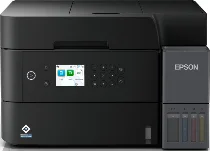
Epson EcoTank L6370 Drivers for Windows and macOS.
Supported Microsoft Windows Operating Systems
Windows 11
Windows 10 (32-bit and 64-bit)
Windows 8.1 (32-bit and 64-bit)
Windows 8 (32-bit and 64-bit)
Windows 7 (32-bit and 64-bit)
Windows Vista (32-bit and 64-bit)
Supported OS: Windows 10 32-bit, Windows 8.1 32-bit, Windows 8 32-bit, Windows 7 32-bit, Windows Vista 32-bit
Supported OS: Windows 11, Windows 10 64-bit, Windows 8.1 64-bit, Windows 8 64-bit, Windows 7 64-bit, Windows Vista 64-bit
Supported OS: Windows 11, Windows 10 32-bit and 64-bit, Windows 8.1 32-bit and 64-bit, Windows 8 32-bit and 64-bit, Windows 7 32-bit and 64-bit, Windows Vista 32-bit and 64-bit
Supported macOS Operating Systems
macOS Sequoia 15
macOS Sonoma 14
macOS Ventura 13
macOS Monterey 12
macOS Big Sur 11
macOS Catalina 10.15
macOS Mojave 10.14
macOS High Sierra 10.13
macOS Sierra 10.12
OS X El Capitan 10.11
OS X Yosemite 10.10
OS X Mavericks 10.9
OS X Mountain Lion 10.8
Mac OS X Lion 10.7
Mac OS X Snow Leopard 10.6
Mac OS X Leopard 10.5
Supported OS: Mac OS X Leopard 10.5, Mac OS X Snow Leopard 10.6, Mac OS X Lion 10.7, OS X Mountain Lion 10.8, OS X Mavericks 10.9, OS X Yosemite 10.10, OS X El Capitan 10.11, macOS Sierra 10.12, macOS High Sierra 10.13, macOS Mojave 10.14, macOS Catalina 10.15, macOS Big Sur 11, macOS Monterey 12, macOS Ventura 13, macOS Sonoma 14, macOS Sequoia 15
Epson EcoTank L6370 Specifications
Printing becomes quite effective due to the high-capacity ink tank system. The printer is able to print, scan, copy, and fax. Duplex printing is automated, which results in the saving of paper and consistent quality of printed documents. An automated document feeder makes multiple-page scanning and copying easier. Printing via computer, smartphone, and other wireless devices is possible owing to wireless technology.
Printing remains consistent because of the PrecisionCore printhead, which ensures good quality both of text and color printouts. Quick print speed will be useful for completing the office workload. A large paper tray will not require frequent refilling of paper. Print on borderless pages is possible by using particular paper types. Users can connect the printer either to an Ethernet network or a Wi-Fi network.
Cost efficiency is provided thanks to the refillable ink tank system. Front transparent ink tanks make refilling and checking of ink level easy without unnecessary downtime. The color display screen helps navigate through settings, maintenance, and printing options. Energy-efficient usage ensures low electricity consumption and consistent printing at the same time.