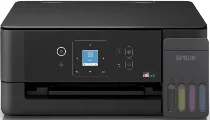
Epson EcoTank L3360 Drivers for Windows and macOS.
Supported Microsoft Windows Operating Systems
Windows 11
Windows 10 (32-bit and 64-bit)
Windows 8.1 (32-bit and 64-bit)
Windows 8 (32-bit and 64-bit)
Windows 7 (32-bit and 64-bit)
Windows Vista (32-bit and 64-bit)
Supported OS: Windows 10 32-bit, Windows 8.1 32-bit, Windows 8 32-bit, Windows 7 32-bit
Supported OS: Windows 11, Windows 10 64-bit, Windows 8.1 64-bit, Windows 8 64-bit, Windows 7 64-bit, Windows Vista 64-bit
Supported OS: Windows 11, Windows 10 32-bit and 64-bit, Windows 8.1 32-bit and 64-bit, Windows 8 32-bit and 64-bit, Windows 7 32-bit and 64-bit, Windows Vista 32-bit and 64-bit
Supported macOS Operating Systems
macOS Sequoia 15
macOS Sonoma 14
macOS Ventura 13
macOS Monterey 12
macOS Big Sur 11
macOS Catalina 10.15
macOS Mojave 10.14
macOS High Sierra 10.13
macOS Sierra 10.12
OS X El Capitan 10.11
OS X Yosemite 10.10
OS X Mavericks 10.9
Supported OS: OS X Mavericks 10.9, OS X Yosemite 10.10, OS X El Capitan 10.11, macOS Sierra 10.12, macOS High Sierra 10.13, macOS Mojave 10.14, macOS Catalina 10.15, macOS Big Sur 11, macOS Monterey 12, macOS Ventura 13, macOS Sonoma 14, macOS Sequoia 15
Supported OS: OS X Mavericks 10.9, OS X Yosemite 10.10, OS X El Capitan 10.11, macOS Sierra 10.12, macOS High Sierra 10.13, macOS Mojave 10.14, macOS Catalina 10.15, macOS Big Sur 11, macOS Monterey 12, macOS Ventura 13, macOS Sonoma 14, macOS Sequoia 15
Epson EcoTank L3360 Specifications
First, this Epson printer is able to provide high-quality printing through its refillable ink tank, which means low running costs. This product gives sharp printing and brilliant color printing thanks to the technology called PrecisionCore developed by the manufacturer. Moreover, the printer is compact and fits well even in small office rooms without wasting space on a desk. Such functions as Wi-Fi and Wi-Fi Direct will help you print wirelessly from laptops and smartphones. Automatic duplex printing will help to save your paper and improve your work productivity.
Features of scanning and copying are aimed at performing usual operations related to document management reliably and easily. A flatbed scanner will help to scan your papers with a good image and readable text according to personal, study, or business needs. You will be able to scan important documents directly on your device. The control panel will make it easy for you to perform any printing operations quickly. Quick first-page printing will reduce waiting time during your work process.
Economical and energy-saving operation is another benefit of this printer. High-yield ink bottles will allow you to print thousands of pages before needing to refill them. Such a function as borderless photo printing will help to get beautiful images. Good construction will ensure high productivity and low maintenance while working regularly.