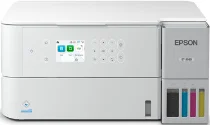
Epson EcoTank ET-3930 Drivers for Windows and macOS.
Supported Microsoft Windows Operating Systems
Windows 11
Windows 10 (32-bit and 64-bit)
Windows 8.1 (32-bit and 64-bit)
Windows 8 (32-bit and 64-bit)
Windows 7 (32-bit and 64-bit)
Windows Vista (32-bit and 64-bit)
Supported OS: Windows 11, Windows 10 32-bit and 64-bit, Windows 8.1 32-bit and 64-bit, Windows 8 32-bit and 64-bit, Windows 7 32-bit and 64-bit
Supported OS: Windows 10 32-bit, Windows 8.1 32-bit, Windows 8 32-bit, Windows 7 32-bit
Supported OS: Windows 11, Windows 10 64-bit, Windows 8.1 64-bit, Windows 8 64-bit, Windows 7 64-bit
Supported OS: Windows 11, Windows 10 32-bit and 64-bit, Windows 8.1 32-bit and 64-bit, Windows 8 32-bit and 64-bit, Windows 7 32-bit and 64-bit
Supported OS: Windows 10 32-bit, Windows 8.1 32-bit, Windows 8 32-bit, Windows 7 32-bit, Windows Vista 32-bit
Supported OS: Windows 11, Windows 10 64-bit, Windows 8.1 64-bit, Windows 8 64-bit, Windows 7 64-bit, Windows Vista 64-bit
Supported macOS Operating Systems
macOS Sequoia 15
macOS Sonoma 14
macOS Ventura 13
macOS Monterey 12
macOS Big Sur 11
macOS Catalina 10.15
macOS Mojave 10.14
macOS High Sierra 10.13
macOS Sierra 10.12
OS X El Capitan 10.11
OS X Yosemite 10.10
OS X Mavericks 10.9
OS X Mountain Lion 10.8
Mac OS X Lion 10.7
Mac OS X Snow Leopard 10.6
Supported OS: OS X Mavericks 10.9, OS X Yosemite 10.10, OS X El Capitan 10.11, macOS Sierra 10.12, macOS High Sierra 10.13, macOS Mojave 10.14, macOS Catalina 10.15, macOS Big Sur 11, macOS Monterey 12, macOS Ventura 13, macOS Sonoma 14, macOS Sequoia 15
Supported OS: OS X Mavericks 10.9, OS X Yosemite 10.10, OS X El Capitan 10.11, macOS Sierra 10.12, macOS High Sierra 10.13, macOS Mojave 10.14, macOS Catalina 10.15, macOS Big Sur 11, macOS Monterey 12, macOS Ventura 13, macOS Sonoma 14, macOS Sequoia 15
Supported OS: OS X Mavericks 10.9, OS X Yosemite 10.10, OS X El Capitan 10.11, macOS Sierra 10.12, macOS High Sierra 10.13, macOS Mojave 10.14, macOS Catalina 10.15, macOS Big Sur 11, macOS Monterey 12, macOS Ventura 13, macOS Sonoma 14, macOS Sequoia 15
Supported OS: Mac OS X Snow Leopard 10.6, Mac OS X Lion 10.7, OS X Mountain Lion 10.8, OS X Mavericks 10.9, OS X Yosemite 10.10, OS X El Capitan 10.11, macOS Sierra 10.12, macOS High Sierra 10.13, macOS Mojave 10.14, macOS Catalina 10.15, macOS Big Sur 11, macOS Monterey 12, macOS Ventura 13, macOS Sonoma 14, macOS Sequoia 15
Epson EcoTank ET-3930 Specifications
Equipped with a modern 4-color CMYK MicroPiezo and PrecisionCore 1S printhead, the Epson EcoTank ET-3930 produces precise prints. The speed of printing is up to 18 ISO ppm for black and 9 ISO ppm for color. Automatic duplex printing is available at 7 ISO ppm for black documents and 5 ISO ppm for color pages. Print resolution is equal to 4800 × 1200 dpi, which allows getting detailed text and bright images in various documents. Mobile printing is easy using Epson Smart Panel, Epson Connect, Apple AirPrint, Android Printing, Mopria, and Amazon Alexa voice commands.
This model also operates as a reliable copier that can print copies at a speed of up to 11.5 ISO cpm for black documents. The speed of color copies is 5.7 ISO cpm, and it is possible to print from 1 to 99 pages. There are convenient copy features such as automatic duplex copying, ID Copy, shadow removal, borderless printing, and scaling from 25 to 400 percent. The model has a CIS flatbed scanner which can scan documents at a resolution of 1200 × 2400 dpi hardware resolution and 9600 dpi interpolated. The scanning capabilities allow saving documents on a computer, cloud services, Chromebook, and Mopria Scan applications.
Connectivity options include Hi-Speed USB, Ethernet, dual-band Wi-Fi 5, Wi-Fi Direct, and mesh networking. This multifunction printer is compatible with Windows, macOS, ChromeOS, and different editions of Windows Server. Paper handling options consist of a 250-sheet paper tray, a 20-sheet photo input, and a 10-envelope capability. This model can print on paper with a size of up to 8.5 × 14 inches, including legal, A4, envelopes, and premium photo media. The device has a 2.4-inch color LCD that allows simple navigation and PC-free printing, scanning, and copying.
This printer is suitable for high demands on productivity because of its capability to perform up to 10,000 pages per month. Ink bottles of genuine Epson 502 deliver up to 8,500 black pages and 6,500 color pages. In the case of separate copying, the printer consumes about 15 watts of power, and it consumes 0.1 watts when it is turned off. There is the ENERGY STAR certification, RoHS compliance, and SmartWay partnership that show the environmentally responsible performance of the device. One-year limited warranty, bundled software, and ink bottles are included.