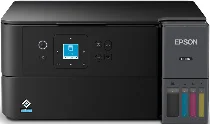
Epson EcoTank ET-2985 Drivers for Windows and macOS.
Supported Microsoft Windows Operating Systems
Windows 11
Windows 10 (32-bit and 64-bit)
Windows 8.1 (32-bit and 64-bit)
Windows 8 (32-bit and 64-bit)
Windows 7 (32-bit and 64-bit)
Windows Vista (32-bit and 64-bit)
Supported OS: Windows 11, Windows 10 32-bit and 64-bit, Windows 8.1 32-bit and 64-bit, Windows 8 32-bit and 64-bit, Windows 7 32-bit and 64-bit
Supported OS: Windows 10 32-bit, Windows 8.1 32-bit, Windows 8 32-bit, Windows 7 32-bit
Supported OS: Windows 11, Windows 10 64-bit, Windows 8.1 64-bit, Windows 8 64-bit, Windows 7 64-bit
Supported OS: Windows 11, Windows 10 32-bit and 64-bit, Windows 8.1 32-bit and 64-bit, Windows 8 32-bit and 64-bit, Windows 7 32-bit and 64-bit
Supported OS: Windows 10 32-bit, Windows 8.1 32-bit, Windows 8 32-bit, Windows 7 32-bit, Windows Vista 32-bit
Supported OS: Windows 11, Windows 10 64-bit, Windows 8.1 64-bit, Windows 8 64-bit, Windows 7 64-bit, Windows Vista 64-bit
Supported macOS Operating Systems
macOS Sequoia 15
macOS Sonoma 14
macOS Ventura 13
macOS Monterey 12
macOS Big Sur 11
macOS Catalina 10.15
macOS Mojave 10.14
macOS High Sierra 10.13
macOS Sierra 10.12
OS X El Capitan 10.11
OS X Yosemite 10.10
OS X Mavericks 10.9
OS X Mountain Lion 10.8
Mac OS X Lion 10.7
Mac OS X Snow Leopard 10.6
Supported OS: OS X Mavericks 10.9, OS X Yosemite 10.10, OS X El Capitan 10.11, macOS Sierra 10.12, macOS High Sierra 10.13, macOS Mojave 10.14, macOS Catalina 10.15, macOS Big Sur 11, macOS Monterey 12, macOS Ventura 13, macOS Sonoma 14, macOS Sequoia 15
Supported OS: OS X Mavericks 10.9, OS X Yosemite 10.10, OS X El Capitan 10.11, macOS Sierra 10.12, macOS High Sierra 10.13, macOS Mojave 10.14, macOS Catalina 10.15, macOS Big Sur 11, macOS Monterey 12, macOS Ventura 13, macOS Sonoma 14, macOS Sequoia 15
Supported OS: OS X Mavericks 10.9, OS X Yosemite 10.10, OS X El Capitan 10.11, macOS Sierra 10.12, macOS High Sierra 10.13, macOS Mojave 10.14, macOS Catalina 10.15, macOS Big Sur 11, macOS Monterey 12, macOS Ventura 13, macOS Sonoma 14, macOS Sequoia 15
Supported OS: Mac OS X Snow Leopard 10.6, Mac OS X Lion 10.7, OS X Mountain Lion 10.8, OS X Mavericks 10.9, OS X Yosemite 10.10, OS X El Capitan 10.11, macOS Sierra 10.12, macOS High Sierra 10.13, macOS Mojave 10.14, macOS Catalina 10.15, macOS Big Sur 11, macOS Monterey 12, macOS Ventura 13, macOS Sonoma 14, macOS Sequoia 15
Epson EcoTank ET-2985 Specifications
The Epson EcoTank ET-2985 performs reliably using CMYK MicroPiezo inkjet technology and PrecisionCore 1S printhead. This product provides fast printing at the speed of 15 ISO ppm in black and 8 ISO ppm in color. Automatic two-sided printing provides 6.5 ISO ppm in black and 4.5 ISO ppm in color documents. Print resolution is a maximum of 4800 × 1200 dpi, which allows achieving clear text and bright images. The printer provides mobile printing with the use of Epson Smart Panel, Apple AirPrint, Android Printing, Mopria Print Service, and Epson Remote Print.
Copy and scan functions of this all-in-one printer work effectively and quickly. Copy speed is 11 ISO cpm in black and 5.5 ISO cpm in color. It is possible to perform 1 to 99 PC-free copies, changing their size between 25 and 400 percent. The flatbed CIS scanner works with a hardware resolution of 1200 × 2400 dpi and 9600 dpi interpolation. Among the scanning functions are direct scans to computers, e-mail, and Mopria Scan applications.
Epson EcoTank ET-2985 provides reliable connections with the help of Hi-Speed USB, Wi-Fi, Wi-Fi Direct, and Wi-Fi Agile Multiband Mesh networking. Among the operating systems that it supports are Windows, macOS, ChromeOS, and several Windows Server versions. The rear input tray holds 100 plain sheets, 20 photo sheets, or 10 envelopes efficiently. Paper sizes supported by this printer range from 3.5 × 5 inches to legal and A4 sizes. 1.44-inch color LCD facilitates navigation and printer usage.
Four refillable ink bottles provide high yields of prints to use this product economically in the long term. The printer uses ink from them with a yield of 8,500 pages of black ink and 6,500 pages for each color bottle. The printer has received ENERGY STAR, ECOLOGO, and RoHS certification, providing efficient and environmentally friendly performance. Recommended monthly workload of this printer is 800 pages with a maximum duty cycle of 5,000 pages. The package includes starter ink bottles, Epson software, power cord, manuals, and a two-year limited warranty.