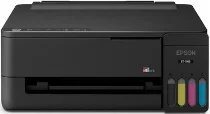
Epson ET-1913 Driver for Windows and Macintosh OS.
Microsoft Windows Supported Operating System
Windows 11
Windows 10 (32/64 bit)
Windows 8.1 (32/64 bit)
Windows 8 (32/64 bit)
Windows 7 SP1 (32/64 bit)
Windows Vista SP2 (32/64 bit)
Supported OS: Windows 11, Windows 10 32-bit and 64-bit, Windows 8.1 32-bit and 64-bit, Windows 8 32-bit and 64-bit, Windows 7 32-bit and 64-bit
This combo package installer obtains and installs the following items:
- Printer Driver
- Epson Photo+ Utility
- Epson Software Updater
Supported OS: Windows 10 32-bit, Windows 8.1 32-bit, Windows 8 32-bit, Windows 7 32-bit
Supported OS: Windows 10 64-bit, Windows 8.1 64-bit, Windows 8 64-bit, Windows 7 64-bit
Supported OS: Windows 10 32-bit, Windows 8.1 32-bit, Windows 8 32-bit, Windows 7 32-bit, Windows Vista 32-bit
Supported OS: Windows 11, Windows 10 64-bit, Windows 8.1 64-bit, Windows 8 64-bit, Windows 7 64-bit, Windows Vista 64-bit
macOS Supported Operating Systems
macOS Tahoe 26
macOS Sequoia 15
macOS Sonoma 14
macOS Ventura 13
macOS Monterey 12
macOS Big Sur 11
macOS Catalina 10.15
macOS Mojave 10.14
macOS High Sierra 10.13
macOS Sierra 10.12
macOS El Capitan 10.11
macOS Yosemite 10.10
macOS Mavericks 10.9
macOS Mountain Lion 10.8
macOS Lion 10.7
macOS Snow Leopard 10.6
Supported OS: macOS Tahoe 26, macOS Sequoia 15, macOS Sonoma 14, macOS Ventura 13, macOS Monterey 12, macOS Big Sur 11, macOS Catalina 10.15, macOS Mojave 10.14, macOS High Sierra 10.13, macOS Sierra 10.12, macOS El Capitan 10.11, macOS Yosemite 10.10, macOS Mavericks 10.9
This combo package installer obtains and installs the following items:
- Printer Driver
- Epson Photo+ Utility
- Epson Software Updater
Supported OS: macOS Tahoe 26, macOS Sequoia 15, macOS Sonoma 14, macOS Ventura 13, macOS Monterey 12, macOS Big Sur 11, macOS Catalina 10.15, macOS Mojave 10.14, macOS High Sierra 10.13, macOS Sierra 10.12, macOS El Capitan 10.11, macOS Yosemite 10.10, macOS Mavericks 10.9
Supported OS: macOS Tahoe 26, macOS Sequoia 15, macOS Sonoma 14, macOS Ventura 13, macOS Monterey 12, macOS Big Sur 11, macOS Catalina 10.15, macOS Mojave 10.14, macOS High Sierra 10.13, macOS Sierra 10.12, macOS El Capitan 10.11, macOS Yosemite 10.10, macOS Mavericks 10.9, macOS Mountain Lion 10.8, macOS Lion 10.7, macOS Snow Leopard 10.6
Epson ET-1913 Specifications
The Epson ET-1913 is a color printer built for print-only output, not scanning or copying. Its Heat-Free MicroPiezo printhead works with refillable ink tanks instead of standard cartridges. Epson’s 522 black, cyan, magenta, and yellow EcoFit bottles feed the four-color ink system. In addition, the tank layout gives users a clear way to refill ink without replacing cartridge sets.
Print resolution reaches up to 5760 x 1440 dpi, so text and color graphics can stay sharp on suitable paper. ISO speed runs up to 11 ppm in black and 6 ppm in color. A rear paper feed handles plain sheets for letters, forms, reports, and everyday documents. Also, the printer starts without a long warmup delay, which helps when printing short jobs after standby.
Connection choices include USB and Wi-Fi, giving users either a direct computer link or wireless printing through a network. Epson also lists mobile printing through Epson Smart Panel, Apple AirPrint, and Mopria Print Service. The compact body fits small desks and home work areas where space matters. However, the model does not include Ethernet, fax, ADF hardware, or a touchscreen, so setup stays focused on basic printer use.