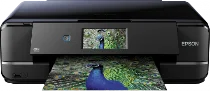
Epson Expression Photo XP-960 Printer Software and Drivers for Windows and macOS.
Supported Microsoft Windows Operating Systems
Windows 11
Windows 10 (32-bit and 64-bit)
Windows 8.1 (32-bit and 64-bit)
Windows 8 (32-bit and 64-bit)
Windows 7 (32-bit and 64-bit)
Windows Vista (32-bit and 64-bit)
Windows XP (32-bit and 64-bit)
Supported OS: Windows 11, Windows 10 32-bit and 64-bit, Windows 8.1 32-bit and 64-bit, Windows 8 32-bit and 64-bit, Windows 7 32-bit and 64-bit, Windows Vista 32-bit and 64-bit
This driver package installer contains the following items:
- Printer Driver
- Scanner Driver and EPSON Scan Utility
- Epson Easy Photo Scan
- Epson Event Manager
- Epson Print CD
- Epson Software Updater
- Network Installer
- Epson ReadyInk Agent (Requires Windows 7 or later)
Supported OS: Windows 10 32-bit, Windows 8.1 32-bit, Windows 8 32-bit, Windows 7 32-bit, Windows Vista 32-bit, Windows XP 32-bit
Supported OS: Windows 11, Windows 10 64-bit, Windows 8.1 64-bit, Windows 8 64-bit, Windows 7 64-bit, Windows Vista 64-bit, Windows XP 64-bit
Supported OS: Windows 11, Windows 10 32-bit and 64-bit, Windows 8.1 32-bit and 64-bit, Windows 8 32-bit and 64-bit, Windows 7 32-bit and 64-bit, Windows Vista 32-bit and 64-bit, Windows XP 32-bit and 64-bit
Supported OS: Windows 10 32-bit, Windows 8.1 32-bit, Windows 8 32-bit, Windows 7 32-bit, Windows Vista 32-bit, Windows XP 32-bit
Supported OS: Windows 11, Windows 10 64-bit, Windows 8.1 64-bit, Windows 8 64-bit, Windows 7 64-bit, Windows Vista 64-bit, Windows XP 64-bit
Supported macOS Operating Systems
macOS Ventura 13
macOS Monterey 12
macOS Big Sur 11
macOS Catalina 10.15
macOS Mojave 10.14
macOS High Sierra 10.13
macOS Sierra 10.12
OS X El Capitan 10.11
OS X Yosemite 10.10
OS X Mavericks 10.9
OS X Mountain Lion 10.8
Mac OS X Lion 10.7
Mac OS X Snow Leopard 10.6
Mac OS X Leopard 10.5
Supported OS: macOS Catalina 10.15, macOS Big Sur 11, macOS Monterey 12, macOS Ventura 13
This driver package installer contains the following items:
- Printer Driver
- ICA Scanner Driver
- Epson Easy Photo Scan
- Epson Print CD
- Epson Event Manager
- Epson Software Updater
Supported OS: Mac OS X Lion 10.7, OS X Mountain Lion 10.8, OS X Mavericks 10.9, OS X Yosemite 10.10, OS X El Capitan 10.11, macOS Sierra 10.12, macOS High Sierra 10.13, macOS Mojave 10.14
This driver package installer contains the following items:
- Printer Driver
- ICA Scanner Driver
- Epson Easy Photo Scan
- Epson Print CD
- Epson Event Manager
- Epson Software Updater
Supported OS: Mac OS X Leopard 10.5, Mac OS X Snow Leopard 10.6, Mac OS X Lion 10.7, OS X Mountain Lion 10.8, OS X Mavericks 10.9, OS X Yosemite 10.10, OS X El Capitan 10.11, macOS Sierra 10.12, macOS High Sierra 10.13, macOS Mojave 10.14, macOS Catalina 10.15, macOS Big Sur 11, macOS Monterey 12, macOS Ventura 13
Supported OS: macOS Catalina 10.15, macOS Big Sur 11, macOS Monterey 12, macOS Ventura 13
Supported OS: Mac OS X Snow Leopard 10.6, Mac OS X Lion 10.7, OS X Mountain Lion 10.8, OS X Mavericks 10.9, OS X Yosemite 10.10, OS X El Capitan 10.11, macOS Sierra 10.12, macOS High Sierra 10.13, macOS Mojave 10.14
Supported OS: OS X El Capitan 10.11
Supported OS: Mac OS X Leopard 10.5, Mac OS X Snow Leopard 10.6, Mac OS X Lion 10.7, OS X Mountain Lion 10.8, OS X Mavericks 10.9, OS X Yosemite 10.10, OS X El Capitan 10.11, macOS Sierra 10.12, macOS High Sierra 10.13, macOS Mojave 10.14, macOS Catalina 10.15, macOS Big Sur 11, macOS Monterey 12, macOS Ventura 13
Supported OS: Mac OS X Snow Leopard 10.6, Mac OS X Lion 10.7, OS X Mountain Lion 10.8, OS X Mavericks 10.9, OS X Yosemite 10.10, OS X El Capitan 10.11, macOS Sierra 10.12, macOS High Sierra 10.13, macOS Mojave 10.14, macOS Catalina 10.15, macOS Big Sur 11, macOS Monterey 12, macOS Ventura 13
Epson Expression Photo XP-960 Specifications
Epson XP-960 Expression Photo offers a range of printer products suitable for amateur picture-takers and digital enthusiasts. It uses a six-color Claria Photo HD ink set designed to produce a range of hues, giving A3 photographs. This feature is hardly ever surpassed—it has an A4 footprint compared to an A3 photo. Printed photographs look brilliantly colored, with a lively and authentic vegetative green. Moreover, I noticed the fine points in this. In addition, the model also has a resolution of 5760 x 1440 dpi, which provides an incredibly detailed image. The XP-960 handles everyday jobs like printing text documents one after another quickly. It has a manageable-size 4.3-inch touchscreen for accessing its features. The features can be easily selected and copied, scanned, or printed from an SD card.
The versatility of the XP-960 extends well beyond paper size and type to its core component: connectivity. Using Epson Connect, this product comes with Email Print, Epson iPrint, and Remote Print, so you can handle any print job from your phone. Beyond its offerings, Apple AirPrint and Google Cloud Print give iPad and Android users the power to send their e-concepts into the physical world as pixels on paper. XP-960 focuses on user convenience and also features front-loading paper trays and a rear feed for specialty media in the layout. With minimal effort and maximum efficiency, it makes life much easier for users.
Potential users have to look at the capital running costs. They make a high output level but only by relying on premium Epson cartridges to support it, which means when such things get rolling, the sums can get big in a hurry–especially for anyone doing a lot of printing. Nevertheless, given the breathtaking results, the outlay on quality’s behalf may be worth it. The Epson Expression Photo XP-960 printer weighs 7.9 kg (17.4 lbs), so you can take it wherever you go. There is hardly any bad news about this, either of convenience or the quality of the photographs and text in your printed documents, for those who will keep going.