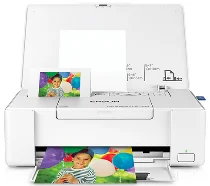
Epson PictureMate PM 400 Single Function Inkjet printer Software and Drivers for Windows and Macintosh OS.
Microsoft Windows Supported Operating System
Windows 11 (64 bit)
Windows 10 (32/64 bit)
Windows 8.1 (32/64 bit)
Windows 8 (32/64 bit)
Windows 7 SP1 (32/64bit)
Windows Vista SP2 (32/64bit)
Windows XP SP3 (32/64bit)
supported os: Windows 11, Windows 10 32-bit & 64-bit, Windows 8.1 32-bit & 64-bit, Windows 8 32-bit & 64-bit, Windows 7 32-bit & 64-bit, Windows Vista 32-bit & 64-bit
This driver package installer contains the following items:
- Printer Driver
- Epson Software Updater
- Network Installer
supported os: Windows 10 32-bit, Windows 8.1 32-bit, Windows 8 32-bit, Windows 7 32-bit, Windows Vista 32-bit, Windows XP 32-bit
supported os: Windows 11, Windows 10 64-bit, Windows 8.1 64-bit, Windows 8 64-bit, Windows 7 64-bit, Windows Vista 64-bit, Windows XP 64-bit
supported os: Windows 10 32-bit, Windows 8.1 32-bit, Windows 8 32-bit, Windows 7 32-bit, Windows Vista 32-bit, Windows XP 32-bit
supported os: Windows 11, Windows 10 64-bit, Windows 8.1 64-bit, Windows 8 64-bit, Windows 7 64-bit, Windows Vista 64-bit, Windows XP 64-bit
Apple Supported Operating System
Mac OS X 13 Ventura
Mac OS X 12 Monterey
Mac OS X 11 Big Sur
Mac OS X 10.15 Catalina
Mac OS X 10.14 Mojave
Mac OS X 10.13 High Sierra
Mac OS X 10.12 Sierra
Mac OS X 10.11 El Capitan
Mac OS X 10.10 Yosemite
Mac OS X 10.9 Mavericks
Mac OS X 10.8 Mountain Lion
Mac OS X 10.7 Lion
Mac OS X 10.6 Snow Leopard
Mac OS X 10.5 Leopard
supported os: MacOS Catalina 10.15, MacOS Big Sur 11, MacOS Monterey 12, MacOS Ventura 13
This driver package installer contains the following items:
- Printer Driver
- Epson Software Updater
supported os: Mac OS X Lion 10.7, OS X Mountain Lion 10.8, OS X Mavericks 10.9, OS X Yosemite 10.10, OS X El Capitan 10.11, MacOS Sierra 10.12, MacOS High Sierra 10.13, MacOS Mojave 10.14
This driver package installer contains the following items:
- Printer Driver
- Epson Software Updater
supported os: Mac OS X Leopard 10.5, OS X Snow Leopard 10.6, OS X Lion 10.7, OS X Mountain Lion 10.8, OS X Mavericks 10.9, OS X Yosemite 10.10, OS X El Capitan 10.11, MacOS Sierra 10.12, MacOS High Sierra 10.13, MacOS Mojave 10.14, MacOS Catalina 10.15, MacOS Big Sur 11, MacOS Monterey 12, MacOS Ventura 13
supported os: Mac OS X Snow Leopard 10.6, OS X Lion 10.7, OS X Mountain Lion 10.8, OS X Mavericks 10.9, OS X Yosemite 10.10, OS X El Capitan 10.11, MacOS Sierra 10.12, MacOS High Sierra 10.13, MacOS Mojave 10.14, MacOS Catalina 10.15, MacOS Big Sur 11, MacOS Monterey 12, MacOS Ventura 13
Epson PictureMate PM 400 Specifications
Epson PictureMate PM 400 Personal Photo Lab is a convenient and highly portable printer for businesses and photographers. The device ensures borderless photo prints of high quality, and its size is compatible. PM 400 is perfect for small spaces and can be placed on any table or shelf. Although generated pictures correspond to the size up to 4×6 inches and 5×7 inches repeat the specified parameters of color density and reality, the printer is similar to any service where photos are printed professionally.
Setting up the Epson device is a straightforward process, and with the wireless printing feature, it is convenient to print from anywhere. However, the price for one print is slightly higher than the original Epson pictures. Except for this detail, the device is impressive with its speed of printing images and simplicity of utilization. It can print a 4×6 photo in approximately 36 seconds; however, the device is more comfortable and twice as fast as any other printer at minimum speed. Besides, the printer and the mobile owners can utilize the Epson mobile printing application, which allows pictures to be printed directly from smartphones and tablets. It is especially beneficial for most people who spend hours on the mobile screen.
Unquestionably, the density of color is beyond reproach, and it is suitable to declare that the picture has a rich realistic look. Except for the fact that resulting photos have a high reality, most importantly, they are pleasant for the eyes. Another point is that the photo printer costs more than other small-format models. Yet, its unique features and the quality of the device justify it, as the pictures are durable, smudge, scratch, water, and fade resistant. In terms of ease of use, remarkable and rich color spectrum, and sturdy enough for a photo printer, PM 400 is a preferable variant for every amateur photographer or ordinary person who wants high-quality and bright photos in a physical format.