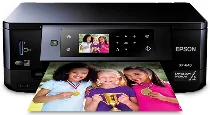
Epson Expression Premium XP-640 Printer Software and Drivers for Windows and Macintosh OS.
Microsoft Windows Supported Operating System
Windows 11 (64 bit)
Windows 10 (32/64 bit)
Windows 8.1 (32/64 bit)
Windows 8 (32/64 bit)
Windows 7 SP1 (32/64bit)
Windows Vista SP2 (32/64bit)
Windows XP SP3 (32/64bit)
supported os: Windows 11, Windows 10 32-bit & 64-bit, Windows 8.1 32-bit & 64-bit, Windows 8 32-bit & 64-bit, Windows 7 32-bit & 64-bit, Windows Vista 32-bit & 64-bit
This driver package installer contains the following items:
- Printer Driver
- Scanner Driver and Epson Scan 2 Utility
- Epson Easy Photo Scan
- Epson Event Manager
- Epson ReadyInk Agent (Requires Windows 7 or later)
- Epson Scan OCR Component
- Epson Print CD
- Epson Software Updater
supported os: Windows 10 32-bit, Windows 8.1 32-bit, Windows 8 32-bit, Windows 7 32-bit, Windows Vista 32-bit, Windows XP 32-bit
supported os: Windows 11, Windows 10 64-bit, Windows 8.1 64-bit, Windows 8 64-bit, Windows 7 64-bit, Windows Vista 64-bit, Windows XP 64-bit
supported os: Windows 11, Windows 10 32-bit & 64-bit, Windows 8.1 32-bit & 64-bit, Windows 8 32-bit & 64-bit, Windows 7 32-bit & 64-bit, Windows Vista 32-bit & 64-bit, Windows XP 32-bit & 64-bit
supported os: Windows 10 32-bit, Windows 8.1 32-bit, Windows 8 32-bit, Windows 7 32-bit, Windows Vista 32-bit, Windows XP 32-bit
supported os: Windows 11, Windows 10 64-bit, Windows 8.1 64-bit, Windows 8 64-bit, Windows 7 64-bit, Windows Vista 64-bit, Windows XP 64-bit
Apple Supported Operating System
Mac OS X 13 Ventura
Mac OS X 12 Monterey
Mac OS X 11 Big Sur
Mac OS X 10.15 Catalina
Mac OS X 10.14 Mojave
Mac OS X 10.13 High Sierra
Mac OS X 10.12 Sierra
Mac OS X 10.11 El Capitan
Mac OS X 10.10 Yosemite
Mac OS X 10.9 Mavericks
Mac OS X 10.8 Mountain Lion
Mac OS X 10.7 Lion
Mac OS X 10.6 Snow Leopard
Mac OS X 10.5 Leopard
supported os: MacOS Catalina 10.15, MacOS Big Sur 11, MacOS Monterey 12, MacOS Ventura 13
This driver package installer contains the following items:
- Printer Driver
- Scanner Driver and Epson Scan 2 Utility
- Epson Easy Photo Scan
- Epson Event Manager
- Epson Print CD
- Epson Software Updater
supported os: OS X Lion 10.7, OS X Mountain Lion 10.8, OS X Mavericks 10.9, OS X Yosemite 10.10, OS X El Capitan 10.11, MacOS Sierra 10.12, MacOS High Sierra 10.13, MacOS Mojave 10.14
This driver package installer contains the following items:
- Printer Driver
- Scanner Driver and Epson Scan 2 Utility
- Epson Easy Photo Scan
- Epson Event Manager
- Epson Print CD
- Epson Software Updater
supported os: Mac OS X Leopard 10.5, OS X Snow Leopard 10.6, OS X Lion 10.7, OS X Mountain Lion 10.8, OS X Mavericks 10.9, OS X Yosemite 10.10, OS X El Capitan 10.11, MacOS Sierra 10.12, MacOS High Sierra 10.13, MacOS Mojave 10.14, MacOS Catalina 10.15, MacOS Big Sur 11, MacOS Monterey 12, MacOS Ventura 13
supported os: OS X Snow Leopard 10.6, OS X Lion 10.7, OS X Mountain Lion 10.8, OS X Mavericks 10.9, OS X Yosemite 10.10, OS X El Capitan 10.11, MacOS Sierra 10.12, MacOS High Sierra 10.13, MacOS Mojave 10.14, MacOS Catalina 10.15, MacOS Big Sur 11, MacOS Monterey 12, MacOS Ventura 13
supported os: OS X Snow Leopard 10.6, OS X Lion 10.7, OS X Mountain Lion 10.8, OS X Mavericks 10.9, OS X Yosemite 10.10, OS X El Capitan 10.11, MacOS Sierra 10.12, MacOS High Sierra 10.13, MacOS Mojave 10.14, MacOS Catalina 10.15, MacOS Big Sur 11, MacOS Monterey 12, MacOS Ventura 13
Epson Expression Premium XP-640 Specifications
Epson’s L640 is a small ink tank printer that aims to deliver high-quality images while minimizing cost. They desire to strike an equilibrium that remembers the quality of the function of a printer. Another noteworthy selling point is the ink tank technology. Being a cost-conscious print user can enable you to fill up cheap ink bottles and significantly reduce price-per-print ratios. The L640 becomes an obvious choice for those who print a lot of material, such as small-business workers or home-office professionals who want to manage their printing budgets well.
The Epson L640 is not deficient in the print quality department, producing clear text and radiant graphics without effort. It does well in all document printing mishaps, but basic photo printing differs from its forte. Its pictures are acceptable, but anyone concerned about image quality should go elsewhere. Despite this, the L640 does provide consistent quality for everyday work; its print speeds are in keeping with its class, so users can get their printing jobs done quickly. And with a back-end in size, it’s quite suitable for use in small offices where desk space is challenging.
In the fiercely competitive market for ink tank printers, the Epson L640 holds its vantage point with dependable printing solutions at a low cost. It cannot do wireless connectivity, which allows people to print from their smartphones or tablets, but the L640 can be simple. It is this very simplicity that certain users may find most appealing. Especially for those who have a cost-out and are primarily interested in simple document printing, L640 can be worth looking at. It’s different from spending a lot of money on the added features; instead, it promises steady performance and long-term ink savings.