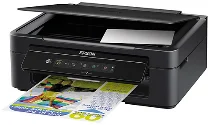
Epson Expression Home XP-200 Printer Software and Drivers for Windows and Macintosh OS.
Microsoft Windows Supported Operating System
Windows 11 (64 bit)
Windows 10 (32/64 bit)
Windows 8.1 (32/64 bit)
Windows 8 (32/64 bit)
Windows 7 SP1 (32/64bit)
Windows Vista SP2 (32/64bit)
Windows XP SP3 (32/64bit)
supported os: Windows 11, Windows 10 32-bit & 64-bit, Windows 8.1 32-bit & 64-bit, Windows 8 32-bit & 64-bit
This driver package installer contains the following items:
- Printer Driver
- Scanner Driver and EPSON Scan Utility
- Epson Event Manager
- Epson Software Updater
- Network Installer
supported os: Windows 7 32-bit & 64-bit, Windows Vista 32-bit & 64-bit, Windows XP 32-bit & 64-bit
This driver package installer contains the following items:
- Printer Driver
- Scanner Driver and EPSON Scan Utility
- Epson Event Manager
- Epson Software Updater
- Network Installer
supported os: Windows 10 32-bit, Windows 8.1 32-bit, Windows 8 32-bit, Windows 7 32-bit, Windows Vista 32-bit, Windows XP 32-bit
supported os: Windows 11, Windows 10 64-bit, Windows 8.1 64-bit, Windows 8 64-bit, Windows 7 64-bit, Windows Vista 64-bit, Windows XP 64-bit
supported os: Windows 11, Windows 10 32-bit & 64-bit, Windows 8.1 32-bit & 64-bit, Windows 8 32-bit & 64-bit, Windows 7 32-bit & 64-bit, Windows Vista 32-bit & 64-bit, Windows XP 32-bit & 64-bit
supported os: Windows 10 32-bit, Windows 8.1 32-bit, Windows 8 32-bit, Windows 7 32-bit, Windows Vista 32-bit, Windows XP 32-bit
supported os: Windows 11, Windows 10 64-bit, Windows 8.1 64-bit, Windows 8 64-bit, Windows 7 64-bit, Windows Vista 64-bit, Windows XP 64-bit
Apple Supported Operating System
Mac OS X 13 Ventura
Mac OS X 12 Monterey
Mac OS X 11 Big Sur
Mac OS X 10.15 Catalina
Mac OS X 10.14 Mojave
Mac OS X 10.13 High Sierra
Mac OS X 10.12 Sierra
Mac OS X 10.11 El Capitan
Mac OS X 10.10 Yosemite
Mac OS X 10.9 Mavericks
Mac OS X 10.8 Mountain Lion
Mac OS X 10.7 Lion
Mac OS X 10.6 Snow Leopard
Mac OS X 10.5 Leopard
supported os: Mac OS X Snow Leopard 10.6, OS X Lion 10.7, OS X Mountain Lion 10.8, OS X Mavericks 10.9, OS X Yosemite 10.10, OS X El Capitan 10.11, MacOS Sierra 10.12, MacOS High Sierra 10.13, MacOS Mojave 10.14, MacOS Catalina 10.15, MacOS Big Sur 11, MacOS Monterey 12, MacOS Ventura 13
supported os: Mac OS X Leopard 10.5, OS X Snow Leopard 10.6, OS X Lion 10.7, OS X Mountain Lion 10.8, OS X Mavericks 10.9, OS X Yosemite 10.10, OS X El Capitan 10.11, MacOS Sierra 10.12, MacOS High Sierra 10.13, MacOS Mojave 10.14, MacOS Catalina 10.15, MacOS Big Sur 11, MacOS Monterey 12, MacOS Ventura 13
supported os: Mac OS X Leopard 10.5, OS X Snow Leopard 10.6, OS X Lion 10.7, OS X Mountain Lion 10.8, OS X Mavericks 10.9, OS X Yosemite 10.10, OS X El Capitan 10.11, MacOS Sierra 10.12, MacOS High Sierra 10.13, MacOS Mojave 10.14
supported os: Mac OS X Snow Leopard 10.6, OS X Lion 10.7, OS X Mountain Lion 10.8, OS X Mavericks 10.9, OS X Yosemite 10.10, OS X El Capitan 10.11, MacOS Sierra 10.12, MacOS High Sierra 10.13, MacOS Mojave 10.14, MacOS Catalina 10.15, MacOS Big Sur 11, MacOS Monterey 12, MacOS Ventura 13
Epson Expression Home XP-200 Specifications
The Epson Expression Home XP-200 is a compact printer that puts some users off for lack of frills. But as the compactness of it suggests the machine finds a natural habitat in small places, like those having little space for an office or a dormitory suite. Setting up the printer is easy. It’s a sensible choice for newcomers who want to print immediately without disarray. This model includes wireless technology, which is rare for a product like this. You can print from your notebook, cell phone, or tablet without getting into one giant mess of wires. It is very convenient for a family or a student, as it increases the places and ways you can print.
If you only do casual printing, the XP-200’s print quality will be okay. Text documents emerge clear enough for conventional uses such as essays, recipes, or meeting notes. Text printed super-sharp is not, however, suitable for business documents. Quality is okay regarding color prints and photos if you don’t expect top-drawer results, but not to the level of a quality lab. The print speed is slow. You might find it slow if you print a great many pages. The printer is for some light, occasional printouts not for everyone who prints all day.
Another consideration is the high cost of ink. The XP-200’s ink is expensive and may prove costly if you print often. In addition, the printer needs more modern functions, such as printing directly from mobile apps. In short, the Epson Expression Home XP-200 is a good buy for those who need a practical, easy to operate printer for minor tasks. While not the swiftest runner, it’s practical by everyday standards and convenient for wireless printing.